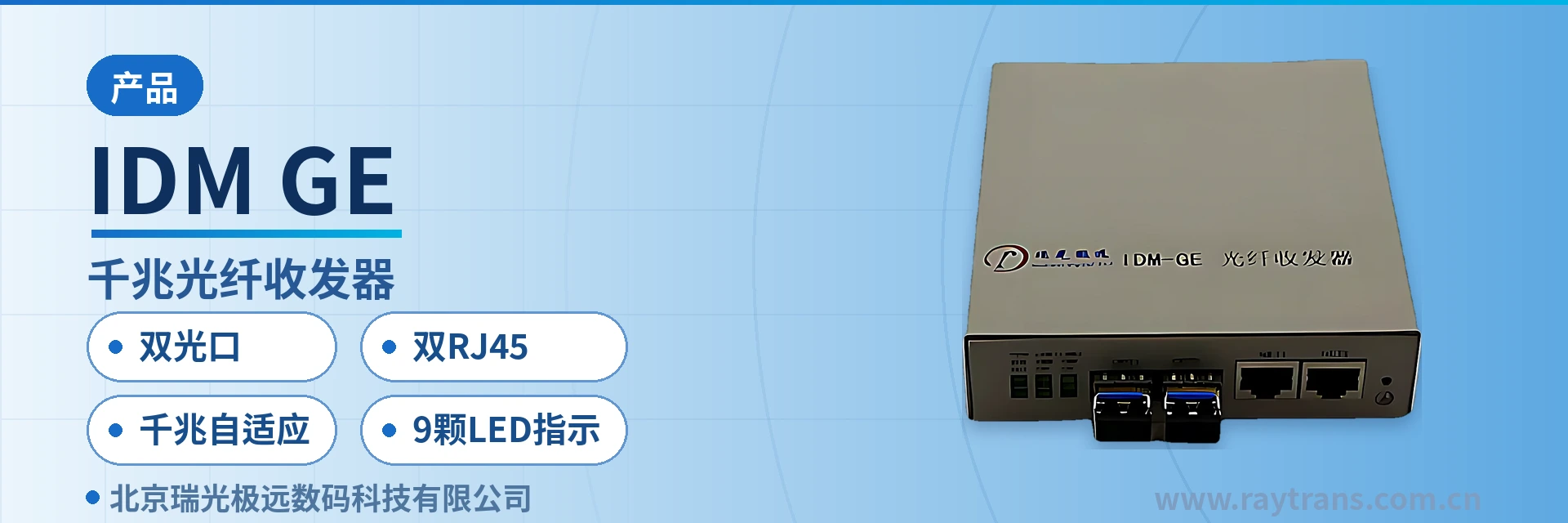
IDM-GE Gigabit Media Converter
Dual optical ports and dual RJ45, standalone bidirectional conversion, 9 LED indicators for on-site diagnosis, device cascading expansion
The IDM-GE gigabit media converter is an optical-to-electrical signal converter used to convert the electrical signals of a computer's gigabit Ethernet into optical signals. It complies with IEEE 802.3z/AB standards. Its features include: the electrical port signal supports 10/100/1000Base-T auto-negotiation and can operate in full-duplex or half-duplex mode, while the optical port signal supports only 1000Base-SX/LX full-duplex mode. It offers good stability and reliability.
The IDM-GE dual-optical-port gigabit media converter is an optical-to-electrical signal conversion device that converts the electrical signals of a computer's gigabit Ethernet into optical signals, and complies with the IEEE 802.3z/802.3ab standards. The product features a compact dual-optical-port design: the device provides 2 RJ45 twisted pair interfaces and 2 optical fiber ports, so a single standalone unit can complete optical-to-electrical conversion in both directions. The front panel has 9 LED indicators in total, so power, optical port, twisted pair rate, and link status can all be read directly on site, making it easy for O&M personnel to quickly grasp the operating status of the device.
Key Specifications at a Glance: Dual optical ports · Dual RJ45 · Gigabit adaptive · 9 LED indicators · Cascading supported · Multi-vendor compatible
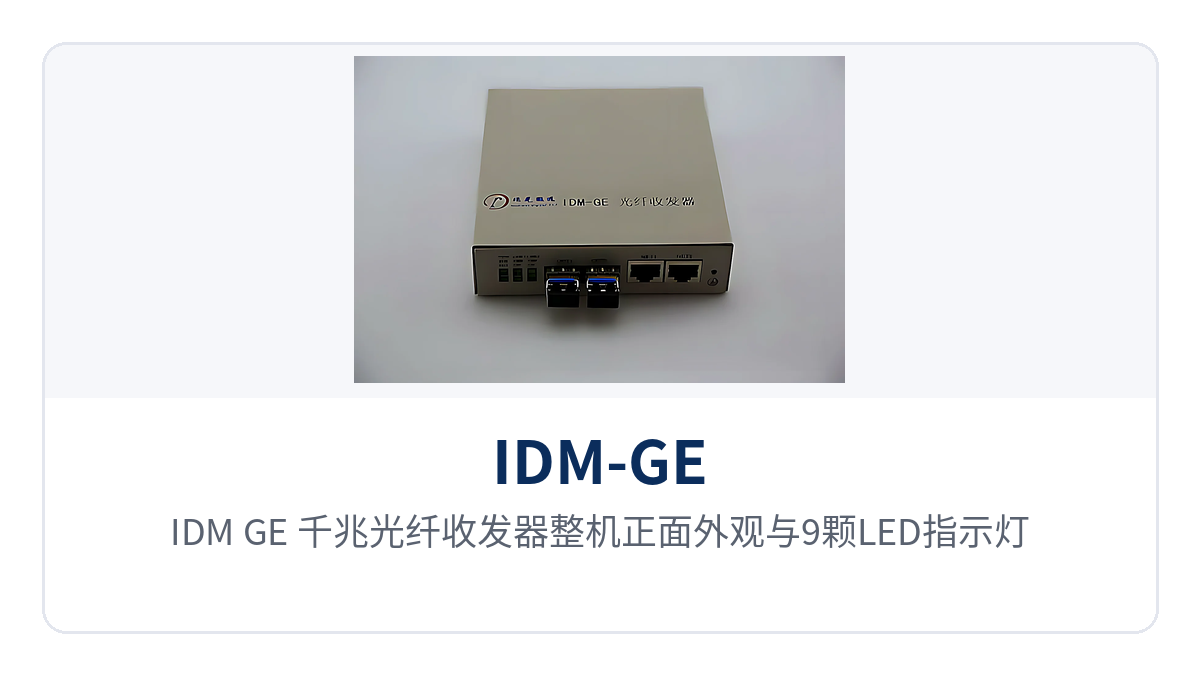
Figure 1: Front view of the IDM-GE gigabit media converter and its 9 LED indicators
Optical-to-electrical conversion changes only the transmission medium, not the encoding or address structure of Ethernet frames, and remains transparent to upper-layer protocols. The existing address plans and network parameters of edge computers, industrial PCs, cameras, and IP telephones need no modification—once wiring is complete, the device works. This is also why gigabit media converters are often used as link extension devices in existing private networks. As a professional media converter manufacturer, Raytrans supports device cascading and point-to-multipoint networking on this product series, and the products can be flexibly paired with fiber optic switches and industrial Ethernet switches, making them widely applicable to scenarios such as government private network optical fiber communication solutions and military emergency communications vehicle solutions.
What Kind of Device Is a Dual-Optical-Port Gigabit Media Converter?
A dual-optical-port gigabit media converter refers to an optical-to-electrical conversion device with two electrical ports and two optical ports, all at gigabit rates—a common type of media converter in product showcases. The two RJ45 electrical ports of the IDM-GE face edge terminals, while the two optical fiber ports face the optical cable: one serves as the uplink, and the other serves as a cascade or a second-direction extension. When a site on an industrial private network is expanded, connecting the second optical port to the next-level device enables device cascading and expands service capacity without replacing the complete unit.
What Is the Difference Between Electrical Port Adaptation and Optical Port Full Duplex?
The rate and duplex mode of the electrical ports are determined by auto-negotiation, whereas the optical ports are fixed in full-duplex mode. The electrical ports of the IDM-GE can adapt among 10/100/1000Base-T, with full duplex and half duplex negotiated by the devices at both ends; the optical ports can only work in 1000Base-SX/LX full-duplex mode, with the receive and transmit directions operating simultaneously. Therefore, the optical ports at both ends must both be gigabit full duplex to establish a link, and the optical ports are not backward compatible with Fast Ethernet or 10M links.

Figure 2: Rear panel layout of the IDM-GE gigabit media converter with 2 RJ45 electrical ports and 2 optical ports
Key Specifications and Interface Configuration
The functions and performance of the IDM-GE are concentrated in three parts: interfaces, rates, and indications. The table below is organized by function item and parameter item, so selections can be checked directly against on-site conditions; items marked as not yet recorded in the knowledge base are content subject to the technical documentation supplied with the unit, and should be confirmed item by item with the media converter manufacturer before engineering calculations.
Function Overview
| Function | Description |
|---|---|
| Dual RJ45 electrical port access | 2 RJ45 twisted pair interfaces connect twisted pair cables and can access gigabit Ethernet terminals such as computers, fiber optic switches, and cameras |
| Dual optical port optical-to-electrical conversion | 2 optical fiber ports connect optical fibers, convert the Ethernet electrical signals of the electrical ports into 1000Base-SX/LX optical signals for transmission, and restore received optical signals to electrical signals |
| Gigabit adaptive | The electrical ports support 10/100/1000Base-T adaptation, with full-duplex and half-duplex modes automatically negotiated according to the opposite end device, so existing Fast Ethernet terminals can be connected as-is |
| Optical port gigabit full duplex | The optical ports work in 1000Base-SX/LX full-duplex mode, with receive and transmit directions operating simultaneously, and do not participate in rate auto-negotiation |
| Device cascading | Device cascading is supported; the second optical port can connect to the next-level device, and service capacity expands with the number of cascade levels without replacing the complete unit |
| Point-to-multipoint multi-vendor compatibility | In point-to-multipoint networking mode, gigabit media converters from different manufacturers can access the same network as connecting devices, so existing third-party devices need not be replaced all at once |
| Coordination with optical switches | Can be used with gigabit fiber optic switches, with the uplink side connected to the optical port of a central equipment room or aggregation node |
| 9 LED indicators | The panel provides 9 indicators in total, including POW, SD1, SD2, TP 1000, TP 100, LINK1, and LINK2, covering power, optical port, twisted pair rate, and link status |
Technical Specifications
| Item | Parameter/Specification | Description/Applicable Conditions |
|---|---|---|
| Model | IDM-GE | Gigabit media converter |
| Device Type | Optical-to-electrical signal conversion device | Performs interchange between twisted pair electrical signals and optical fiber signals without changing Ethernet frame encoding |
| Number and standard of electrical ports | 2 RJ45, 10/100/1000Base-T | Corresponding to IEEE 802.3, 802.3u, and 802.3ab, with rate adapted according to the opposite end device |
| Electrical port duplex mode | Full duplex or half duplex | Determined by auto-negotiation between the devices at both ends of the link |
| Number and standard of optical ports | 2 optical fiber ports, 1000Base-SX/LX | Corresponding to IEEE 802.3z; multi-mode SX and single-mode LX are selected according to on-site optical cable type and distance |
| Optical port duplex mode | Full duplex | The optical ports do not participate in auto-negotiation; both ends must be gigabit full duplex to establish a link |
| Status indication | 9 LEDs, including POW, SD1, SD2, TP 1000, TP 100, LINK1, and LINK2 | The correspondence between each indicator and port is subject to the panel silkscreen and the documentation supplied with the unit |
| Networking topology | Point-to-point, point-to-multipoint networking, device cascading | Can be used with gigabit fiber optic switches and gigabit media converters from different manufacturers |
| Optical module and transmission distance | Not yet recorded in the knowledge base | Wavelength, transmit optical power, receiver sensitivity, and achievable distance are subject to the selected optical module and the manufacturer's technical documentation |
| Power supply and overall power consumption | Not yet recorded in the knowledge base | Power supply format, power consumption, and power connector are subject to the technical documentation supplied with the unit |
| Enclosure dimensions and operating environment | Not yet recorded in the knowledge base | Dimensions, installation method, operating temperature, and humidity are subject to the manufacturer's technical documentation |
How to Wire and Cascade Dual RJ45 and Dual Optical Ports
The wiring sequence proceeds in the order of electrical ports first, optical ports second, and indicator check last; a single device can usually be enabled by one person. Before installation, first confirm that the optical ports at both ends of the link are both gigabit full duplex and that the optical module model matches the optical cable type, then wire according to the following steps:
- Electrical port wiring: Use Cat 5e or Cat 6 twisted pair cables to connect edge terminals to the RJ45 electrical ports, with cable length controlled according to structured cabling standards.
- Optical port wiring: Connect the optical module or optical patch cord to the optical fiber port, cross-connect the TX and RX directions according to the opposite end device, and clean the patch cord end face before insertion.
- Power-on check: After powering on, confirm that POW is steadily on, then check whether the SD and LINK indicators are lit to confirm that both the optical path and the link have been established.
- Cascading expansion: When capacity expansion is needed, connect the second optical port to the next-level media converter and establish links level by level; the number of device cascade levels is determined according to the on-site link budget.
Point-to-point connection between two devices is the conventional form, with the electrical ports at both ends each connected to local terminals and the optical ports at both ends interconnected through one optical fiber link. In point-to-multipoint networking, the gigabit fiber optic switch at the central node can connect multiple IDM-GE units downstream, and each site backhauls services through its own optical port. In this mode, gigabit media converters from different manufacturers can be used as connecting devices, so existing third-party devices need not be replaced all at once. Raytrans can provide selection support for government private network optical fiber communication solutions and military emergency communications vehicle solutions, making it easy for contractors to configure networking according to on-site conditions.
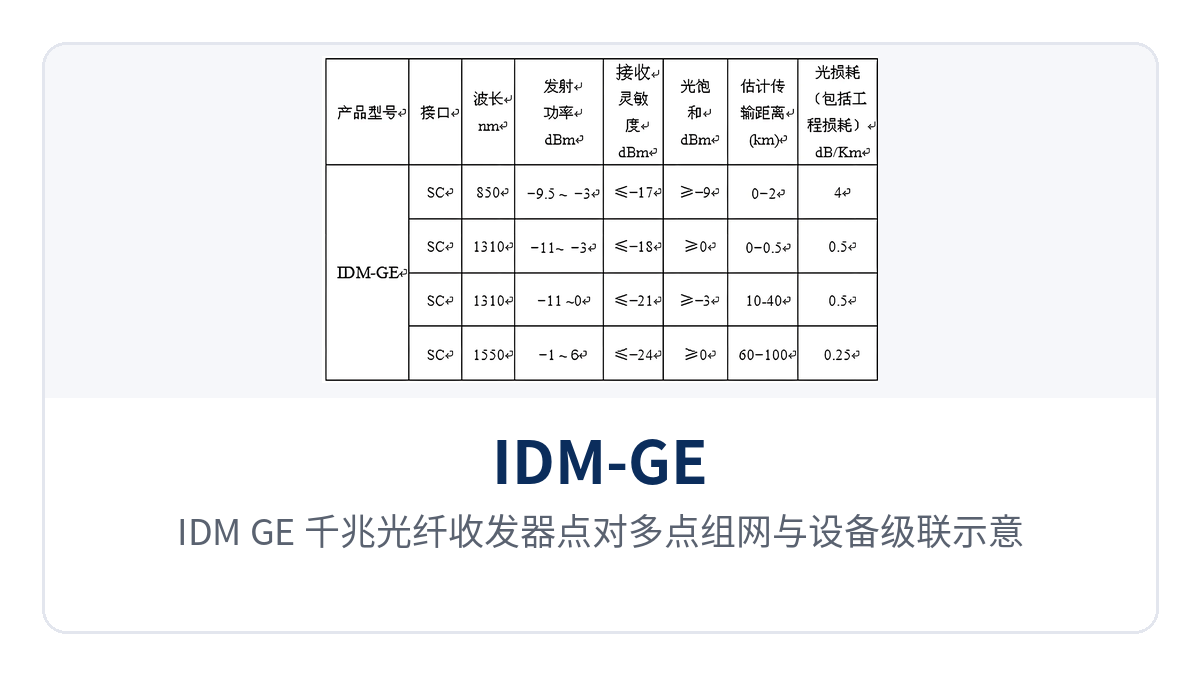
Figure 3: Point-to-multipoint networking and device cascading of the IDM-GE gigabit media converter
How to Read the 9 LED Indicators
The 9 LEDs on the panel are the direct basis for on-site troubleshooting: check power first, then the link, and then use the rate indicators to determine which rate the link is running at. The table below gives the reading order according to indicator meanings; the correspondence between each indicator and port is subject to the panel silkscreen and the documentation supplied with the unit.
| Indicator | Meaning | On-site Reading |
|---|---|---|
| POW | Power indicator | Steady on indicates normal power supply; if not lit, first check the power adapter and power wiring |
| SD1, SD2 | Optical port signal detection | Lit when the corresponding optical port receives a valid optical signal; if not lit, the opposite end is not transmitting or the optical path is interrupted |
| TP 1000 | Electrical port gigabit rate | Lit when the electrical port negotiates to 1000M, used to confirm that the link is running at the gigabit level |
| TP 100 | Electrical port Fast Ethernet rate | Lit when the electrical port negotiates to 100M; if only this indicator is lit for a gigabit terminal, it is usually due to insufficient cable grade or poor crimping of the RJ45 connector |
| LINK1, LINK2 | Link status | Lit after the corresponding port establishes a link with the opposite end; the specific port correspondence is subject to the panel silkscreen |
Troubleshooting in the order from power to link helps avoid detours. If POW is not lit, first check the power supply and power adapter; if POW is normal but SD is not lit, the opposite end is not transmitting or the optical path is interrupted, so first check the optical patch cord and optical module; if SD is normal but LINK is not lit, the problem is mostly at the local electrical port or network cable. If TP 1000 is not lit but TP 100 is lit after a gigabit terminal is connected, it is usually due to insufficient cable grade, which can be confirmed by replacing the cable and re-measuring. If industrial Ethernet switches are also deployed on site, their port indicator LEDs can be read together to speed up fault location.
Typical Application Scenarios
The dual-electrical, dual-optical structure and cascading capability of the IDM-GE make it suitable for industrial private network occasions where edge sites are scattered, cabinet space is limited, and links need to be extended along existing optical cables. The following three industry scenarios describe the device placement and link organization in the product showcase according to on-site conditions.
Industrial Automation Private Network: Terminal Access and Uplink in Workshop Equipment Cabinets
Industrial PCs, PLC hosts, visual inspection terminals, and human-machine interfaces in industrial automation private networks mostly provide only RJ45 electrical ports and are concentrated in workshop equipment cabinets. The distance from equipment cabinets to the control room often exceeds the usable gigabit range of twisted pair, so a media converter is needed at the edge to convert services into optical signals before uplinking.
The IDM-GE is installed in the equipment cabinet: the two electrical ports connect nearby to two types of terminals, while of the two optical ports, one connects to the fiber optic switch in the control room and the other is reserved for cascading to the adjacent workshop section. Optical fiber is immune to electromagnetic interference from variable-frequency drives and power cables, and the control room and production line are connected by an optical link; gigabit adaptation allows existing Fast Ethernet inspection terminals to be connected as-is, concentrating replacement and expansion work on the media converter side.
Communications Along Electric Power and Rail Transit Lines: Link Extension for Stations and Equipment Boxes
Protection devices, monitoring terminals, cameras, and dispatch telephones in substations, distribution rooms, switching stations, and equipment boxes along rail transit lines are mostly accessed via RJ45 electrical ports, and the distance from sites to the communications equipment room often exceeds the capability of twisted pair. With strong on-site electromagnetic interference and large ground potential differences, direct copper cable connections can hardly ensure long-term link stability.
The IDM-GE is deployed in station cabinets or equipment boxes: the electrical ports aggregate the terminals in the box, and the optical ports uplink along existing optical cables to the communications equipment room or the station aggregation node. One device handles two electrical ports and two optical ports, reducing both the number of devices in the cabinet and the fiber core usage accordingly; the two ends of the optical fiber link are not commonly grounded, there is no electrical path between station devices and edge terminals, and multiple sites along the line can be organized in point-to-multipoint networking mode.
Unattended Field Sites: On-site Troubleshooting by Reading Indicators
Unattended field sites, surveillance pole boxes, and communication relay points usually have no permanent staff; O&M personnel arrive according to the inspection cycle, and fault location time is compressed into the ten-plus minutes spent on site. Cameras, acquisition terminals, and alarm devices at the site are concentrated in one enclosure, making cabling and power supply points very tight.
The 9 LED indicators of the IDM-GE place power, optical port, twisted pair rate, and link status on the same panel, so after arrival there is no need to test section by section—simply reading in the order of POW, SD, LINK, and rate indicators is enough to determine the fault section. The dual-electrical, dual-optical structure and device cascading capability allow expansion by adding devices only, without changing edge configurations, saving both installation space and power supply points in field cabinets.
Conclusion
The IDM-GE dual-port gigabit media converter packs 2 RJ45 electrical ports and 2 optical fiber ports into a single unit: the gigabit adaptive electrical ports interface with existing terminals, while the gigabit full-duplex optical ports handle uplink and cascading, and 9 LEDs make link status visible on site. As a gigabit media converter under Raytrans for industrial private networks, it suits edge access scenarios such as industrial automation, sites along electric power and rail transit lines, and unattended sites.
The design of device cascading and point-to-multipoint compatibility with multiple manufacturers means site capacity expansion and multi-brand mixed networking require no replacement of the unit; items such as optical module type, transmission distance, power supply and operating environment can be confirmed one by one at the selection stage in combination with the media converter manufacturer's technical documentation and on-site conditions, and it can likewise serve as a candidate device for edge access and link extension in projects such as government private network optical fiber communication solutions and military emergency communications vehicle solutions.