IP Multimedia Audio and Video Dispatching Exchange
16-screen split display, smooth at 100 kbps, 32-channel mixing, over 100 video templates
The IP multimedia audio and video dispatching exchange supports split-screen display of up to 16 screens, and more screens can be displayed in polling mode, providing great convenience for users in conference dispatching and control management
The 16-view split-screen audio and video dispatching exchange is an Ethernet-architecture audio and video conferencing and audio and video dispatching device developed by Beijing Ruiguang Jiyuan Digital Technology Co., Ltd. It consists of three parts: the control center, the main venue, and the branch venues. It is used to organize multi-party video conferences over industrial private networks such as electric power, rail transit, and military emergency communications, and to bring multiple live video images together in front of the operator seat for command and dispatch. The entire system is built on an Ethernet switching network. A video conferencing server is deployed in the control center, and the main venue and branch venues access the server through a wired network to exchange audio and video in real time and complete interactive video conferencing. As a multimedia dispatching exchange designed for industrial private networks, the 16-view split-screen audio and video dispatching exchange supports split-screen display of 16 views, with additional views displayed in sequence by polling, gathering the multiple video channels required for conference dispatching and control management into one place and providing intuitive product showcase and image support for command and dispatch.
Key specifications at a glance: 16-view split screen · smooth at 100kbps · 50k-100M bandwidth · 32-channel mixing · over 100 video templates · 4096×2048 desktop resolution
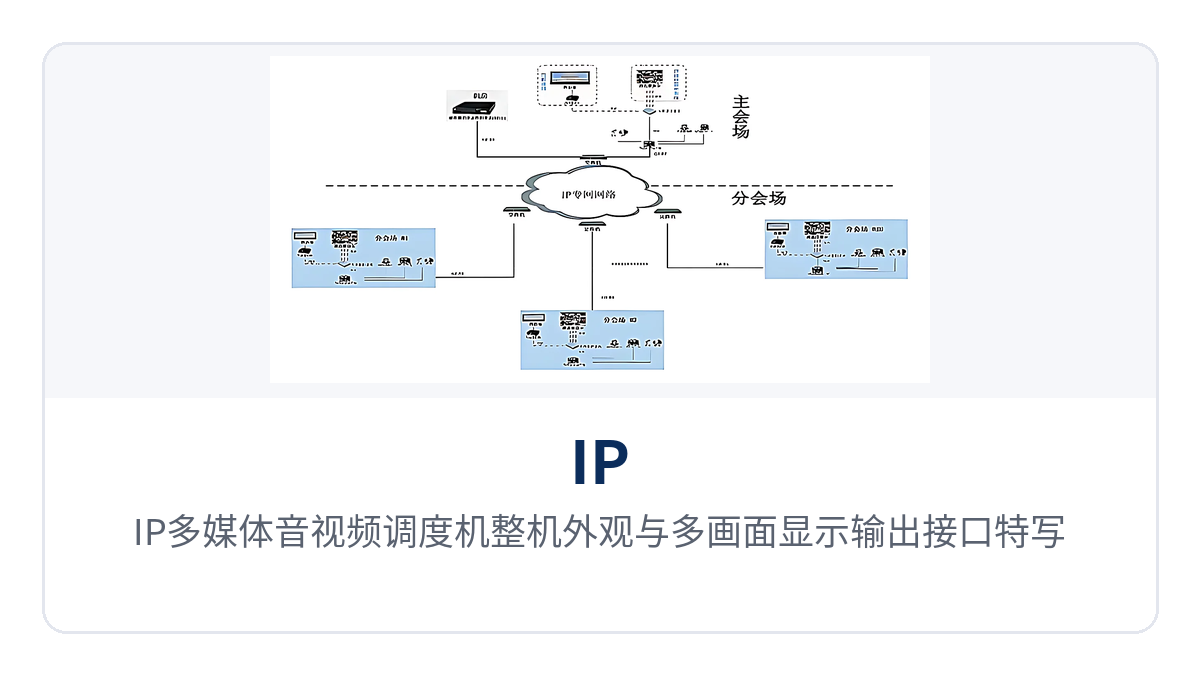
Figure 1: Overall appearance of the IP multimedia audio and video dispatching exchange and close-up of the multi-view display output interfaces
What Parts Make Up the 16-View Split-Screen Audio and Video Dispatching Exchange?
The 16-view split-screen audio and video dispatching exchange consists of three parts: the control center, the main venue, and the branch venues. The control center is the switching and dispatching core of the entire video conferencing system and the hub that keeps audio and video dispatching running smoothly. The control center can be deployed in the central communications equipment room, where a video conferencing control unit or video conferencing server is installed. The main venue and branch venues access the control center over the network to implement interactive video conferencing. The number of participating sites is theoretically unlimited, and the actual scale is mainly constrained by the computing capability of the server. Therefore, when planning, first calculate the carrying capacity on the server side, then determine the number of venues and concurrent channels.
How to Build the Video Conferencing System Network: What Equipment Is Needed at the Venue Side
How to build the video conferencing system network depends on two things: the venue-side equipment and the transmission channel. The venue side can be quickly enabled with the same set of module configurations. The system modules at the main venue and branch venues mainly include a high-definition video conferencing client, conference audio and high-definition image capture systems, and conference tables and operator seat layout. The video conferencing desktop terminal equipment installed at the venue is required to provide multiple audio, video, and data interfaces to support various conference functions. At the venue side, a touchscreen computer with the video conferencing system client installed accesses the video conferencing server in the control center via the Web to join the conference, enabling real-time audio and video dispatching and product showcase exchange without deploying a separate server at each venue. The four types of supporting devices in the venue are divided as follows:
Display system: ultra-narrow-bezel LCD screens in a video wall or a high-definition projector system, combined with an image splicer and video matrix, to display command and control information and video conference images on the video wall; the existing large display system can also be connected.
Video conference terminal: a high-definition video conference terminal is installed at the venue and directly connected to video and audio input and output devices; video output through a built-in video conference camera or capture card is connected to the video matrix to present the video conference image on the spliced display screen.
High-definition image camera: an integrated PTZ high-definition camera-D70 is configured and directly connected to the video conference terminal to capture high-definition video of the conference at the venue.
Audio system: includes conference wireless microphones and speakers, directly connected to the high-definition software video conferencing computer terminal to capture the speech of participants at the conference and play sound.
How Does Low-Bandwidth Video Transmission Technology Keep Images Smooth at 100kbps?
Low-bandwidth video transmission technology is a type of technology that, when bandwidth is compressed very low, relies on protocols and algorithms to compensate for packet loss, out-of-order packets, and jitter, keeping images continuous rather than fragmented. The entire video conferencing system uses the RTP transmission protocol, together with independently developed transmission algorithms such as automatic packet loss retransmission, automatic out-of-order recovery, buffer jitter prevention, and automatic error correction. Under low-bandwidth conditions of around 100kbps, it can keep images real-time and smooth with images that never fragment, and audio and video can be transmitted normally in network environments with bandwidth from 50KBPS to 100MBPS.
The audio side is equally key to low-bandwidth usability. The system uses multiple compression encoding methods such as G723.1, GSM, G722, G711(A/U), and MP3, supports voice activity detection (VAD), noise suppression (NS), acoustic echo cancellation (AEC), automatic gain control (AGC), and jitter buffer technology, and supports up to 32-channel mixing, with the volume of each channel adjustable individually, ensuring no screen corruption under low bandwidth requirements.
When the network environment is complex, audio and video can be transmitted interactively through tunnel mode (Http Tunnel), proxies (Http Proxy, Socks5 Proxy), firewalls, VPN, and NAT. The system also provides bandwidth testing tool software, which can test the uplink and downlink bandwidth values between any point connected to the server and the server, based on which the number of smooth video images that can be opened simultaneously is determined. As a professional command and dispatch system manufacturer, Raytrans has been deeply engaged in the audio and video dispatching and command and dispatch fields for many years, and can provide multimedia dispatching exchanges and supporting military emergency communications vehicle solutions, government private network optical fiber communication solutions, and smart mining communication solutions to meet command and dispatch communication needs in different scenarios.
Core Functions and Performance Specifications
Function | Description |
|---|---|
16-screen split screen | The video conferencing server system supports on-screen display of 16 video streams at the same time; any excess is displayed in sequence by polling, which facilitates conference dispatching and control management and also provides intuitive multi-stream control for audio and video dispatching scenarios. |
Video browsing and templates | More than 100 video templates are provided, with support for 16:9 widescreen LCD mode; windows in a template can be dragged freely, and the templates of participants and the host are synchronized in real time, facilitating flexible screen arrangement in product showcase and command and dispatch. |
HD desktop display | The desktop resolution supports up to 4096×2048, and works with splicing screens or HD projectors to output HD conference images, meeting the large display presentation requirements of a dispatch center. |
Multiple video formats | Video uses compression encoding such as mpeg4, H263, H263+ and H.264, with adjustable and selectable frame rate and stream; video input supports AV terminals, S terminals, TV signals and USB camera input, and each conference terminal supports 8 video signal inputs. |
Multiple audio formats and mixing | Audio uses compression encoding such as G723.1, GSM, G722, G711(A/U) and MP3, and supports voice activity detection (VAD), noise suppression (NS), echo cancellation (AEC), automatic gain control (AGC) and jitter buffer technologies; it supports up to 32-channel mixing with independent volume adjustment for each channel, providing a clear voice dispatching foundation for the multimedia dispatching exchange. |
Network audio and video stream transmission | It adopts the RTP protocol together with transmission algorithms such as automatic packet loss retransmission, automatic out-of-order recovery, jitter buffer prevention and automatic error correction, ensuring real-time, smooth images that are never broken even at a low bandwidth of around 100 kbps, adapting to the transmission requirements of audio and video dispatching in a private network environment. |
Tunnel and penetration | Supports users transmitting audio and video interactively through tunnel mode (Http Tunnel), proxies (Http Proxy, Socks5 Proxy), firewalls, VPN and NAT. |
Conference data control | Supports multi-party collaborative drawing on an electronic whiteboard, screen sharing of computer documents (PPT, Excel, Word, web pages, courseware, software interfaces), note passing and conference chat, file transfer, and scrolling subtitle conference announcements at the bottom of the screen; VCD and DVD video files can also be played during a conference, facilitating information sharing and product showcase in command and dispatch. |
Instant messaging | Integrates text chat, file transfer, electronic whiteboard collaboration, screen sharing, remote control, audio and video conversation, multi-party conversation, contact search, joining a conference and inviting others to a conference. |
Conference recording and video on demand | The audio and video, electronic whiteboard and screen data of the conference process can be recorded into a single file for storage, with support for playback review and remote video on demand (VOD), suitable for teaching and process kept on file. |
Virtual conference center | Multiple independent conference room centers can be virtualized on the system platform, and can be accessed separately, controlled independently and do not interfere with one another. |
Multi-level delegated management | Management rights are divided into levels such as super administrator, organization administrator and department administrator; conference identities include host, participant and auditor, with chairman and speaker as extensions, and the host can authorize participants to take part in control at any time. |
B/S architecture management | System administrators can manage the system through IE from any place with Internet access, with simple operation. |
One-touch installation | One-touch installation is adopted; the database, WEB service and central management platform are all deployed automatically during program installation. |
Control panel and message notification | The conference control panel hides automatically and reappears when the mouse moves to the edge of the screen; when participants enter or leave a conference, the system automatically pops up a message prompt. |
Bandwidth test | Bandwidth test tool software is provided, allowing the uplink and downlink bandwidth values between any location connected to the server and the server to be tested at that location. |
Item | Parameter/Specification | Description/Applicable Conditions |
|---|---|---|
System composition | Control center + main venue + branch venue | The complete system is built on an Ethernet switching network |
Control center | Deploy a video conferencing control unit or conferencing server | Can be deployed in the central communications equipment room |
Venue access mode | Touchscreen PC + video conferencing client, Web-based access to the server | The main venue and branch venues access the control center over a wired network |
Split-screen display | 16 views | More views are displayed by polling |
Video compression encoding | MPEG4, H.263, H.263+, H.264 | Frame rate and stream are adjustable and selectable |
Video input per terminal | 8 channels | Supports AV terminal, S-video terminal, TV signal and USB camera input |
Desktop resolution | 4096×2048 | Supports 16:9 widescreen LCD mode |
Video templates | More than 100 | Windows in a template can be dragged freely |
Audio compression encoding | G723.1, GSM, G722, G711(A/U), MP3 | Supports VAD, NS, AEC, AGC and JitterBuffer |
Number of mixing channels | 32 channels | The volume of each channel can be adjusted separately |
Transmission protocol | RTP | Combined with automatic packet loss retransmission, automatic out-of-order recovery, anti-buffer jitter and automatic error correction algorithms |
Applicable bandwidth | About 100 kbps ensures real-time smooth images; audio and video can be transmitted normally in bandwidth environments from 50 KBPS to 100 MBPS | 100 kbps is the bandwidth condition for real-time smooth images |
Network penetration | Tunnel mode (Http Tunnel), proxy (Http Proxy, Socks5 Proxy), firewall, VPN, NAT | Adapts to complex networks and cross-network scenarios |
Management architecture | B/S architecture, IE browser management | Can be managed from any location with Internet access |
Permissions and identities | Super administrator/institution administrator/department administrator; host/attendee/observer | Conference identities can be extended to chairman and speaker |
HD image camera | Integrated PTZ HD camera - D70 | Directly connected to the video conference terminal |
Number of participating sites | Theoretically unlimited | Mainly limited by server computing capability |
Conference recording | Supports conference recording and remote video on demand | Audio and video, electronic whiteboard and screen data are recorded into one file |
Overall power consumption, dimensions and operating environment | Not yet recorded in the knowledge base | Subject to the manufacturer's technical documentation and commercial confirmation |
Differentiated value: 16-view split-screen display, smooth at 100 kbps, 50k-100M bandwidth, 32-channel mixing
Differentiated Short Label | Differentiated Selling Point | User Value |
|---|---|---|
16-screen split display | 16-screen split display + polling, multiple video streams under control on one screen for command and dispatch | Multiple on-site video streams are gathered onto one screen, with polling covering more channels, so dispatchers do not have to switch back and forth among multiple monitors |
Smooth at 100kbps | Real-time, smooth and never broken images at low bandwidth of 100kbps | The site remains clearly visible even when private network bandwidth is compressed, and video dispatching is not interrupted by bandwidth constraints |
50k-100M bandwidth | Audio and video can be transmitted normally in bandwidth environments from 50kbps to 100Mbps | From narrowband dedicated lines to broadband networks, one set of equipment covers sites with different bandwidth conditions |
32-channel mixing | Supports up to 32-channel mixing, with the volume of each channel adjustable separately | When multiple venues speak at the same time, sources can still be distinguished and volume adjusted accurately, facilitating conference hosting and recording |
What are the typical application scenarios?
Electric power and energy industrial private network
Electric power and energy sites are scattered, the private network bandwidth between substations is often not high, and remote consultation and emergency dispatching are needed daily. The 16-screen split display audio and video dispatching exchange ensures real-time, smooth images under low-bandwidth conditions of around 100kbps, bringing the control center, maintenance teams and operation sites into the same video conference; on the substation side, only a touchscreen computer plus camera, microphone and speaker are needed to join the conference by accessing the video conferencing server of the control center via Web, without building a separate conference system for each site. For such scenarios, Raytrans can provide government private network optical fiber communication solutions and audio and video dispatching capabilities to help electric power and energy users build a unified command and dispatch system.
Rail transit and pipe gallery dispatching
Rail transit lines and integrated pipe galleries have many sites but few duty personnel, and command and dispatch need to grasp multiple on-site images at the same time. The system supports 16-screen split-screen display, presenting the surveillance and conference images of multiple sites on the same screen, with more images switched in sequence by polling, so dispatchers can complete image viewing and voice dispatching within the range of one tunnel or pipe gallery. With the image splicer and video matrix, images can also be sent to a large display or splicing screen and interfaced with the existing display system, forming a complete multimedia dispatching exchange product showcase and command and dispatch solution.
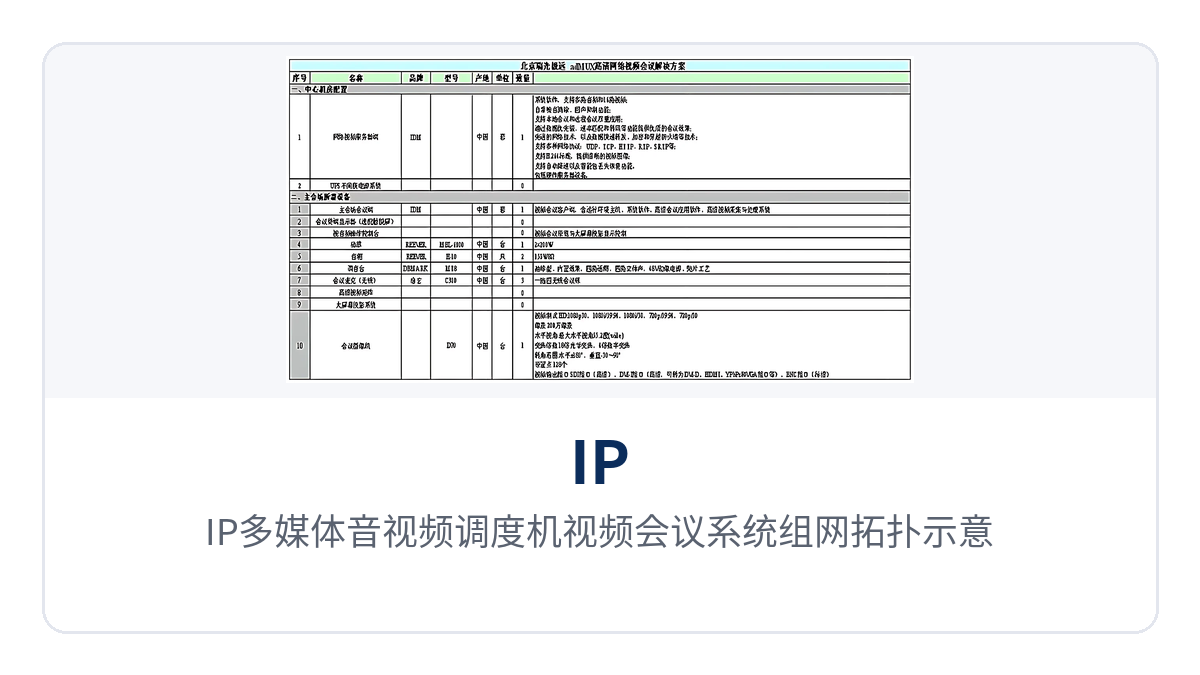
Figure 2: Networking topology diagram of the IP multimedia audio and video dispatching exchange video conferencing system
Military and emergency command private network
Communication conditions in disaster areas and field sites are unstable, link bandwidth is often compressed, and once command video stutters or breaks, judgment is affected. The whole system adopts the RTP protocol and transmission algorithms such as automatic packet loss retransmission and automatic out-of-order recovery, ensuring real-time, smooth and never broken images under low-bandwidth conditions of around 100kbps, and supports tunnel mode, proxy and NAT traversal, adapting to compressed private network links; audio and video can be transmitted normally in network environments with bandwidth from 50KBPS to 100MBPS, so one system covers different emergency sites from narrowband to broadband. In the military emergency communications vehicle solution, audio and video dispatching can work with vehicle-mounted links to provide stable command and dispatch support for forward command posts; for the smart mining communication solution, underground and surface multimedia dispatching exchanges can likewise be incorporated into a unified dispatching system.
How to select an audio and video dispatching exchange?
To select an audio and video dispatching exchange, you can check five things item by item: bandwidth, venues, display, permissions and archiving, and determine the configuration only after clarifying the on-site conditions.
Check bandwidth first: if the on-site private network bandwidth remains at the order of 100kbps for a long time, focus on confirming image continuity under low bandwidth; when bandwidth conditions span narrowband and broadband, select according to the applicable range of 50KBPS-100MBPS.
Then determine venues: first count the number of venues to be connected and the number of concurrent channels; limited by server computing capability, the number of participation points is theoretically unlimited, but the configuration should leave margin.
Display method: if multiple images need to be on the same screen, look at the 16-screen split display and polling capabilities; for sites with an existing large display or splicing screen, confirm the interfacing method of the image splicer and video matrix.
Permissions and identity: when shared by multiple departments, use hierarchical permissions of super administrator, organization administrator and department administrator, and set meeting identities as host, participant and observer.
Archiving and traceability: for scenarios with teaching and review needs, confirm whether data control functions such as conference video recording and remote video on demand, screen sharing and electronic whiteboard meet the requirements.