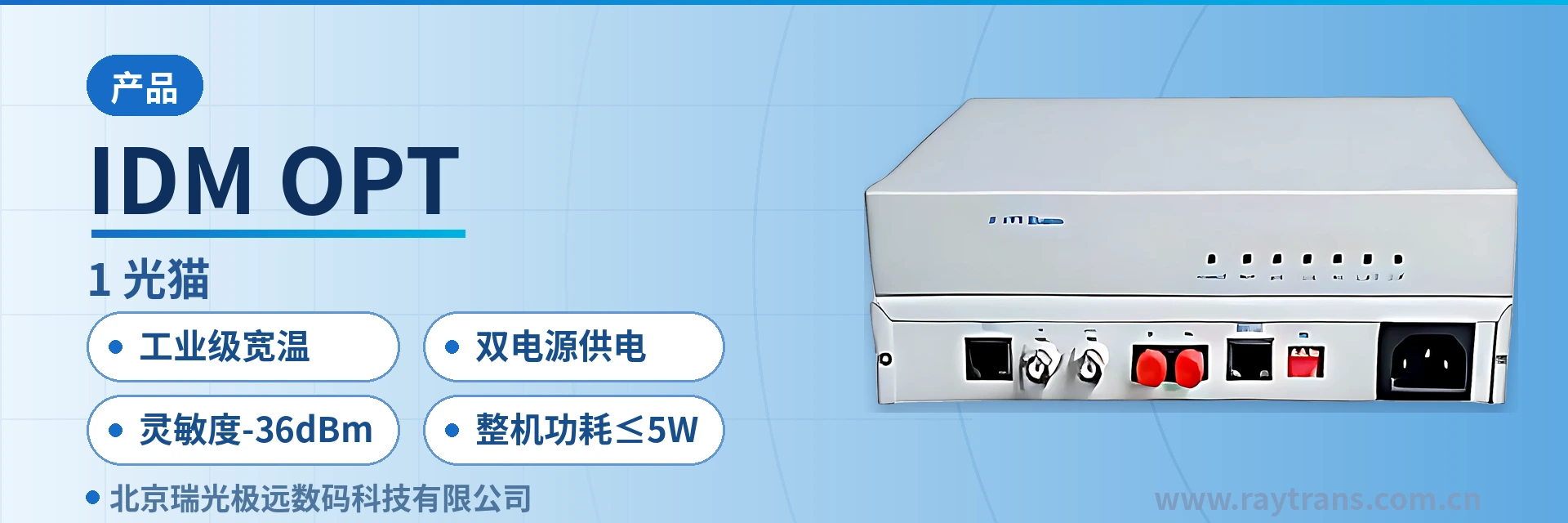
IDM OPT-E1 Optical Modem
Interoperable with single E1 bridge optical port; desktop dual power supply ≤5 W; star capacity expansion by adding remote units
The IDM OPT-E1 optical modem has a desktop form factor. Each unit provides an E1 transmission channel over optical fiber, including clock extraction and transmission. It can interoperate with the optical port of a single E1 bridge and can easily form a star network with centralized optical modems. The device supports dual power supply of AC 220 V and DC -48 V and can be used in various fields such as LAN interconnection, video on demand, and remote monitoring.
IDM OPT-E1 optical modem is a desktop E1 optical modem that converts a single E1 signal into an optical signal for long-distance transmission over optical fiber. Also commonly referred to as a desktop optical modem, it is developed by Beijing Ruiguang Jiyuan Digital Technology Co., Ltd. (Raytrans) and is used at remote sites of private networks to complete service backhaul by replacing E1 cables with optical fiber. Each device provides one E1 transmission channel over optical fiber, including clock extraction and transmission. The unit has a desktop structure and can be deployed point-to-point as a single unit.
The optical port of the E1 optical modem can directly intercommunicate with the optical port of a single-E1 bridge, and can also work with centralized optical modems to form a star network. When a site is expanded, additional optical modems can be added according to the number of remote ends. As an optical multiplexer manufacturer, Raytrans also offers supporting options such as bridge converters, PCM equipment, and optical multiplexing equipment in its product showcase for this series, making it easy to build a complete government private network optical fiber communication solution. The device uses dual power supply of AC 220 V and DC -48 V, with overall power consumption ≤5 W. The same unit can be connected to a DC busbar in an equipment room or used at field sites with only mains power.
Key Specifications at a Glance: Single E1 · 2048 Kbps bit rate · 155M optical port at 1550 nm · receiver sensitivity below -36 dBm · industrial-grade wide temperature · dual power supply · overall power consumption ≤5 W
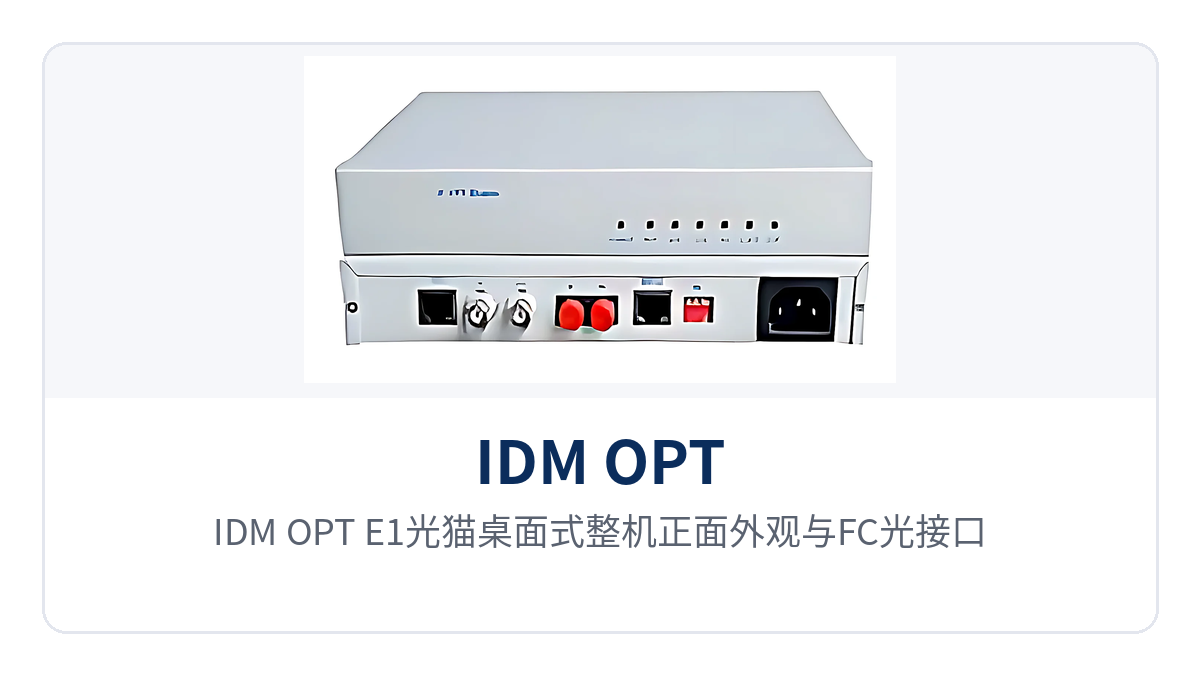
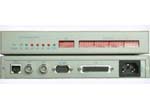
Figure 1: Front view of the desktop IDM OPT-E1 optical modem and its FC optical interface
Which Transmission Segment Does the E1 Optical Modem Address in a Private Network?
The E1 optical modem addresses the interfacing of E1 services in terms of transmission medium and distance: G.703-standard E1 signals are transmitted over cables at a rate of 2048 Kbps with HDB3 line coding, and the usable distance is limited by wire gauge and electromagnetic interference, while optical cables are often already laid between stations. The IDM OPT-E1 optical modem converts E1 electrical signals into 155 Mbps optical signals for transmission over optical fiber, and the opposite end restores them to standard E1, with the service frame structure and time slot content passed through unchanged.
The conversion occurs only at the physical layer. The device does not rewrite the PCM30/31 frame structure or channel-associated signaling. Framed or unframed operation can be set according to the opposite-end device, and time slots can also be configured according to service requirements. For sites that only need one segment of E1 optical fiber transmission, this approach saves investment and rack positions compared with adding a separate transmission device.
Existing dispatching exchanges and PCM equipment at the site do not need their original configurations changed when connected to the optical link, and in engineering practice such devices are usually classified as bridge converters. In procurement communication, they are also often referred to as single-E1 optical multiplexers or desktop optical modems, but the final check is still based on the three parameters of interface, rate, and distance.
What Functions Are Integrated in One E1 Optical Modem Enclosure?
The functions cover E1 service transmission, clock transfer, intercommunication with bridges and centralized equipment, operating mode settings, and power supply adaptation. Each item corresponds to one on-site wiring step or one commissioning configuration, and they are listed in the table below for comparison and verification during acceptance.
| Function | Description |
|---|---|
| E1 optical fiber transmission channel | A single device provides one bidirectional E1 transmission channel over optical fiber, with transparent transmission of 2048 Kbps services |
| Clock extraction and transfer | Line clock is extracted from the E1 signal and transferred over the optical link, keeping the clocks at both ends consistent |
| Intercommunication with the optical port of a single-E1 bridge | The optical port can be directly connected to the optical port of a single-E1 bridge, with both ends at the same 155 Mbps optical rate |
| Star networking | Works with centralized optical modems so that multiple remote E1 optical modems aggregate to the central station in a star topology |
| Framed and unframed selectable | The operating mode can be set; framed mode processes PCM30/31, while unframed mode transparently transmits the entire 2048 Kbps |
| Configurable time slots | In framed mode, 64K time slots are allocated according to service requirements for easy interfacing with PCM equipment |
| Dual power supply | Two power supply formats, AC 220 V and DC -48 V, adapting to equipment room DC busbars and mains-powered sites |
| Desktop structure | A standalone small enclosure that does not occupy a rack, suitable for small spaces such as distribution rooms and section equipment rooms |
Optical Interface and E1 Interface Parameters of the E1 Optical Modem
The parameters are divided into four groups: optical interface, E1 interface, environmental conditions, and power consumption, and are listed item by item in the table below. Items with applicable conditions noted in the table are selected according to on-site tiers; those without notes follow standard values. The three rows of transmission distance, wavelength, and transmit optical power are interrelated and should be confirmed as a group during selection.
| Item | Parameter/Specification | Description/Applicable Conditions |
|---|---|---|
| Equipment form factor | Desktop standalone enclosure | A single unit provides one E1 service and does not require rack installation |
| E1 bit rate | 2048 Kbps ±50 ppm | Consistent with the G.703 standard E1 rate |
| E1 line coding | HDB3 | Standard E1 line coding method |
| E1 standard protocol | Supports ITU-T G.703 | Can interface with existing E1 equipment and single-E1 bridges |
| E1 impedance | 75 Ω/120 Ω | 75 Ω with coaxial cable, 120 Ω with twisted pair; both ends must be consistent |
| Frame structure | PCM30/31 | Frame format in framed mode |
| Signaling | Channel-associated signaling | Signaling is transmitted together with the voice channel time slots |
| Jitter characteristics | Compliant with ITU-T G.823 | Meets the jitter and wander tolerance of the E1 interface |
| Operating mode | Framed/unframed configurable, time slots configurable | Set according to the opposite-end device and service type |
| Optical interface type | FC, SC and others customizable | Selected according to the patch cord interface form in the equipment room |
| Fiber mode and distance | Single-mode (multi-mode optional), distance selectable | Selected according to link length and optical cable conditions |
| Optical fiber rate | 155 Mbps ±50 ppm | Same rate as the optical port of a single-E1 bridge, allowing intercommunication |
| Wavelength | 1550 nm | Transmission window for long-distance links and weak-light conditions |
| Transmit optical power | -2 to -11 dBm | Selected in conjunction with the link loss budget |
| Receiver sensitivity | Better than -36 dBm | Still provides receive margin when link loss is relatively high |
| Operating temperature | -15℃ to +65℃ | Equipment room and cabinet environments for standard models |
| Industrial-grade temperature | -40℃ to +85℃ | Choose industrial-grade wide temperature for outdoor cabinets and unattended sites |
| Storage temperature | -25℃ to +75℃ | Transportation and storage conditions |
| Relative humidity | 0 to 95% (non-condensing) | Suitable for both equipment rooms and field cabinets |
| Power supply mode | AC 220 V/DC -48 V | Dual power supply; wire according to on-site power conditions |
| Overall power consumption | ≤5 W | Small-capacity sites can be powered long-term by a low-power supply |
Typical Application Scenarios
Electric Power Private Network: E1 Channels Between Substations and Distribution Rooms
Protection, automation, and metering services in substations are usually aggregated into E1 through PCM or dispatching equipment, and optical cables run between stations and between stations and the dispatch center. The IDM OPT-E1 optical modem is installed in the communications cabinet in the station, sends the station-end E1 onto the optical fiber, and the opposite end restores it and connects it back to the dispatching equipment, so the original cable routing does not need to be rearranged.
Electric power sites are mostly unattended. Distribution rooms have large temperature differences between winter and summer and no long-term personnel for temperature control, so the industrial-grade wide-temperature version can operate within the range of -40℃ to +85℃. Stations have both existing DC distribution panels and mains power incoming, and the dual power supply is wired according to on-site conditions. With overall power consumption ≤5 W, long-term operation does not increase the station's electricity load.
Rail Transit: E1 Service Backhaul in Section Equipment Rooms
Section equipment rooms along rail lines have limited space and are separated from stations and the control center by several kilometers of optical cable. Section telephones, PA, and signal auxiliary services are often uplinked in E1 form. The IDM OPT-E1 optical modem is small and can be placed on a desktop, making it suitable for installation on a spare shelf in a section cabinet to send section E1 services to the station-side equipment.
Section links are long and have many connectors and splice points, so the link loss budget is often tight. The 1550 nm wavelength, together with receiver sensitivity better than -36 dBm, still enables stable reception under weak-light conditions. Maintenance windows are concentrated at night, and the optical port and E1 interface forms are fixed and easy to interpret, facilitating replacement and verification within limited time.
Oil and Gas Pipelines and Unattended Field Sites: Low-Power E1 Long-Term Online
Valve chambers, cathodic protection stations, and communication relay points along oil and gas pipelines are mostly unattended, with only low-power supplies or solar power on site, and services are mainly voice and monitoring data in E1 form. With overall power consumption ≤5 W, the IDM OPT-E1 optical modem can be powered directly by the small-capacity power supply in the station, without separately expanding capacity for communications equipment.
Field cabinets experience high temperatures in summer and low temperatures in winter, with humidity fluctuating by season. The industrial-grade wide temperature and the humidity range of 0 to 95% (non-condensing) cover such environments. Dual power supply allows connection under both mains and DC conditions, and site upgrades can select according to the on-site power form without changing the cabinet structure or service configuration.
How Are Point-to-Point and Star Networking Connected?
Point-to-point connection is simple: place one IDM OPT-E1 optical modem at each end of the link, connect the optical transmit port of one unit to the optical receive port of the other, and connect the E1 interfaces at both ends to the local service devices. Both devices have the same 155 Mbps optical rate. When one end is a single-E1 bridge, the connection is likewise optical port to optical port, with no additional conversion device.
Star networking is suitable for aggregating multiple remote sites to one central station: the central station is equipped with a centralized optical modem, each remote site has one E1 optical modem, and all optical cables are aggregated to the central equipment room. When the number of remote ends increases, only remote optical modems and central-side ports need to be added; sites already in operation do not need to be changed, and the modification scope is limited to one new device and one patch cord.
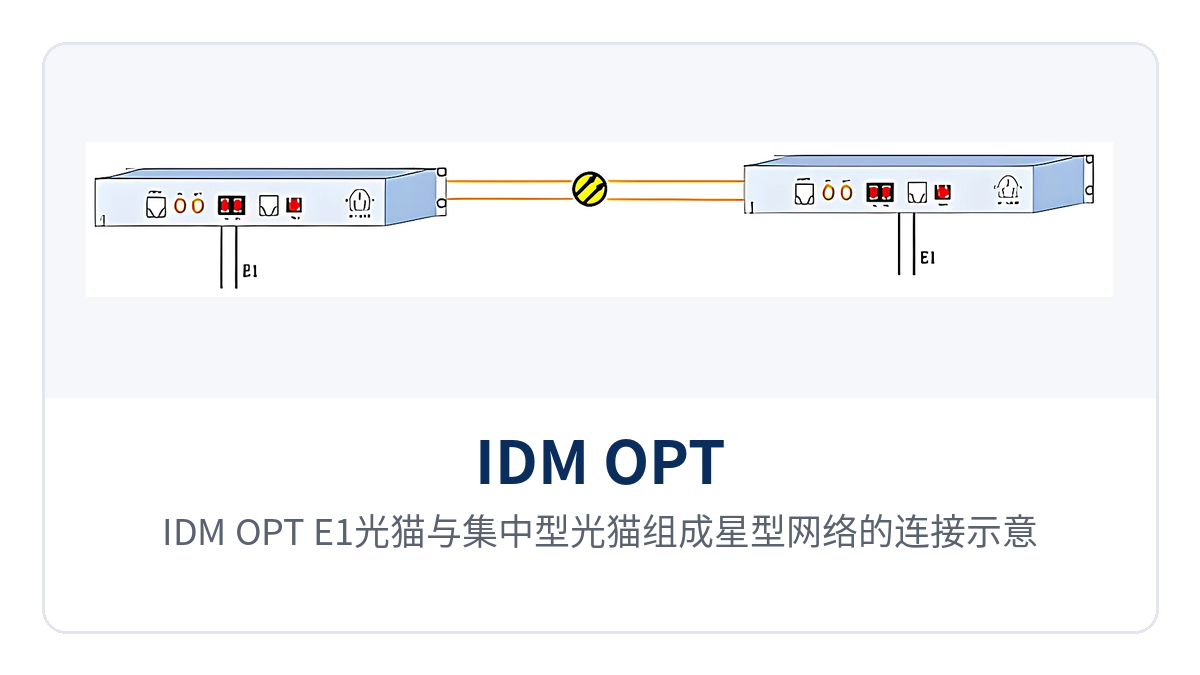
Figure 2: Connection diagram of IDM OPT-E1 optical modems and centralized optical modems forming a star network
From Cabinet Installation to Service Provisioning: How Is On-Site Deployment Done?
On-site deployment proceeds in four steps: interfaces, optical path, power supply, and service verification. Doing them out of order easily leads to repeated troubleshooting after power-on. Before wiring, first check the opposite-end interface form and optical module tier, and power on only after confirming they are correct, to avoid line release and rework after power-on. Complete wiring and labeling in one pass, so that subsequent inspection and failure handling require fewer detours. As an optical multiplexer manufacturer, Raytrans clearly marks the interface and power supply configuration of each model in its product showcase; before deployment, simply check against the product showcase materials.
- Select E1 interface cabling by impedance: use coaxial cable with BNC connectors for 75 Ω, and twisted pair with corresponding connectors for 120 Ω; keep the impedance consistent at both ends of the same link.
- Select FC or SC adaptation for the optical interface according to the patch cord form, cross-match the transmit and receive directions, and after insertion confirm the latch is fully engaged and the end face is free of contamination.
- Connect power according to on-site conditions to AC 220 V or DC -48 V. Before wiring, verify the voltage level and DC polarity; the DC side must not be connected in reverse.
- After power-on, first confirm at the local station that the E1 interface has a service signal, then check whether the opposite end of the optical path receives the service, gradually narrowing the troubleshooting scope.
- Before service provisioning, verify the E1 interface alarms and service status at both ends, put the system into operation after confirmation, and complete the interface labels.
Which Conditions Must Be Confirmed During Selection?
For the same model, the differences in combinations across sites are concentrated in five items: distance, optical port form, E1 impedance, power supply, and temperature grade. Define these five items before purchase, and the equipment can be installed directly upon arrival. If any item does not match the site, it will cause one more rework and waiting period. Write the five conditions into the purchase list and acceptance sheet and verify them against the same criteria. Raytrans PCM equipment and optical multiplexing equipment are likewise confirmed item by item against these five items during the selection stage, and supporting devices such as bridge converters involved in government private network optical fiber communication solutions are verified against the same criteria.
- Transmission distance: determine the optical module tier according to the inter-station optical cable length and loss budget; for long-distance links, also confirm the 1550 nm wavelength and transmit optical power.
- E1 impedance: select 75 Ω or 120 Ω according to the existing equipment interface, keep both ends of the same link consistent, and do not mix connections in between.
- Optical interface form: select FC or SC according to the existing patch cords in the equipment room; fewer adapter points make the link more stable. If a non-standard form is required, specify it at the time of ordering.
- Power supply mode: choose DC -48 V for equipment rooms with a DC busbar, and AC 220 V for sites with only mains power; wire the dual power supply according to on-site conditions.
- Temperature grade: standard models can be selected inside equipment rooms, while industrial-grade wide-temperature versions should be selected for outdoor cabinets and unattended sites.
Conclusion
IDM OPT-E1 optical modem performs optical fiber transmission of one E1 channel in a desktop standalone unit form. Its optical port interworks with a single-E1 bridge and can form a star network with centralized optical modems, making it suitable for private network sites with distributed sites that only need to extend one E1 link. For sites with only one E1 service that do not want to add a complete set of transmission equipment, a single desktop optical modem saves both rack position and investment. Raytrans, as an optical multiplexer manufacturer, often pairs single-E1 optical multiplexers with optical multiplexing equipment and PCM equipment in government private network optical fiber communication solutions, and can flexibly select configurations according to site scale in the product showcase.
The industrial-grade wide-temperature version covers -40℃~+85℃ and, with AC220V/DC-48V dual power supply and ≤5W overall power consumption, can operate long-term at unattended sites; receiver sensitivity below -36dBm gives 1550nm long-distance links receive margin even under weak-light conditions. Electric power, rail transit and oil and gas pipeline private networks send station-side E1 services over optical cables, and one E1 optical modem completes the access, with maintenance performed according to standard interfaces.