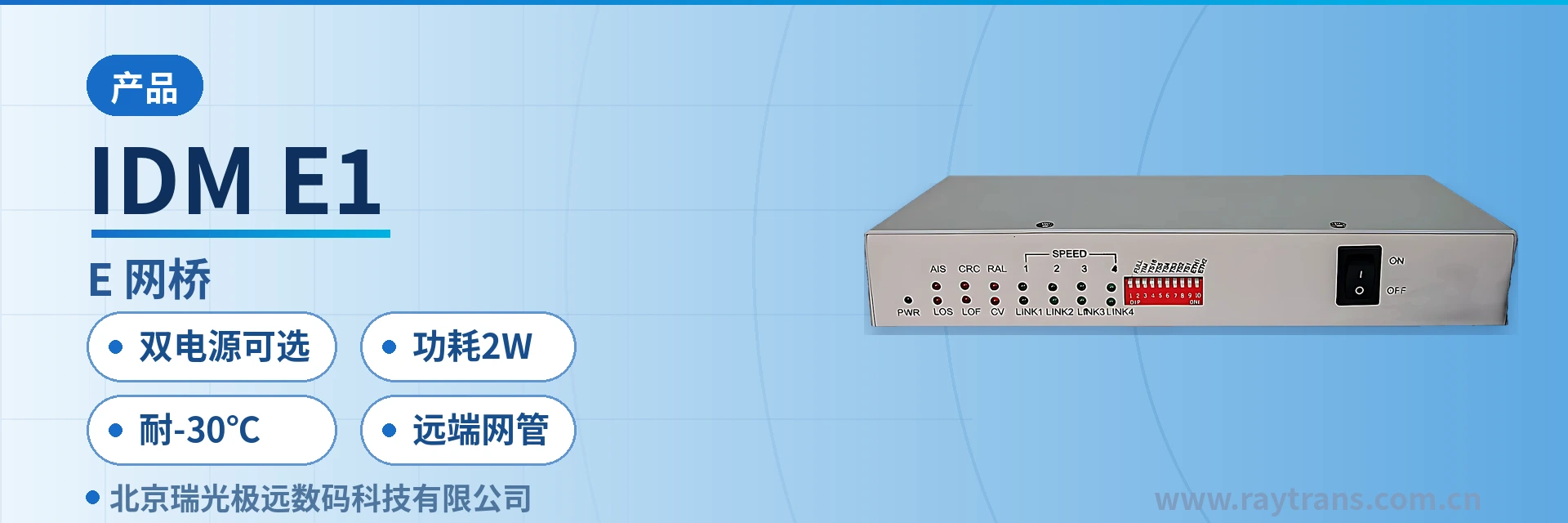
IDM E1/FE Bridge
Dual power supply, low power consumption, DIP-switch tool-free configuration, centralized with remote network management
The IDM E1/FE Bridge is designed with large-scale dedicated integrated circuits and implements inverse multiplexing of Ethernet data onto one E1 channel or an optical fiber. The device is available in centralized and desktop models; the centralized device provides 1 Ethernet interface, and the desktop device provides 4 Ethernet interfaces. The device supports two transmission modes: E1 and optical fiber. When the device operates in E1 transmission mode, the maximum Ethernet bandwidth is 2.048 M; when the device operates in optical fiber transmission mode, the maximum Ethernet bandwidth is 4.096 M. The device supports network management functions. The management device can manage the local end or desktop devices through the centralized device, and at the same time the centralized...
IDM E1/FE Bridge is a dual-power-supply, low-power-consumption E1 bridge developed by Beijing Ruiguang Jiyuan Digital Technology Co., Ltd. (Raytrans). As a mature product of a professional optical multiplexer manufacturer and media converter manufacturer, it is used to inverse-multiplex Ethernet data onto one E1 channel or a single optical fiber for transmission. The device is intended for industrial sites that have only a 2M circuit or a single optical fiber and no Ethernet channel yet, allowing upper-layer Ethernet services to be terminated over existing transmission resources, and it can also serve as a bridge converter for flexible adaptation between Ethernet and E1 links.
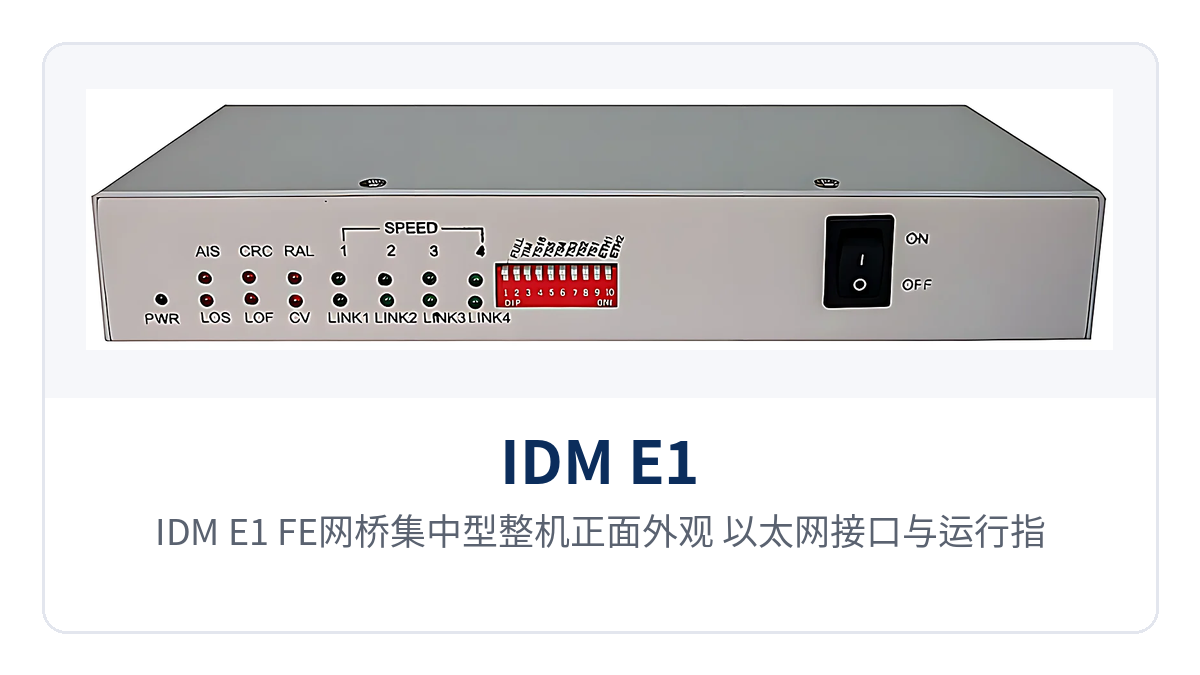
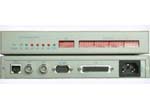
Figure 1: Front view of the centralized IDM E1/FE Bridge unit, Ethernet interface and operating indicator LEDs
The unit is designed with large-scale dedicated integrated circuits. The centralized equipment provides one Ethernet interface, while the desktop device provides four Ethernet interfaces, facilitating product showcase and deployment selection on site. In E1 transmission mode, the Ethernet bandwidth is 2.048M; in optical fiber transmission mode, the Ethernet bandwidth is 4.096M. The device supports AC 220 V or DC -48 V power supply, with overall power consumption below 2 W and an operating temperature of -30℃ to 40℃, making it suitable for long-term operation in unattended cabinets. Raytrans also offers a series of optical multiplexing equipment and media converters, meeting the requirements of various scenarios such as government private network optical fiber communication solutions and military emergency communications vehicle solutions.
Key specifications at a glance: 1 group of unbalanced E1 (BNC) · Ethernet bandwidth 2.048M (E1 mode) · 4.096M (fiber mode) · dual power supply options · power consumption <2 W · withstands -30℃ · remote network management
What kind of device is a dual-power-supply low-power-consumption E1 bridge?
Inverse multiplexing works by splitting Ethernet frames in sequence, loading them into the available time slots of the E1 frame structure for transmission, and reassembling them in sequence into the original Ethernet frames at the receiving end. Placing one bridge converter at each end forms a point-to-point Ethernet channel; the service side still sees a standard Ethernet interface, and the upper-layer network structure needs no modification.
The E1 side uses HDB3 line coding with a bit rate of 2048 kbit/s ±50 ppm. The interface is a 75 Ω unbalanced interface using BNC connectors, compliant with ITU-T G.703/G.704 recommendations, and the jitter characteristics comply with ITU-T G.823. Framed and unframed modes are configurable; in framed mode, the time slots can be set by hardware or software, and data can be carried once aligned with the time slot planning of the transmission device at the opposite end.
For sites where optical cables have already been laid, the transmission mode can be changed to optical fiber, raising the Ethernet bandwidth to 4.096M accordingly. Both the centralized and desktop forms support E1 and optical fiber transmission modes, selected on site according to available resources: use E1 mode where a 2M circuit is available, and optical fiber mode where spare fiber cores exist. The networking structure and configuration approach are the same for both modes.
How to choose between the centralized and desktop forms
Selection starts with how many Ethernet services the site needs to access, then with the division of roles at the two ends: the centralized equipment provides one Ethernet interface and is placed at the equipment room side to take the management role; the desktop device provides four Ethernet interfaces and is placed at the site side to connect multiple terminals nearby to the same link.
| Form | Ethernet interface | Transmission mode | Deployment position and applicable conditions |
|---|---|---|---|
| Centralized | 1 | E1 or optical fiber | Aggregation at the equipment room side, providing a COM port management outlet and managing local and remote devices |
| Desktop | 4 | E1 or optical fiber | Access at the site side, suitable for nearby access of multiple Ethernet devices such as cameras, meters and terminals |
The management capability of the centralized equipment is not limited to itself; through the COM port it can also manage the central office and remote devices, including Ethernet configuration and query, and E1 alarm information query. Both the centralized and desktop forms can use DIP switches to configure E1 interface parameters, device clock and Ethernet parameters, so no dedicated commissioning tool needs to be carried on site.
What are the main functions?
The functions center on four aspects: inverse multiplexing, interface adaptation, on-site configuration and network management, each corresponding to an action that can be checked on site. The table below lists the function items and their effects row by row, so that selection can directly match the site's number of Ethernet interfaces, number of E1 interfaces and O&M approach without asking item by item.
| Function | Description |
|---|---|
| Ethernet-to-E1 inverse multiplexing | Performs inverse multiplexing of Ethernet data onto one E1 channel; the receiving end reassembles the original Ethernet frames in sequence, transparent to upper layers |
| Ethernet-to-fiber inverse multiplexing | Supports multiplexing Ethernet data onto a single optical fiber, raising the Ethernet bandwidth to 4.096M |
| Multiple Ethernet access | The desktop device provides four Ethernet electrical interfaces for nearby access of multiple terminals to the same link; the centralized equipment provides one |
| Remote network management | The management device manages the central office and remote devices through the central office COM port, supporting Ethernet configuration query and E1 alarm information query |
| DIP switch configuration | Both central office and remote devices can set E1 interface parameters, device clock and Ethernet parameters through DIP switches |
| Port enable and disable | Supports enabling and disabling of Ethernet ports; shutting down idle ports avoids misconnection and non-service traffic |
| Rate and duplex configuration | Supports auto-negotiation, rate, and full/half duplex configuration, set according to the capabilities of the opposite end |
| PAUSE flow control | Supports PAUSE flow control to reduce packet loss during transient link congestion |
| E1 framing and clock settings | Framed and unframed modes are selectable; in framed mode, time slots are set by hardware or software, and the device clock is configurable |
Technical specifications and applicable conditions
The specifications are given in three groups: E1 interface, Ethernet interface, and power supply and environment. Nominal values follow the product documentation. On-site verification is subject to the interface form of the transmission device at the opposite end and the accompanying technical documentation; items not given in the table are not estimated, and should be checked item by item with the manufacturer before commercial confirmation.
| Item | Parameter/Specification | Description/Applicable Conditions |
|---|---|---|
| Number of E1 interfaces | 1 group | Ethernet data is inverse-multiplexed onto one E1 channel |
| E1 interface form | 75 Ω unbalanced interface, BNC connector | Connected on site with coaxial cable and BNC connector, consistent with the opposite end |
| E1 line coding | HDB3 | Interworks with the 2M interfaces of existing PCM equipment and transmission equipment |
| E1 bit rate | 2048 kbit/s ±50 ppm | Nominal rate of a single channel; after inverse multiplexing it carries one Ethernet service |
| E1 standard basis | ITU-T G.703/G.704 | Jitter characteristics comply with ITU-T G.823 |
| E1 frame structure | Framed/unframed configurable | In framed mode, time slots can be set by hardware or software |
| Ethernet interface | RJ45, 10/100 Mbps adaptive | Complies with IEEE 802.3 10/100BASE-TX and IEEE 802.3u |
| Ethernet cable | CAT3/5 unshielded twisted pair | MDI/MDI-X adaptive; no need to distinguish straight-through and cross-over cables |
| Ethernet frame length | 64 to 1516 bytes | Upper frame length limit 1516 bytes; long-frame services require consistency at both ends |
| Ethernet bandwidth | 2.048M in E1 mode; 4.096M in fiber mode | Distinguished by transmission mode and varies with the bearer medium |
| Ethernet performance | Complies with RFC2544; packet loss rate <0.01%; latency ≤100 μs | Test basis follows RFC2544; on-site measurement is affected by link quality |
| Flow control | Supports PAUSE flow control | Sends pause frames to the opposite end when a port is congested |
| Network management mode | Central office COM port | Manages Ethernet configuration and E1 alarms of central office and remote devices |
| Power supply mode | AC 220 V/DC -48 V selectable | AC power supply in equipment rooms and DC power supply for communications |
| Overall power consumption | <2 W | Fanless low-heat design, suitable for sealed cabinets and unattended operation |
| Operating temperature | -30℃ to 40℃ | Covers northern field and semi-open cabinet environments |
| Storage temperature | -20℃ to +70℃ | Transportation and storage conditions |
| Relative humidity | ≤95% (non-condensing) | Condensing environments must be avoided |
Ethernet-side performance is given per RFC2544: packet loss rate below 0.01%, latency no greater than 100 μs, and frame length support from 64 to 1516 bytes. The interface complies with IEEE 802.3 10/100BASE-TX and IEEE 802.3u; the port is RJ45, 10/100 Mbps adaptive, connected with CAT3/5 unshielded twisted pair, and MDI/MDI-X adaptation eliminates wiring sequence checks. As a professional optical multiplexer manufacturer, Raytrans has accumulated rich product showcase and engineering experience in the fields of optical multiplexing equipment and bridge converters; in its government private network optical fiber communication solutions and military emergency communications vehicle solutions, the media converter manufacturer's supporting capability and device stability have been verified on site.
Typical application scenarios
The common condition of field sites and equipment rooms along the line is that an E1 circuit or a single optical fiber already exists on site while the service side uses standard Ethernet interfaces, and the cabinets are often unattended with inconsistent power supply formats. The following three scenarios explain where the bridge converter is placed and under what conditions it is selected, and also facilitate judgment against on-site conditions in the product showcase.
Power distribution and substation automation: existing 2M channels carry Ethernet services
Between substations and distribution switching stations, a batch of 2M circuits is usually already in operation, so newly added electric energy collection, records synchronization and auxiliary monitoring data do not require laying separate optical cables. A desktop bridge converter is placed on site, with its four Ethernet interfaces connected separately by service system, while the equipment room side uses centralized equipment for aggregation and unified management.
Power supply formats within a station are not uniform; both AC 220 V and DC -48 V may be present, and the dual power supply option lets the same model suit both types of cabinet. With overall power consumption below 2 W and fanless low-heat design, no extra heat dissipation space is needed in a sealed cabinet, and long-term unattended operation adds no inspection items.
Railway communications and signaling systems: section stations extend Ethernet over a single optical fiber or E1
Stations along a railway are connected to section equipment rooms by optical cables or E1 channels, and the monitoring terminals, cameras and signaling auxiliary equipment at section points all use Ethernet interfaces. A desktop bridge converter is placed at the section side to access four Ethernet services, while the station side uses centralized equipment for aggregation; when a single optical fiber runs between the two ends, the Ethernet bandwidth is 4.096M. If optical multiplexing equipment is used on site to carry multiple services, planning can also be unified according to existing channel conditions.
Equipment rooms along the line are mostly in the field or semi-open locations, with an operating temperature down to -30℃, a storage temperature of -20℃ to +70℃, and a relative humidity of ≤95% non-condensing, leaving corresponding design margins for low-temperature startup in winter and high temperatures inside cabinets in summer, reducing environment-induced downtime.
Oil and gas pipelines and water conservancy field unattended sites: configure once at the central office, no need to visit remote ends
Pipeline valve chambers, water diversion gate stations and pumping stations are widely distributed, and a single inspection trip is costly; usually only an E1 circuit or a single optical fiber is retained between sites. Placing one desktop bridge converter in the station connects meter data and video backhaul into the existing channel, and the four Ethernet interfaces can simultaneously connect two types of terminals: collectors and cameras.
Configuration and troubleshooting do not require visiting each site: the management device can reach remote devices through the central office COM port to view Ethernet configuration and query E1 alarms; E1 interface parameters, device clock and Ethernet parameters can also be set locally with DIP switches, and after card replacement or power restoration they can be dialed back according to the site records.
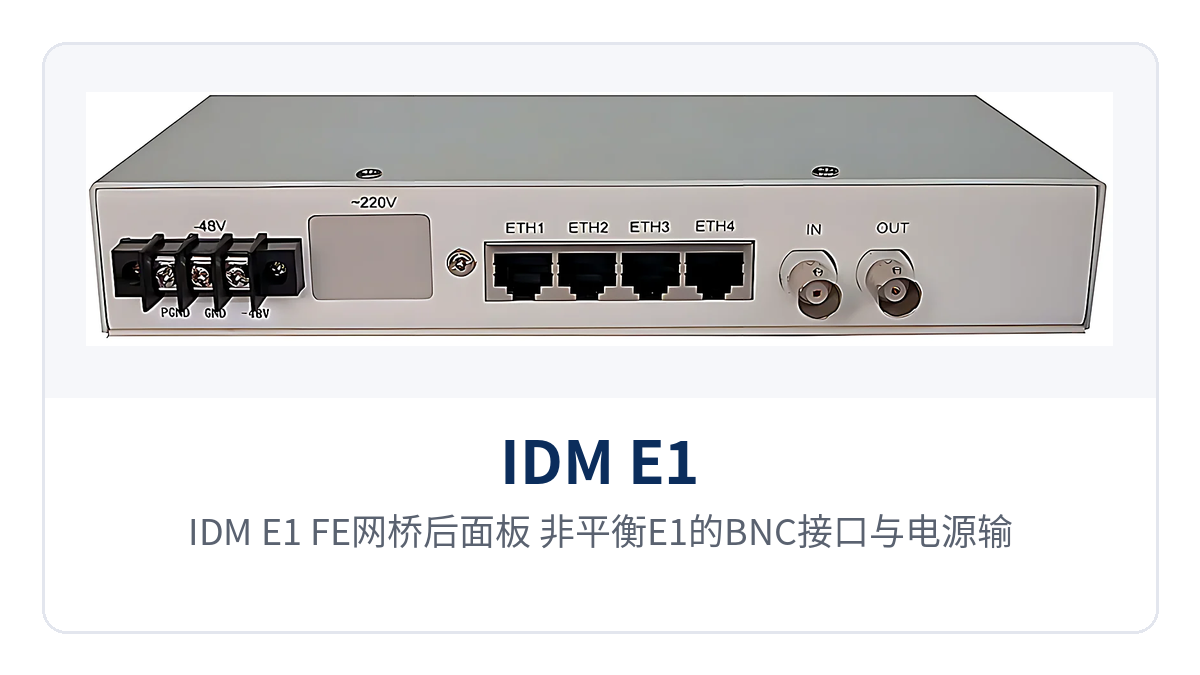
Figure 2: Rear panel of the IDM E1/FE Bridge, layout of unbalanced E1 BNC interfaces and power input
On-site deployment and wiring key points
Deployment follows four steps: interface verification, transmission mode selection, parameter alignment and online verification. The key points are that the E1 interface form, time slots at both ends and the device clock remain consistent; when these three do not match, the typical symptoms are a link that fails to come up or services that frequently flap, so check the interface first and then the parameters.
- Check the interface forms first: the E1 side uses a 75 Ω unbalanced interface with BNC connectors, and the on-site coaxial cable and connector form must match the opposite-end equipment; the Ethernet side uses CAT3/5 unshielded twisted pair terminated with RJ45 connectors.
- Determine the transmission mode first: if the site has an existing 2M circuit, use E1 mode with 2.048M Ethernet bandwidth; if there are spare fiber cores, use fiber mode with 4.096M bandwidth, and where necessary, plan the link together with the existing links of optical multiplexing equipment and media converter manufacturers.
- Align parameters at both ends: the framed or unframed mode, the time slot configuration in framed mode, and the device clock must be consistent at both ends; when one end is changed, change the other end accordingly.
- Allocate ports by service: on the desktop device, map the 4 Ethernet ports to specific service systems in advance, and disable unused ports with the enable/disable function.
- Confirm rate and duplex: set auto-negotiation or a fixed rate and full-duplex/half-duplex according to the capability of the opposite-end equipment, avoiding a rate drop caused by auto-negotiation at one end and a fixed setting at the other.
- Bring up the management channel first: on the centralized equipment, complete local configuration through the COM port first, then establish the network management channel to the remote end and confirm that E1 alarms and Ethernet configuration can be queried.
- Verify port by port before going live: spot-test the connectivity and available bandwidth of each Ethernet service, and confirm there are no persistent E1 alarms before handing over to O&M.
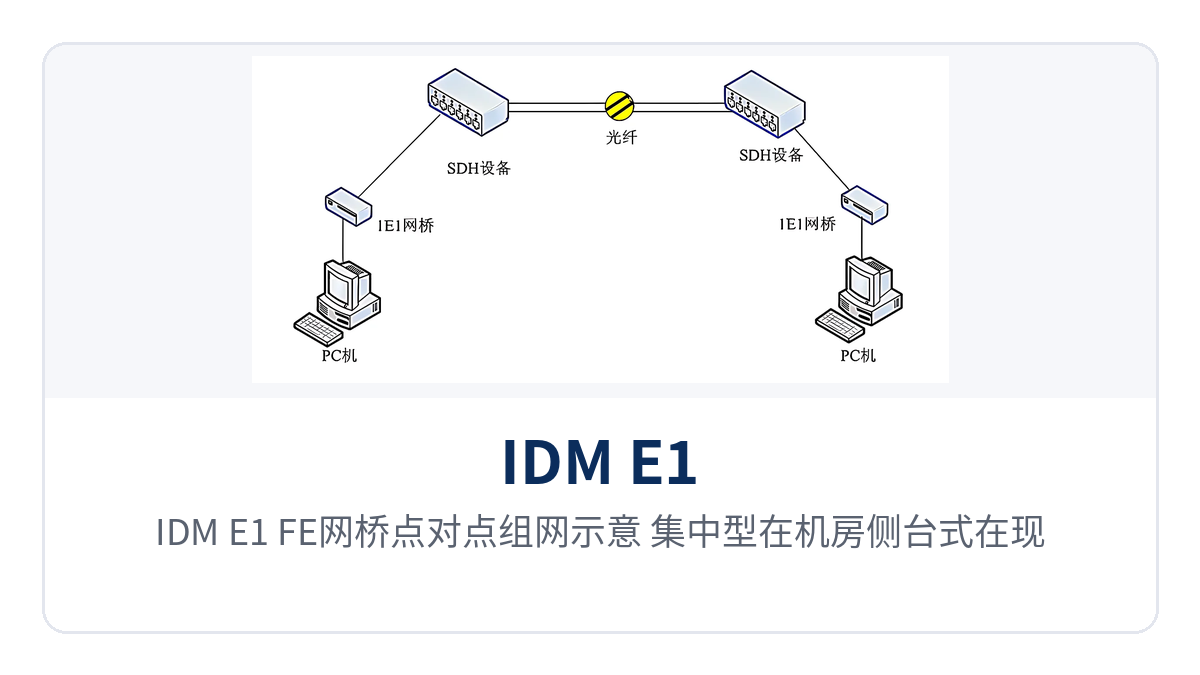
Figure 3: IDM E1/FE Bridge Point-to-Point Networking Schematic, Centralized Unit in the Equipment Room Side and Desktop Unit at the Site Side
Conclusion
As a dual-power-supply, low-power-consumption E1 bridge, the IDM E1/FE bridge inverse-multiplexes Ethernet data onto one E1 link or one optical fiber, activating the existing transmission resources at the site with two bandwidth tiers of 2.048M and 4.096M, so there is no need to lay new lines for a single access. The division of labor—the centralized unit manages the remote end and the desktop unit connects terminals—clarifies the responsibilities of the equipment room side and the site side; Raytrans, as an optical multiplexer manufacturer and a media converter manufacturer, can also provide matching selection and networking recommendations for scenarios such as government private network optical fiber communication solutions and military emergency communications vehicle solutions.
For field sites in power distribution networks, along railway lines, and in oil and gas and water conservancy applications, the four capabilities—selectable AC220V/DC-48V dual power supply, power consumption < 2W, -30℃ operation, and remote network management—correspond precisely to four real-world conditions: mixed on-site power supply formats, limited heat dissipation space, low winter temperatures, and long inspection distances.