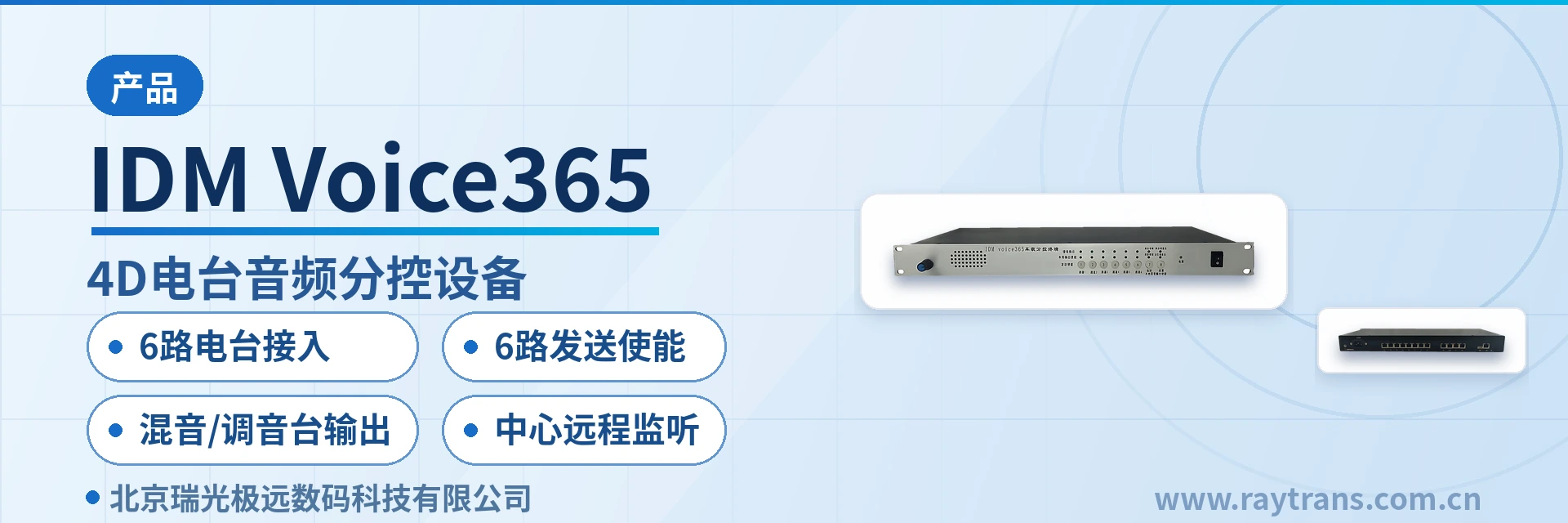
IDM Voice365-4D Radio Audio Sub-Control Device
6 radios aggregated to 1 operator seat with key-based selective access, handset directional transmission, central monitoring
This device provides the opposite function of a radio splitting device, supporting one user to select, via keys, access to the six radio signals connected to the device. 1. It provides local access for six radios, trunking, satellite phones, broadcast intercom, etc.; 2. It provides one analog output for local recording; it provides local speaker output and handset input; 3. The local voice from the handset is controlled to the audio output of a specific radio via six transmit enable keys;
IDM Voice365-4D Radio Audio Sub-Control Device is a radio audio selection and control device developed by Beijing Ruiguang Jiyuan Digital Technology Co., Ltd., used to let 1 user select and access the 6 radio signals connected to the device via buttons. Opposite in direction to a radio audio splitting device that distributes the voice of 1 radio to multiple users, the radio audio selection and control device does the work of aggregation: it concentrates the voice of 6 radios at the side of 1 on-duty person, who decides by buttons which channel to listen to and which channel to speak on. As a professional command and dispatch system manufacturer, the IP access gateway type product launched by Raytrans provides a complete radio audio sub-control solution for various command and dispatch scenarios in its product showcase.
On site, audio sources such as HF radio sets, trunking intercom, satellite phones, and broadcast intercom often exist at the same time, while the duty operator seat is usually staffed by only 1 on-duty person. IDM Voice365-4D connects these audio sources to one device, and together with handset input, local speaker output, and local recording analog output, forms a local audio operating terminal that can listen, speak, and record. This radio audio selection and control device can be widely used in scenarios such as military emergency communications vehicle solutions and government private network optical fiber communication solutions, serving as an IP access gateway to achieve unified access and dispatching of multiple audio sources.
Key Specifications at a Glance: 6-channel radio access (radio/trunking/satellite phone/broadcast intercom) · 1-channel user button-based selection · 6-channel transmit enable · mixing/mixer output · 1-channel local recording analog output · central remote monitoring
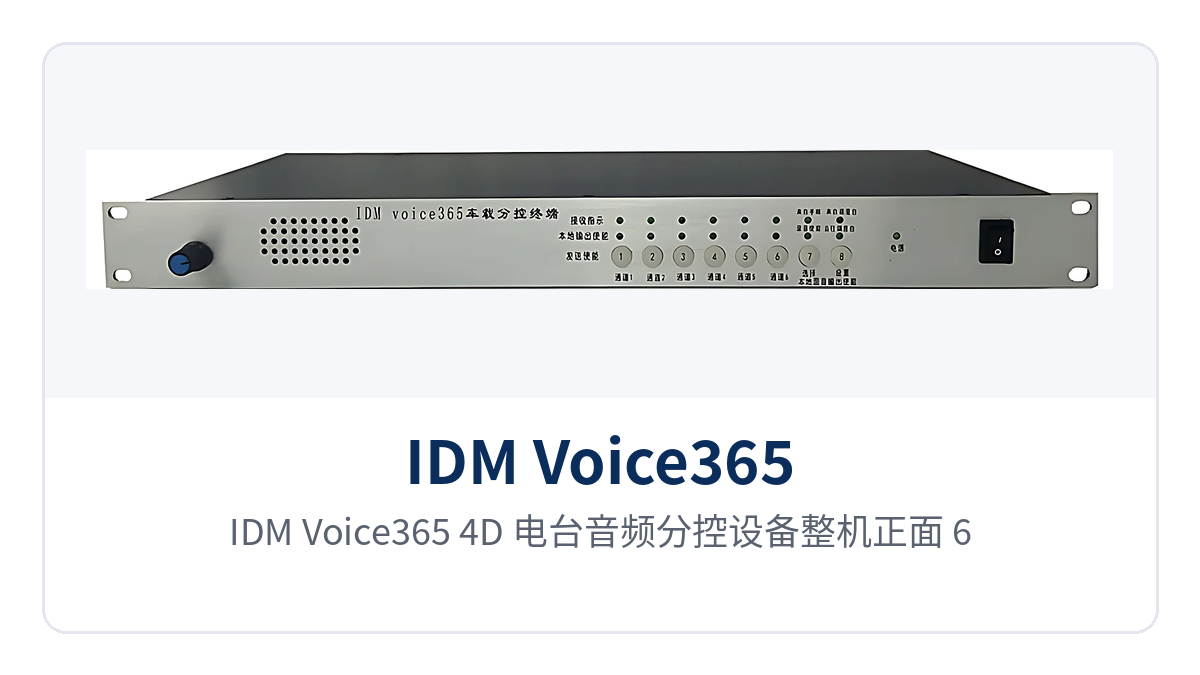
Figure 1: Front view of the IDM Voice365-4D radio audio sub-control device, with 6-channel radio audio access interfaces, 6 transmit enable buttons, and a status indicator LED panel
What Is the Difference Between a Radio Audio Sub-Control Device and a Radio Audio Splitting Device?
The difference between the two lies in the direction of the audio path. A radio audio splitting device distributes the voice of 1 radio so that multiple users can simultaneously listen to and sub-control the same radio; a radio audio sub-control device works the other way around, collecting 6 radio signals into one device, with 1 user selecting and accessing them as required, and the on-duty person switching among the 6 radios with a set of buttons. IDM Voice365-4D, listed by Raytrans in its IP access gateway product showcase, belongs to the latter type of device.
Such a structure suits job roles with limited seats that need to cover multiple networks. Occasions such as on-site support and duty dispatching often have only 1 on-duty person, yet 6 radios must be listened to on call. Replacing the stacking of multiple single-channel extensions with button-based selection leaves only 1 handset and 1 speaker on the duty console, and daily operations are simplified accordingly.
How Does 1 User Select and Access 6 Radios with Buttons
1 user selects the 6 radio signals connected to the device via buttons; the voice of the selected channel is sent to the local speaker, while unselected channels remain connected but produce no sound, and the 6 inputs are switched on the same device.
- Channel selection: buttons switch among the 6 inputs, and the voice of the selected channel is played through the local speaker.
- Targeted transmission: when speaking is needed, press the transmit enable button corresponding to that channel, and the handset voice is sent only to the audio output of that radio.
- Centralized duty: 6 radios are connected to the same device, and only 1 handset and 1 speaker are needed on the duty console.
How Are 6 Radios Connected, and How Is Handset Voice Sent to a Specific Radio?
Access and transmission are the two main lines of this device. 6 local inputs aggregate various audio sources, and 6 transmit enable buttons send local voice out precisely, corresponding respectively to listening and speaking during duty.
Local Access of 6 Radios, Trunking, Satellite Phones, and Broadcast Intercom
- The device provides local access for 6 radios, trunking, satellite phones, broadcast intercom, etc., and the 6 inputs can be allocated according to the actual audio source types on site.
- Access is completed locally, the original operating mode of the radios does not need to be changed, and the wiring on the duty console side remains unchanged.
- The 6 inputs correspond one-to-one with the 6 transmit enable buttons, making it easy for the on-duty person to establish the correspondence between channels and buttons.
6 Transmit Enable Buttons Control Targeted Handset Voice Output
The local voice picked up by the handset is not transmitted outward by default. When the on-duty person presses the transmit enable button corresponding to a certain channel, the local handset voice is sent to the audio output of that radio, and transmission stops when the button is released.
- Transmission target: the 6 transmit enable buttons respectively control the local handset voice to the audio output of one radio.
- Operating mode: press to transmit and release to stop, preventing local voice from being pressed onto all radio channels at the same time.
- Duty action: which channel to listen to and which channel to speak on are both decided by buttons, with no need to plug or unplug cables between devices.
How Are the 6-Channel Audio Mixing Output and Mixer Audio Output Used?
The device supports 6-channel audio mixing output and mixer audio output, and the local mixing output channel can also be selected by buttons. The voice of multiple radios can be mixed and then sent uniformly to a mixer, sound reinforcement system, or recording device, and the on-duty person only needs to select the local mixing output channel according to on-site needs.
Mixing output solves the problem of combining 6 channels of voice into one or more channels, while mixer audio output hands the signal to professional mixing equipment for processing. The device additionally provides 1 channel of local recording analog output, while the local speaker output and handset input are retained in place, so that listening, speaking, recording, and mixing form a complete local audio link.
How Does the Central Console Monitor Audio Channels?
The device supports monitoring of audio channels by the central console, so the central side can grasp the voice conditions of each channel without occupying local operations. The duty operator seat completes selection and announcement locally, while the central console monitors on the same set of audio channels, with the two levels of duty each performing its own role.
Together with abundant status indicator LEDs, on-site personnel can directly read channel and device status on the device front panel, while the central side grasps the call situation by monitoring audio channels. Local operations and central monitoring proceed in parallel, and duty arrangements can be set flexibly according to job role division.
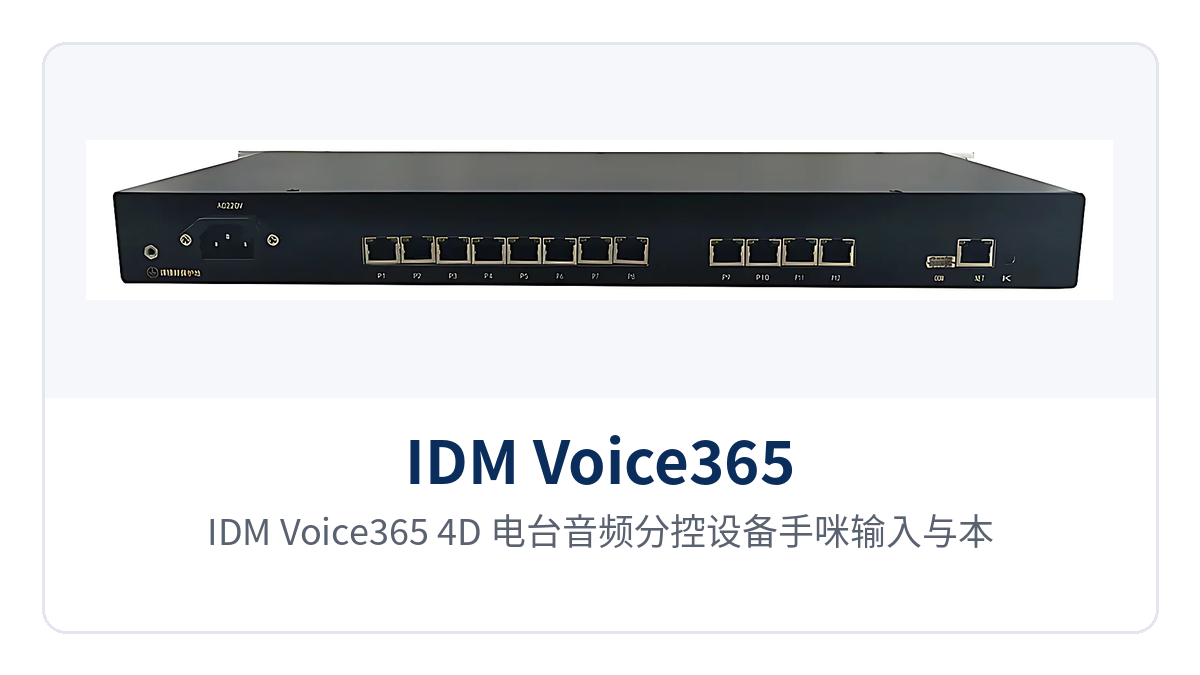
Figure 2: Handset input and local speaker output interfaces, 1-channel local recording analog output, and mixing/mixer output end face of the IDM Voice365-4D radio audio sub-control device
What Functions Does the Device Have?
| Function | Description |
|---|---|
| 6-channel radio access | Provides local access for 6 radios, trunking, satellite phones, broadcast intercom, etc., with the 6 inputs on one device |
| Button-based selection | Supports 1 user selecting the 6 radio signals connected to the device via buttons, with the selected channel played through the local speaker |
| Handset input and speaker output | Provides handset input and local speaker output; local voice is picked up by the handset, and listened voice is played through the speaker |
| Local recording analog output | Provides 1 channel of local recording analog output, which can be connected to a recording device to retain calls |
| 6-channel transmit enable | Controls the local handset voice to the audio output of a certain radio via 6 transmit enable buttons |
| Mixing/mixer output | Supports 6-channel audio mixing output and mixer audio output, and the local mixing output channel can also be selected by buttons |
| Central remote monitoring | Supports monitoring of audio channels by the central console, so the central side remotely grasps the voice of each channel |
| Status indication | Provides abundant status indicator LEDs to indicate the working status of the device and channels |
Technical Specifications and Interfaces
| Item | Parameter/Specification | Description/Applicable Conditions |
|---|---|---|
| Device model | IDM Voice365-4D | Radio audio sub-control device, categorized under IP access gateway |
| Number of local access channels | 6 channels | Supports local access of audio sources such as radios, trunking, satellite phones, and broadcast intercom |
| User side | 1 user | Selects the 6 radio signals connected to the device via buttons |
| Transmit enable | 6 transmit enable buttons | Controls the local handset voice to the audio output of a certain radio |
| Handset input | 1 channel | Local voice input, sent in a targeted manner together with the transmit enable buttons |
| Speaker output | 1 channel of local speaker output | Plays the voice of the selected channel for local listening |
| Recording output | 1 channel of local recording analog output | Can be connected to a recording device to retain calls |
| Mixing output | 6-channel audio mixing output | Multiple channels of voice are mixed and then output uniformly |
| Mixer output | Mixer audio output | The local mixing output channel can be selected by buttons |
| Central monitoring | Supports monitoring of audio channels by the central console | The central side remotely monitors each audio channel |
| Status indication | Abundant status indicator LEDs | Indicates the working status of the device and channels |
| Power supply and power consumption | Not yet recorded in the knowledge base | The manufacturer's technical documentation shall prevail |
Differentiated Value: Button-Based Selection, Targeted Transmission, Mixing and Mixer Output
The value of the IDM Voice365-4D radio audio sub-control device centers on three verifiable points. 1 user selects and accesses 6 radios via buttons, aggregating multi-network audio sources to 1 duty operator seat; 6 transmit enable buttons send local voice out in a targeted manner, preventing one sentence from being pressed onto all radios; and 6-channel audio mixing output and mixer audio output allow multiple channels of voice to be handed uniformly to a mixer or recording device for processing. As a radio audio selection and control device under Raytrans, a command and dispatch system manufacturer, this model can be used in conjunction with the communication links in military emergency communications vehicle solutions and government private network optical fiber communication solutions, and is categorized under IP access gateway in the product showcase.
| Differentiation Point | Customer Value |
|---|---|
| Button-based selection: 1 user selects and accesses 6 radios via buttons | 1 user selects and accesses 6 radios via buttons, achieving multi-network convergence dispatching |
| 6-channel transmit enable: 6 transmit enable buttons | 6 transmit enable buttons precisely control targeted handset voice output |
| Mixing/mixer output: 6-channel audio mixing output and mixer audio output | Supports 6-channel audio mixing output and mixer audio output |
| Central remote monitoring: supports monitoring of audio channels by the central console | The central console remotely monitors audio channels, with duty and monitoring proceeding in parallel |
Typical Application Scenarios
Public Security and Emergency Command Communications
At emergency response sites, HF radio sets, trunking intercom, and satellite phones are often used together, and the duty operator seat in a command vehicle is limited, so 1 communications operator often covers multiple channels. The Raytrans IDM Voice365-4D radio audio sub-control device connects 6 on-site audio sources to the same device; the operator uses buttons to select and access between radios and trunking, and when a certain channel needs to be called, presses the corresponding transmit enable button so that the handset voice is sent only to the target radio, preventing unrelated channels from being occupied by local voice. The central command post monitors audio channels through the central console to grasp on-site calls in real time. As a command and dispatch system manufacturer, Raytrans's IP access gateway and radio audio selection and control device can work with such scenarios to provide reliable audio dispatching support for military emergency communications vehicle solutions.
Rail Transit and Airport Dispatching
Rail transit traffic dispatching and airport ground dispatching operate multiple wireless and intercom systems at the same time, and the duty console needs to cover different channels such as traffic, electric power, and ground support. The device aggregates 6 local audio sources, the duty operator selects channels by buttons for listening, and the 6-channel audio mixing output and mixer audio output send multiple channels of voice into the mixing and recording links of the dispatch console, so that call records can be retained uniformly. Monitoring of audio channels by the central console makes it easy for the dispatch supervisor to grasp the call conditions of each job role.
Energy and Electric Power Inspection Private Network
In the private networks of substations, transmission line inspection, and energy stations, there are many radio and intercom channels and distributed sites, and the duty room needs to handle voice from different areas. The IDM Voice365-4D radio audio sub-control device centralizes these audio sources into one on-duty operator seat, with one-touch call selection and directional announcement via the handset microphone, so on-duty personnel can complete call dispatching to the field indoors; 6-channel mixed output and mixer audio output make it easy to feed calls into recording or conference systems, and the central console handles cross-site monitoring. In government private network optical fiber communication solutions, Raytrans IP access gateways and radio audio selection and control devices likewise provide stable audio access and dispatching capabilities for such private networks.
Deployment and Wiring Key Points
- Radio-side wiring: Connect the 6 channels of radio, trunking, satellite phone, and broadcast intercom audio to the 6 local inputs of the device respectively, and verify the correspondence between the No. and the transmit enable button channel by channel.
- User-side wiring: Connect the handset microphone and local speaker; the handset microphone input is used for local voice, and the speaker is used for listening to the voice of the selected channel.
- Recording wiring: Connect the 1-channel local recording analog output to a recording device or recording channel.
- Mixing and mixer wiring: Connect the 6-channel audio mixed output and mixer audio output to a mixer, sound reinforcement, or conference system, and use buttons to select the local mixed output channel as required.
- Central monitoring wiring: Connect the audio channel to the central console, and verify the one-to-one correspondence between the monitoring channel and the actual radio.
- Enablement check: After power-on, check the status indicator LED, listen channel by channel and test-press the transmit enable buttons, and confirm that the call selection direction and directional announcement target are correct.