IDM HIFI1010
IDM HIFI1010
HIFI1010 High-Fidelity Network Intercom Speaker 1. High-fidelity audio broadcasting and intercom; 2. Two optical fiber interfaces can form a daisy-chain fiber transmission, saving two sets of media converters, or saving a dual-optical-port POE Ethernet switch worth hundreds of yuan;
IDM HIFI1010 High-Fidelity Network Intercom Speaker
High-fidelity audio broadcasting and intercom;
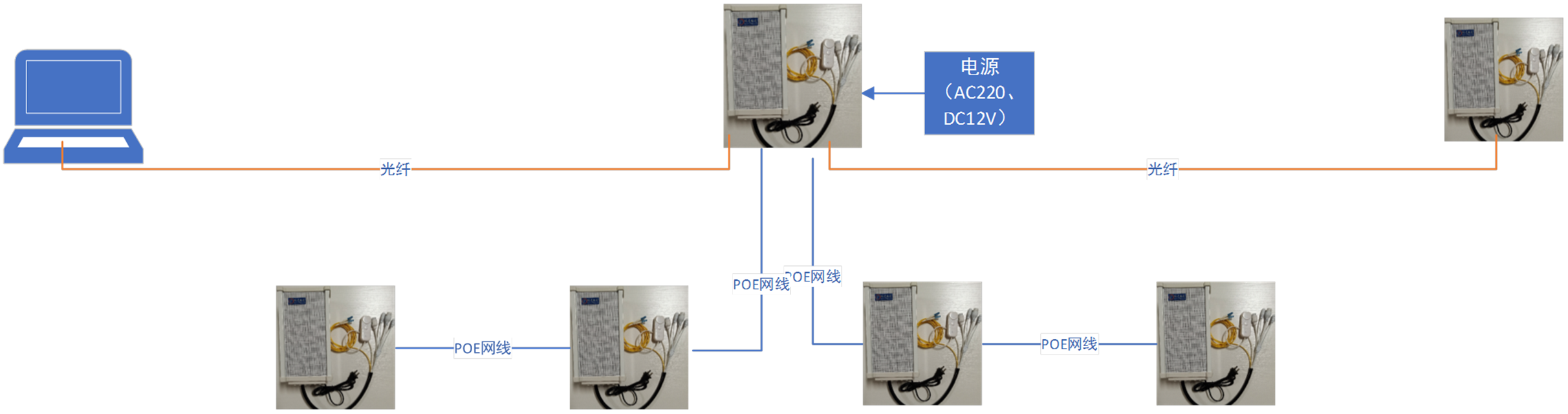
Two optical fiber interfaces can form a daisy-chain fiber transmission, saving two sets of media converters, or saving a dual-optical-port POE Ethernet switch worth hundreds of yuan;
Provides daisy-chain POE Ethernet access service, solving the problem that Category 5 cable transmission using POE switches cannot exceed 100 meters. For example, when installed on light poles, this daisy-chain POE power supply mode can be used; when the optical ports are not used, the SFP optical modules can be omitted and purchased later when needed, saving costs.
The speaker comes with a separate call button box and microphone, which can receive call services. Such as parking lot call service, park call explanation, roadside distress alarm, etc. The microphone can be used for intercom, monitoring, or automatic gain control of the speaker;
The device can also be expanded with 2 Ethernet interfaces internally, which can accommodate a WIFI router module and a camera module;
Provides a switch output interface for connecting audible and visual alarms. Provides a serial port expansion interface for connecting environmental trigger parameters.
Provides flexible central management software. Users can form a professional application platform through simple configuration and modification based on their industry characteristics, with secondary development support;
Provides converged communication solutions with other audio/video systems for command & dispatch, emergency management and other information platforms;
Free application consulting for information platforms across various industries.
IDM HIFI1010 High-Fidelity Network Dispatch Intercom Speaker dispatch functions:
I. PC dispatch console functions:
One-key answering of terminal calls, with simultaneous switching to display the corresponding camera information.
One-key call to terminals for real-time broadcasting, conversation, or monitoring functions for intelligent inspection;
Binding with video surveillance cameras for synchronized display;
Supports group broadcasting, with fixed groups and dynamic groups;
Supports addressed broadcasting, which can search by location, IP address, user name, etc. for addressing;
Sets scheduled call functions for each terminal, with automatic playback at the scheduled time;
Provides temporary hold for a terminal (with hold music), for central-side online consultation;
Alarm release: all terminal call requests can only have their call alarm flags cleared by the central side after the issue is resolved and records are written;
Sensor triggering: when intrusion detection, proximity detection, smoke detection and other information alarms occur, the alarm flag of the corresponding terminal is illuminated; enabling security linkage, service linkage, fire linkage, etc.
Multi-source audio playback: switching audio sources for playing music, stories, notifications, answering calls, chat intercom, inserting microphone audio, etc. (CD, MP3, tuner access uses the broadcast gateway);
Playback file list for managing various commonly used audio files. These files can be used for scheduled broadcasting, loop broadcasting, event-triggered broadcasting, and audio-triggered broadcasting at the speaker;
When a call button alarm signal is received, a work order form automatically pops up for filling in alarm information, etc.;
Information entry for various operation records; information entry includes prompt information settings on the button and corresponding CRUD operations on the basic database. Prompt information includes issues requiring scheduled reminder callbacks, medication reminder information, and reminders to check door-to-door service information. Call content is a record of call requirements, with synchronized recording of call content. If it is a work order requirement, the work order title is displayed here after the work order is filled in;
Supports volume settings for one or a batch of speakers, MIC gain settings, and left/right channel selection, etc.; 15. Supports adjustment of signal bandwidth for a specific speaker;
Recording and video software for recording and retrieving/reviewing alarm scenarios. Recording all terminal calls, documenting important requirement arrangements;
II. User mobile APP functions
Remote call to speakers after login;
Scan the speaker QR code to select a playlist for loop playback;
Scan the speaker QR code to upload broadcast documents, which are stored long-term after review and can be played on demand later;
Scan the speaker QR code for real-name registration, allowing playback of files on the phone and real-time broadcast/announcement;
Registered users can broadcast to multiple IP speakers simultaneously.
FAQs
What Are the Functions and Advantages of Video Optical Terminals?
The function of a video optical terminal is to convert one or multiple channels of analog video signals into optical…
View answerWhat is the difference between a Video Optical Terminal and a Network Video Server?
Composition and Function of Video Optical Terminal and Network Video Server An optical terminal is a device used to…
View answerWhat are common issues when using optical terminals in security surveillance?
Fiber optic technology is increasingly used in security surveillance projects to transmit images, audio, data…
View answerWhat is IPTV and Its Key Technologies
IPTV, or Interactive Network Television, is an innovative technology that utilizes broadband cable TV networks…
View answer