
Network Alarm Intercom IoT Terminal
The IDM Voice365 Network Alarm Intercom IoT Terminal provides audio intercom based on the IoT MQTT protocol, as well as IoT digital input/output interfaces. It is a comprehensive IoT operation terminal that can be used for IoT...
I. Overview
The IDM Voice365 Network Alarm Intercom IoT Terminal provides audio intercom based on the IoT MQTT protocol, as well as IoT digital input/output interfaces. It is a comprehensive IoT operation terminal. It can be registered and managed via an IoT server, or it can adopt an ad-hoc masterless networking mode, offering high system security and survivability!
The desktop unit features a gooseneck microphone, a 3W speaker, 5 buttons (Intercom, Mode, On-demand, Multicast, Broadcast); 8 user-defined buttons and 8 LED indicators.
The IDM Voice365 can provide audio interfaces including a telephone interface, HIFI high-fidelity broadcast interface, intercom PTT handset interface, gooseneck microphone and speaker interface, and wireless trunking gateway interface; it can simultaneously serve as both a transmission device and an intercom device, achieving multi-functionality in one unit.
The IDM Voice365 can also be optionally equipped with an 8-channel key input switch with indicators, as well as 8 individual status indicator lights, for user-defined applications as needed. For example, they can be used as one-key alarm buttons, IoT scenario selectors, etc.
The IDM Voice365 features a 4-inch touchscreen display that can show the device's configuration status; it can also display real-time communication status, such as the working state during intercom, i.e., broadcast, multicast, point-to-point communication, as well as monitoring and speaking; it can also display the name and terminal location of the current speaker to avoid misjudgment based solely on voice; additionally, it can display message information sent from the command center.
Intercom modes include PTT intercom, where pressing the PTT button grants the right to speak and transmits voice, and releasing the PTT button releases the speaking right.
Intercom modes also include recorded intercom, where pressing the talk button records the voice, and releasing the button sends the recorded voice. At the receiving end, complete recorded segments are saved in order of reception and played back sequentially, supporting replay of the last voice message. This prevents missed or misheard messages.
Intercom modes also include a monitoring mode, which requires coordination with the Dispatch Console. The Dispatch Console can display which terminals are currently speaking. The maximum recording time for voice is 60 seconds per transmission; if exceeded, a new file is recorded. The Dispatch Console can designate terminals to be monitored. The speaker on the monitored terminal is muted. The terminal uses VAD technology to detect the presence of voice, and the VAD threshold can be configured.
Intercom modes also include a speech mode, where pressing the talk button once starts broadcasting, and broadcasting ends upon the next button press. During this time, other terminals cannot speak and can only listen. In speech mode, it can be used as a conference network microphone to broadcast directly to network speakers. When used with a server, it enables flexible zone selection and individual terminal paging. It supports real-time speech broadcasting as well as scheduled playback of voice files, etc.
The IDM Voice365 can be optionally equipped with an intelligent voice processing card, which can convert speech to text and text to speech. It also supports setting up to 100 keyword recognition and capture functions, enabling keyword-based alarms or keyword-driven IoT scenario control.
The IDM Voice365 can be used together with the central Dispatch Console to accomplish more functions. The Dispatch Console can enable binding and monitoring of surrounding cameras.
Functions of the central Dispatch Console include: intercom mode selection, viewing intercom history, muting, listen-blocking, work order creation, alarm clearing, scenario remote control, recording, recording search, and intercom group management.
For ease of movement on indoor conference tables, this device can also have a built-in backup power supply; it can also support WIFI networking; and it can support POE power supply, among other options.
II. Product Features
Supports mixed transmission of multiple services over IP networks; supports ad-hoc networking or networking in coordination with a server.
Supports multiple audio interfaces; including telephone interface, HIFI high-fidelity broadcast interface, intercom PTT handset interface, gooseneck microphone and speaker interface, and wireless trunking gateway interface.
Supports user-defined digital inputs and status indication; facilitates linkage control with other execution terminals; includes an 8-channel key input switch with indicators, as well as 8 individual status indicator lights. Can serve as a one-key alarm terminal.
The terminal is equipped with a 4-inch LCD touchscreen display; it can show the device's configuration status; it can also display real-time communication status, such as the working state during intercom, i.e., broadcast, multicast, point-to-point communication, as well as monitoring and speaking; it can also display the name and terminal location of the current speaker.
Intercom modes support PTT intercom and recorded intercom; intercom methods support broadcast, multicast, point-to-point communication, as well as monitoring and speech.
Supports intelligent voice processing, capable of converting speech to text and text to speech. It also supports setting up to 100 keyword recognition and capture functions, enabling keyword-based alarms or keyword-driven IoT scenario control.
III. Technical Specifications
1) Ethernet WAN
Interface | 10M/100MAuto-negotiation | ||
Standard Protocol | SupportsIEEE802.3 | Operating Mode | Full/Half-Duplex/Auto-Negotiation |
2) FXO, FXS Interfaces
Audio Range | 300Hz~3400Hz | Compression | ITU G.711 A-Law |
Impedance | Three-element compound impedance200Ω+560Ω//0.1μF | Loop current | 20mA/channel |
3) EM2/4-wire interface
Audio Range | 300Hz~3400Hz | Impedance | Balanced600Ω |
Compression Rate | A-law in ITU G.711 | Return Loss | Not less than18dB |
4) HIFI High-Fidelity Interface
Bandwidth | 20Hz~20KHz | Sampling Rate | Supports8K~96K |
SNR: | -93 dB | AudioAD/DA | 24bit/16bit |
ALCFunction | Supported | Volume Adjustment | Supported |
5) Intelligent Voice Interface
Text-to-Speech | Supports Chinese, English, and numeric announcement | Wake-up Word | Supports 200 wake-up words |
6) Power Supply and Power Consumption
Power Supply | DC 12V | Total Power Consumption | ≤12W |
7) Environmental Conditions
Operating Temperature | -20oC ~+50oC | Relative Humidity | 0~95% (non-condensing) |
IV. Application Examples
- Serverless Ad-Hoc Networking
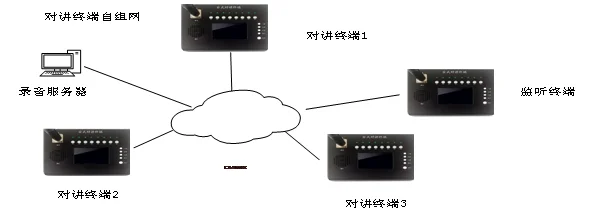
- Intercom Terminals with IoT Server Networking
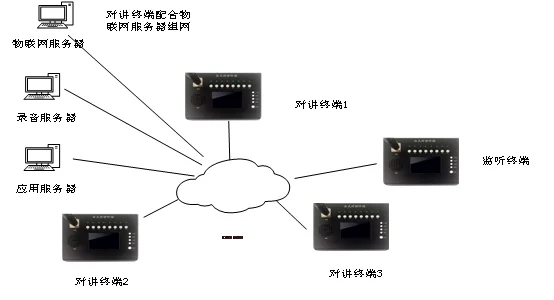
- Dispatch Console Application Interface – Alarm Intercom
Intercom mode selection: PTT intercom, recording intercom, broadcast, monitoring, SMS messaging;
View historical intercom records: time, intercom group name, speaker, number of online listeners;
Member mute (transmit disabled) and listen-disable;
Work order entry: when an IoT alarm is received, a work order of the corresponding category automatically pops up for manual confirmation; it can also be manually filled in after receiving a call.
After alarm handling, old alarms can be cleared;
Scene remote control is used to control the lighting, curtains, air conditioning and fresh air systems of the corresponding remote classrooms. Normally, on-site control is the primary mode;
The recording function records PTT intercom and broadcast speech modes. In recording intercom, monitoring, and SMS modes, the entire communication process is inherently recorded;
Temporary intercom groups are groups initiated ad hoc on the dispatch console and are automatically dissolved after a specified time. Only permanent intercom groups can be stored on the terminal; upon restart, the terminal loads configuration information such as intercom groups from the dispatch server. If the server is unavailable, it loads intercom information from its own storage.
Recording retrieval supports searching voice intercom records by time, by intercom group, and by group member.
- Dispatch Console Application Interface – Telephone Dispatch
FAQs
What is the working principle and function of a media converter?
The rapid advancement of informatization has led to growing demand for multimedia communications such as data, voice…
View answerWhat Is the Definition of Communication?
Communication: the exchange and transmission of information between people, or between people and nature…
View answerWhat is an E1 line? What are the core knowledge points?
E1 Basics Frame Structure of the E1 Channel In an E1 channel, 8 bits form one timeslot (TS)…
View answerPQC-Based FreeSWITCH and PJSIP Quantum-Resistant Communication System Upgrade Solution
The PQC-Based FreeSWITCH and PJSIP Quantum-Resistant Communication System Upgrade Solution transforms FreeSWITCH and…
View answerFortifying VoIP Communication with Quantum-Safe Defense | FreeSWITCH Softswitch Quantum-Safe Communication Mode Analysis, Selection, and Implementation Path
With the rapid iteration of quantum computing technology, traditional cryptographic algorithms such as RSA and ECC face…
View answer