
IDM-MCC2000 Converged Communication Dispatch System
IDM-MCC2000
The IDM-MCC2000 Converged Communication Dispatch System is a system that uses a SIP softswitch as its primary technical architecture and integrates the MQTT IoT communication protocol, RTMP/RTSP streaming media protocols, a GIS geographic information system, and a BI information display system. It brings together voice, video, image, data, and text message dispatching to achieve integrated equipment, flat command, and intelligent operation, and it can easily meet the requirements of different industries through configuration and interface layout.
The IDM-MCC2000 Converged Communication Dispatch System is a new-generation converged communication(s) command and dispatch platform independently developed by Beijing Ruiguang Jiyuan Digital Technology Co., Ltd. With a SIP softswitch as its core architecture, it deeply integrates the MQTT Internet of Things (IoT) protocol, RTMP/RTSP streaming media, a GIS geographic information system, and BI data display to deliver unified dispatching of voice, video, data, images, and text messages, achieving integrated equipment, flat command, and intelligent operation. Through a unified dispatch console, the system applies centralized management to telephones, trunking radio sets, broadcast intercom, video surveillance, and IoT terminals, and can flexibly adapt to the dispatching scenarios of different industries such as power, mining, emergency response, and industrial parks.
What Kind of Equipment Is the IDM-MCC2000 Converged Communication Dispatch System?
The IDM-MCC2000 Converged Communication Dispatch System is a multimedia converged dispatching platform based on a SIP softswitch architecture: the SIP softswitch handles voice call control and switching, the MQTT IoT communication protocol handles access by acquisition and control terminals such as access control intercom and elevator intercom, the RTMP/RTSP streaming media protocols carry audio and video streams from surveillance cameras and video conferencing, and the GIS and BI modules visualize geographic location and the dispatching situation. Because SIP and MQTT are combined, the IDM-MCC2000 can be conveniently applied to acquisition and control terminals such as access control intercom and elevator intercom; it supports a large number of networked user terminals and is well suited to serving as the integrated communications foundation of an industry command and dispatch center.
Technical Architecture and Protocols
The technical architecture of the IDM-MCC2000 Converged Communication Dispatch System consists of four categories of technology: softswitch, IoT, streaming media, and information display. The role of each technology element is shown in the table below.
Technology Element | Role in the System |
|---|---|
SIP softswitch | Call control, voice switching, and signaling processing, forming the primary technical architecture of the system |
MQTT IoT communication protocol | Provides access for acquisition and control terminals such as access control intercom and elevator intercom, extending IoT terminal dispatching capability |
RTMP/RTSP streaming media protocols | Carries the access and forwarding of audio and video streams from surveillance cameras and video conferencing |
GIS geographic information system | Displays terminal location and geographic distribution, and can be linked with BDS/GPS positioning devices |
BI information display system | Outputs dispatching situation and service statistics visualization to the command large display |
For voice terminal access, the IDM-MCC2000 supports ordinary telephones and trunk lines connected through a telephone gateway, SIP network phones, mobile app SIP softphones, and audio terminals such as network broadcast intercom speakers and analog/digital trunking radio sets connected through a SIP gateway, forming a complete voice access system that runs from traditional telephones to IP voice and on to wireless trunking.
Which Terminals Can Be Dispatched?
The dispatchable terminals of the IDM-MCC2000 cover categories such as wired voice, IP communication, wireless trunking, video, positioning, and the Internet of Things (IoT). A dispatcher can complete calls and dispatching for terminals of different standards on a unified dispatch console without setting up a separate operating interface for each type of terminal.
Terminal Category | Typical Dispatchable Terminals |
|---|---|
Wired voice terminal | Analog telephone, fax, loudspeaker telephone |
IP voice terminal | IP telephone, SIP network phone, mobile app SIP softphone |
Visual and video terminal | Videophone, surveillance camera, video conference terminal, audio and video broadcast intercom terminal, network display screen, audio conference terminal |
Wireless and trunking terminal | High frequency (HF)/very high/ultra high frequency (VHF/UHF) radio sets, analog/digital trunking, broadband trunking (B-TrunC), satellite phone, man-pack video transmission |
Positioning and mobile terminal | BDS/GPS positioning device, mobile app |
IoT terminal | MQTT protocol collectors/controllers, such as access control intercom and elevator intercom terminals |
The terminals above are accessed through different technical channels: voice terminals enter the voice dispatching, conference, broadcast, and intercom processes, video terminals enter audio and video command and dispatch, positioning terminals are overlaid and displayed on the GIS map, and IoT terminals are linked through the MQTT channel; the IDM-MCC2000 presents extension status and operation entry points on the dispatch console according to a unified logic.
What Basic Voice Dispatching Functions Are Available?
The IDM-MCC2000 provides a complete voice dispatching function set. An agent seat can go off-hook and then initiate a call by clicking an extension button, the on-screen dial pad, or the phone dial pad, and buttons can also be assigned to outside lines; the main voice dispatching functions supported by the system are shown in the table below.
Function | Description |
|---|---|
Call | Go off-hook, then click an extension or outside line button to initiate a call; the on-screen dial pad and the phone dial pad are supported |
Answer | Click the extension button or the incoming extension button to answer an incoming call |
Hang up | Immediately end the call on the selected terminal |
Monitoring | Monitor the call on the selected terminal without the other party being aware; supports call monitoring and ambient monitoring |
Barge-in | Upgrade the call on the selected terminal to a three-party conference |
Whisper | Talk with the selected terminal without the other party in the call being aware |
Call takeover | Convert the selected call into a call with the console, and the other party is forcibly hung up |
Transfer | Transfer the call on the selected terminal to a specified terminal |
Consultation transfer | Consult the extension first before transferring an incoming call to it; suitable for transferring calls to key leaders or key job roles |
Roll call | Call each extension in the group one by one; once the call is answered, play prerecorded audio; the agent seat can monitor and break in, and a call statistics record is generated |
Polling | Repeat calls to the extensions in the group that were not reached for a set number of rounds; can be stopped by manual intervention, and a call statistics record is generated |
Duty | Transfer calls from the agent seat to the duty telephone for overnight duty service |
Call recording | Record a specified call and stop automatically when the call is hung up |
Conference | Create a temporary conference group for the selected extensions, or activate it and switch to the Conference Group Interface; a group can also be created in the Phone Book Interface |
Broadcast | Create a temporary broadcast group for the selected extensions, or activate it and switch to the Broadcast Group Interface |
Intercom | Create a temporary intercom group for the selected extensions, or activate it and switch to the Intercom Group Interface |
Roll call and polling suit batch notification scenarios. Roll call calls every extension in the group once, plays prerecorded audio after the call is answered, lets the agent seat monitor and break in, and then produces a call statistics record; it can also be used for corporate roll call, e-commerce sales, and similar applications. Polling calls the extensions in the group for several rounds, redialing the extensions that were not reached on each round, and stops when the set number of rounds is reached or by manual intervention, after which it outputs a call statistics record; it is commonly used for telephone notification services.
Dispatch Console Software and Information Display Functions
In addition to voice dispatching, the dispatch console of the IDM-MCC2000 integrates geographic information system (GIS) display, BI dispatching situation display, and service management functions, and supports output to the command center large display. The software functions are described below.
Function | Description |
|---|---|
Geographic information system (GIS) display | Display terminal locations and distribution on a map, and work with BDS/GPS positioning devices to enable visualized dispatching |
BI dispatching situation display | Output real-time dispatching situation and service statistics to the dispatch large display |
Inspection system management | Organization, execution, and result management of inspection tasks, linked with dispatching communication |
Work order dispatch system management | Management of task assignment, routing, and processing status |
Consultation system management | Organization and management of multi-party audio and video consultation |
Structured emergency plan management | Structured editing and storage of emergency plans, for rapid activation when an incident occurs |
Large display output and layout management | Output and layout management of the content shown on the command center large display |
How Does the Conference Room Organize a Multi-Party Conference?
The conference room function of the IDM-MCC2000 supports two types: permanent conference rooms and temporary conference rooms. The conference number, conference name, scheduled start time, conference type (free speaking or request to speak), join password, host number, and host password make up the basic information of a conference room. Conference room data is recorded and managed in the following categories:
Data Category | Recorded Content |
|---|---|
Conference room information | Conference number, conference name, scheduled start time (optional), actual start time, conference type (free speaking/request to speak), join password, host number, host password |
Member information | Extension list and status (whether the extension has joined the conference room), request-to-speak status, speaking status, join method (extension dial-in/invited to join a conference), outside line number and the trunk line number used |
Host information | Host function actions and execution times, names of the recording files used in the conference, and the document index |
Meeting record | Conference start time, member login and departure times, start and end times of member speaking, times and content of host function operations, call records of members not reached, join method records, and dispatcher monitoring records |
On the dispatch console interface, the dispatcher has the same functions as the host: inviting extensions to join a conference, removing extensions from the conference, mute or unmute, designating the speaking extension, mute all or unmute all, and closing the conference room. The dispatcher can also monitor conference content. Conference members include extensions and outside line numbers (including the trunk line number used), and extensions can join a conference either by extension dial-in or when invited. Conference information is displayed as a list, and the list window can be expanded or collapsed to show only small icons for the conference name, conference status, host, and part of the members.
How Is PTT Intercom Implemented?
PTT intercom uses a half-duplex mechanism in which the talk right is granted by pressing a key. Within a PTT intercom group, all extensions are muted by default and can only listen; a member presses # to obtain the talk right and speak, and when several users press # at the same time, only the party that has obtained the talk right can speak while the other members can only listen. The speaker presses # again to end the talk, or the system automatically ends the talk after a set duration; the end mode of the talk supports configuration, so as to suit the need to control speaking time freely. Under PTT, when a member is not speaking, other members cannot hear that member, which is different from conference mode.
PTT intercom groups are suitable for connecting analog intercom groups and digital intercom groups through a gateway, and are also suitable for connecting network broadcast intercom systems with an intercom function. Intercom groups can only be created from the dispatch console and support permanent groups and temporary groups; group members include analog intercom gateways and digital intercom gateways, and gateways are treated as extensions. The dispatch console can invite extensions to join a group, remove extensions from a group, mute extensions, and close a group, and requires PTT intercom groups to be monitored throughout and output to speakers. Intercom group records store the group name, the start/stop time of each member's talk, and the dispatch console function operation records, which facilitates later review.
Audio and Video Command and Dispatch and Dispatch Console Operating Interface
Audio and video command and dispatch extends voice dispatching into the video domain: video signals from surveillance cameras, video conference terminals, videophones, and man-pack video transmission are connected to the dispatch console, and the dispatcher can complete audio and video calls, video viewing, and video switching in the same interface. Video layout assignment modes cover mobile and PC layouts, and the video from different terminal types can be assigned display areas as needed.
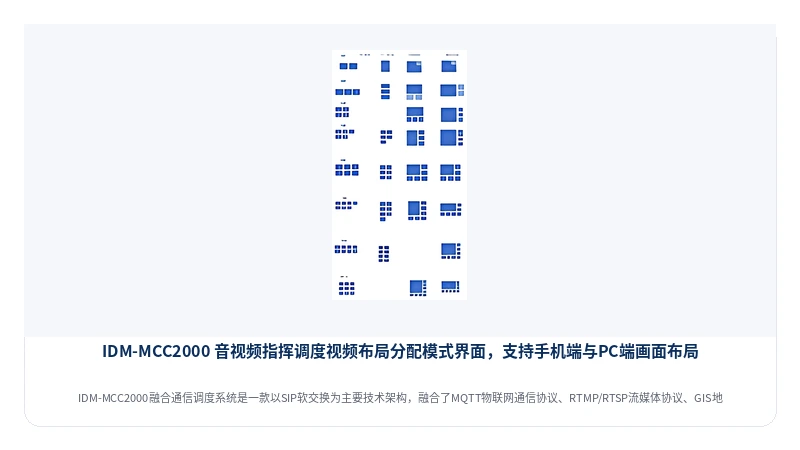
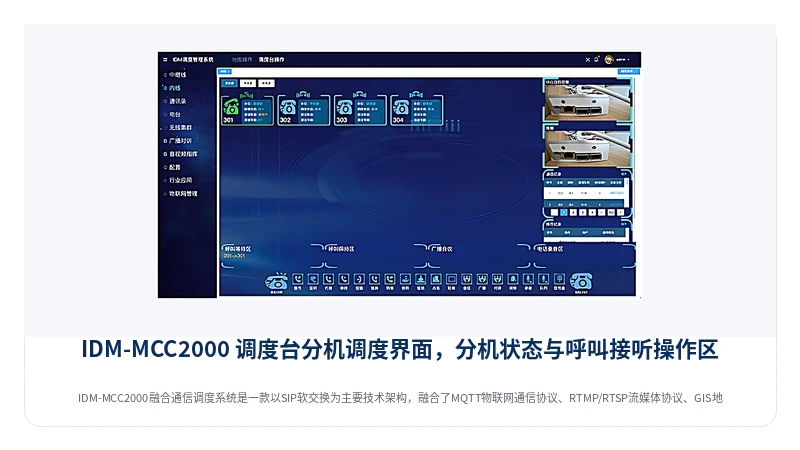
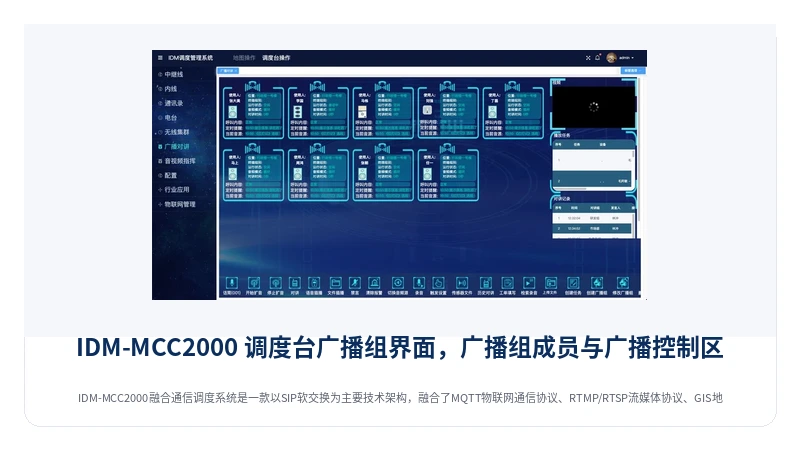
The daily operation of audio and video command and dispatch is mainly carried out through the three dispatch console interfaces: extension dispatching, phone book dispatching, and broadcast group. Each interface is designed for different dispatching actions, and the dispatcher can switch between them at any time.
Extension Dispatching Interface
The extension dispatching interface presents terminal status and call relationships by extension. Here the dispatcher performs voice dispatching operations such as call, answer, hang up, monitoring, barge-in, and transfer, and it is the main operating interface for an agent seat's daily duty.
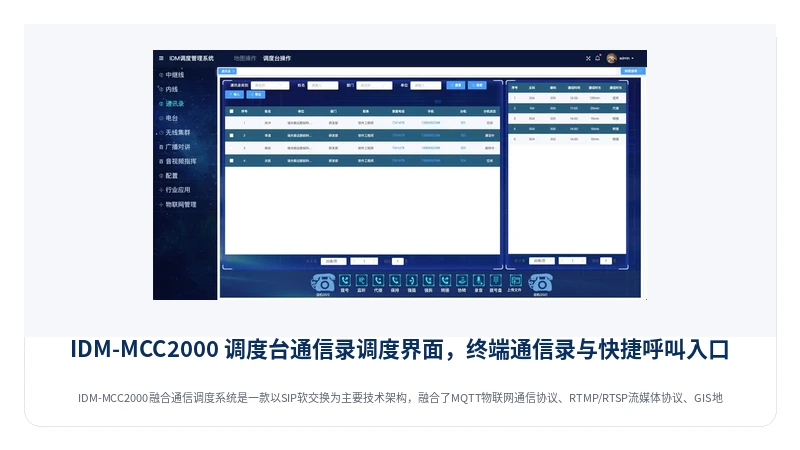
Phone Book Dispatching Interface
The phone book dispatching interface organizes dispatchable terminals, including extensions, outside lines, and various gateway terminals, in the form of a phone book. The dispatcher can initiate calls or create conference groups or broadcast groups directly from the phone book, which is suitable for quickly reaching frequently used contacts.
Broadcast Group Interface
The broadcast group interface is designed for broadcast dispatching scenarios and displays broadcast group members and broadcast status. The dispatcher can create temporary broadcast groups, add multiple selected extensions to a broadcast group, and make a unified PA announcement to the terminals in the group, which is applicable to emergency notification and production dispatching scenarios.
Typical Application Scenarios
Emergency Command and Multi-Department Collaborative Dispatching
Handling emergency incidents requires dispatching wired telephones, trunking radio sets, satellite phones, man-pack video transmission, and video surveillance at the same time, and IDM-MCC2000 connects all types of terminals to the dispatch console in a unified way. The commander can view the positions of personnel and vehicles via GIS, monitor the dispatching situation on a BI large display, and use the roll call, broadcast, and conferencing functions to quickly organize multi-party consultation, achieving flat command and rapid linkage in emergency scenarios.
Production Dispatching for Mining, Industrial Parks, and Large Enterprises
Production dispatching for mining, chemical industrial parks, and large enterprises involves a large number of terminals such as administrative telephones, production loudspeaker telephones, broadcast intercom, and access control and elevator intercom. With its access capability combining SIP and MQTT, IDM-MCC2000 brings scattered voice terminals and Internet of Things (IoT) terminals into a unified platform, and, together with duty, recording, inspection, and work order dispatch management, meets the needs of daily production dispatching and night-shift duty.
Security Patrol, Inspection, and Batch Notification Scenarios
In security patrol, inspection, and batch notification scenarios, BDS/GPS positioning devices can be used to track personnel positions on a GIS map, tasks can be issued and managed through the work order dispatch system, personnel roll call can be completed with the roll call function, or batch telephone notification can be made with the polling function; call statistics records are generated automatically throughout the process, which facilitates later verification.
Frequently Asked Questions (FAQ)
What Is a Converged Communication Dispatch System?
A converged communication dispatch system takes a softswitch as its core and concentrates information dispatching modes such as voice, video, images, data, and text messages onto a unified platform
FAQs
What Does Uncompressed All-Digital Video Transmission Mean, and What Benefits Does It Offer for Surveillance Images?
Uncompressed all-digital video refers to a process where the video signal undergoes 8-bit A/D sampling at the transmitting end, is transmitted directly in digital form over optical fiber without compression encoding, and is then restored via D/A conversion at the receiving end. The image suffers no loss from compression algorithms, with a video signal-to-noise ratio of ≥70dB (weighted).
View answerWhat advantages do Raytrans brand telephone optical terminals offer?
Optical transmission interfaces: Supports PDH and SDH interfaces PDH interfaces support 155M, 250M, 2.5G, and 5G rates
View answer