
adMUX Private Network HD Video Conference System
The adMUX Private Network HD Video Conference System consists of a control center, main venue, and branch venues…
- System Functions
The adMUX Private Network HD Video Conference System consists of a control center, main venue, and branch venues, forming the entire video conference system, which is built on an Ethernet switching network.
The functional requirements of each subsystem are as follows:
- Control Center: It can be deployed in the central communication equipment room, where the video conference control unit or video conference server is installed. The main venue and branch venues access the control center via the network, enabling interactive video conference functions.
- Main Venue: The system modules of this venue mainly include the HD video conference client, conference audio and HD image acquisition system, conference table and seat arrangement, etc. The main venue is equipped with video conference desktop terminal devices, which are required to have multiple audio/video and data interfaces to meet various conference functions. A large-screen display system and video display control system are installed. Audio and HD image acquisition and processing systems are also installed.
- Branch Venue: The system modules of this venue mainly include the HD video conference client, conference audio and HD image acquisition system, conference table and seat arrangement, etc. Branch venues are equipped with video conference desktop terminal devices, which are required to have multiple audio/video and data interfaces to meet various conference functions. Audio and HD image acquisition and processing systems are installed.
The video conference server system supports up to 16-screen split display, and more screens can be displayed in polling mode, providing great convenience for users in conference scheduling and control management.
Touchscreen computers with corresponding video conference system clients are deployed in the main venue and branch venues, along with appropriate audio and image acquisition devices. Each client accesses the video conference server at the control center via web to join conferences, realizing real-time video conference exchange functions.
- System Solution
The overall topology design of the network video conference system is shown in Figure 1 below.
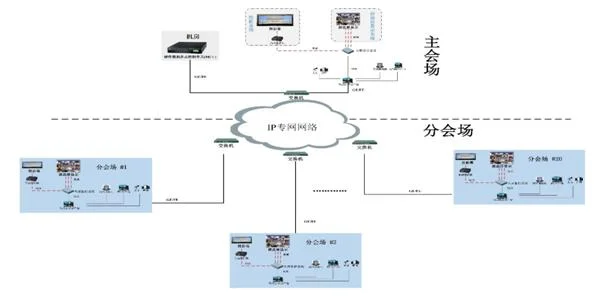
Figure 1 Overall Topology of the Video Conference System
As shown in the figure above, in this video conference system, an HD video conference server and supporting server systems are installed in the equipment room. The main venue and branch venues are deployed with touchscreen computer platforms with corresponding clients installed.
All main and branch venues access the video conference server through the wired network to realize the interactive functions of the entire video conference. In this solution, the number of conference participants is theoretically unlimited, mainly constrained by the server's processing capability.
Venue Configuration Overview
- Display System: The display system can use ultra-narrow-bezel LCD screens for video wall splicing or adopt an HD projection system. An image processor and video matrix are used in conjunction to enable the display of command information and video conference images on the spliced screen. It can also be integrated into an existing large-screen display system. Alternatively, HD projection equipment can be used to display video conference images.
- Video Conference Terminal: The venue is equipped with an HD video conference terminal, directly interfacing with video and audio input/output devices to realize the software video conference layout. The built-in video conference camera or a video capture card outputs video to the video matrix, enabling conference images to be displayed on the spliced display screen.
- HD Image Camera: An integrated PTZ HD camera - D70 is configured, directly connected to the video conference terminal. The captured HD conference images from the main venue are directly fed into the video conference system.
- Audio System: It includes conference wireless microphones and speakers directly connected to the HD software video conference computer terminal, capturing the speech of meeting participants and playing back audio.
- System Features
- Easy Installation and Maintenance: One-click installation is adopted. The database, web services, and central management platform are all automatically deployed during program installation.
- B/S Architecture for System Management: System administrators can manage the system via IE from any internet-connected location. The operation is simple and the functions are powerful.
- Multi-level Decentralized Management Support: It can be divided into super administrator, organization administrator, department administrator, etc., with different management permissions at each level. Meanwhile, meeting participants can be categorized as host, participant, or listener, with roles such as chairperson and speaker extended as needed. The host has the highest authority and can authorize participants to control at any time, achieving consistent control and mutual assistance in an interactive manner.
- Virtual Conference Center Technology: Multiple independent virtual conference room centers can be created on the system platform, accessible separately, independently controlled, and non-interfering with each other.
- Powerful Video Browsing and HD Display Functions: The system provides over 100 video templates, supports 16:9 widescreen LCD mode, and allows free dragging between template windows for flexible operation. The desktop resolution supports up to 4096x2048 HD resolution, and all participants' templates are synchronized in real time with the host during conferences.
- Multiple Video Formats: Video compression encoding methods such as MPEG4, H263, H263+, and H.264 are adopted, with adjustable frame rate and bitrate for strong network adaptability. Video input supports multiple input methods such as AV terminals, S-video terminals, TV signals, and USB camera input. Each conference terminal supports up to 8 video signal inputs to meet various application scenarios.
- Multiple Audio Formats: Audio compression encoding methods such as G723.1, GSM, G722, G711(A/U), and MP3 are adopted, supporting voice activity detection (VAD), noise suppression (NS), acoustic echo cancellation (AEC), automatic gain control (AGC), and jitter buffer technology to ensure no image distortion under lower bandwidth requirements. It supports up to 32-channel audio mixing, with individual volume adjustment for each channel.
- Excellent Network Audio/Video Streaming Technology: The RTP transmission protocol is adopted, with proprietary transmission algorithms for automatic packet loss retransmission, automatic out-of-order recovery, buffer jitter prevention, and automatic error correction. Under low bandwidth conditions of around 100 kbps, real-time smooth image transmission is guaranteed, and images never break. Audio and video can be transmitted normally in network environments with bandwidth ranging from 50 KBPS to 100 MBPS. It supports user transmission of audio and video through tunnel mode (HTTP Tunnel), proxy (HTTP Proxy, SOCKS5 Proxy), firewall, VPN, and NAT.
- Powerful Conference Data Control Functions: It supports multi-party collaborative drawing on an electronic whiteboard, and allows screen sharing of computer documents such as PPT, Excel, Word, web pages, courseware, and software interfaces for real-time synchronized viewing by all participants, commonly used in remote training scenarios. It supports communication and exchange through note-passing and conference chat without affecting the normal meeting. It supports mutual file transfer functions. It supports conference announcements, notifying all participants of important content via scrolling subtitles at the bottom of the screen. It supports playing VCD and DVD format video files during conferences to meet multimedia meeting requirements.
- Instant Messaging Function Support: The video conference system integrates an instant messaging system with functions such as text chat, file transfer, electronic whiteboard collaboration, screen sharing, remote control, audio/video conversation, multi-party conversation, contact search, joining conferences, and inviting to conferences. It can be deployed within an enterprise to facilitate communication and exchange among employees, while also playing an important role in enterprise network security and management.
- Conference Recording Function Support: The entire meeting process, including audio/video, electronic whiteboard, and screen data, can be recorded into a single file for storage, enabling future playback, review, or teaching, and supporting remote on-demand viewing.
- Auto-hide Control Panel and Pop-up Message Notification: The conference control panel auto-hides and automatically appears when the mouse moves to the far left or right edge, providing convenient use. Additionally, when participants enter or exit a conference, the system automatically pops up message notifications for clear visibility.
- Bandwidth Test Function Support: The system provides a bandwidth test tool software that can test the upstream and downstream bandwidth values between any point connected to the server and the server. This allows accurate determination of the network bandwidth at that point, helping decide how many smooth video streams can be opened simultaneously.
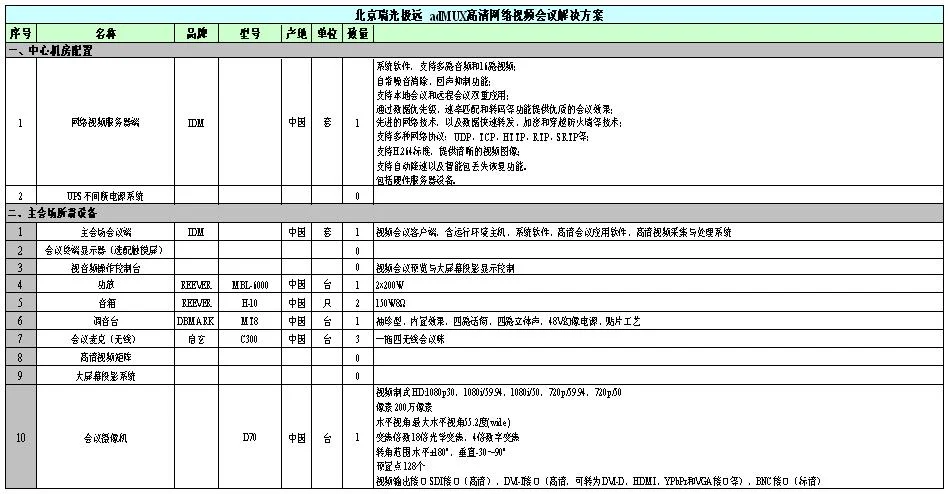
- Typical Configuration List
FAQs
What Is the Definition of Communication?
Communication: the exchange and transmission of information between people, or between people and nature…
View answerWhat is the working principle and function of a media converter?
The rapid advancement of informatization has led to growing demand for multimedia communications such as data, voice…
View answerWhat is the difference between an Optical Terminal and a Media Converter?
Optical Terminal is a device that converts multiple E1 (a data transmission standard for trunk lines…
View answerPCM30 Working Principle: What Is PCM30/32
PCM30 Equipment Working Principle The 30-channel PCM equipment refers to equipment that provides 30 user interfaces and…
View answerWhat is E1? How to Use E1
What is E1 The European 30-channel pulse code modulation PCM is abbreviated as E1, with a rate of 2.048Mbit/s.
View answer