IDM Wetalk
IDM Wetalk
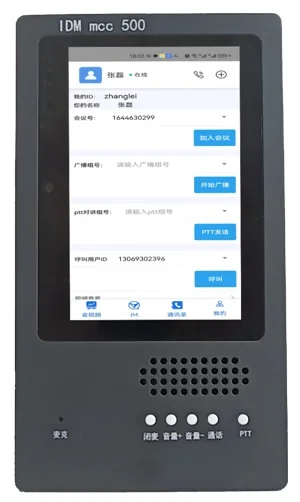
The IDM Wetalk SIP Phone Broadcast Intercom Badge is a portable internal telephony terminal for enterprises or administrative organizations. It serves both as an identification tool for face-to-face communication and as a group intercom communication device for instant communication anytime, anywhere. As a portable internal communication phone carried by employees, it works with a dedicated enterprise SIP phone dispatch switch to provide an efficient means of rapid internal communication. It can also be used with a broadcast dispatch console and broadcast dispatch switch to support unicast, multicast, and broadcast, as well as real-time announcements, scheduled announcements, time-triggered announcements, hourly time signals, and one-key emergency alarm functions.
- Product Overview
The IDM Wetalk SIP Phone Broadcast Intercom Badge is a portable internal telephony terminal for enterprises or administrative organizations. It serves both as an identification tool for face-to-face communication and as a group intercom communication device for instant communication anytime, anywhere. As a portable internal communication phone carried by employees, it works with a dedicated enterprise SIP phone dispatch switch to provide an efficient means of rapid internal communication. It can also be used with a broadcast dispatch console and broadcast dispatch switch to support unicast, multicast, and broadcast, as well as real-time announcements, scheduled announcements, time-triggered announcements, hourly time signals, and one-key emergency alarm functions.

Figure 1 IDM WeTalk SIP WIFI Phone Intercom Terminal
- Functional Design
2.1. Communication Modes
(1). One-to-one voice calling;
(2). Full-duplex conference room intercom;
(3). PTT button intercom;
(4). SIP-based communication, interoperable with SIP phones, SIP broadcast terminals, and SIP apps;
(5). Voice interworking with surveillance cameras, webRTC terminals, etc.;
(6). As an internal telephony system terminal, it can communicate freely across regions over the Internet;
(7). As a dispatch phone, it offers more calling modes than a standard phone, capable of placing normal calls and emergency calls. It can also work with the central system to handle normal incoming calls and emergency incoming calls, as well as priority-based response ordering;
(8). Can transfer or place external calls; internal phones remain in a dispatchable state, supporting forced release, barge-in, monitoring, transfer, hold, etc.;
2.2. Positioning
(1). The terminal sends the received WIFI signal strength to the server, and the server determines the location (supported only on the LAN); alternatively, the AP router proactively sends terminal information to the server.
2.3. AI Features
(1). Voice interaction functions implemented through the server, including voice chat, IoT control, etc.;
(9). Terminals can dial into an audio conference room to control smart devices such as Xiao Ai and Tmall Genie, operating AI to control corresponding terminals;
(10). Can connect to large language models such as ChatGPT.
2.4. User and Group Settings
(1). Pre-configured user call numbers or group numbers, with number + username (or group name) indicated;
(11). Pre-configured communication groups (similar to trunking intercom channels);
(12). Groups can be switched via buttons, or the device can be configured by scanning the QR code on the device with a mobile phone.
2.5. Intercom Badge Buttons
(1). Uses touch-sensitive buttons with button indicator lights;
(13). 4 touch buttons: Call (for dialing, answering incoming calls, and hanging up), Up (scroll up, or volume +), Down (scroll down, or volume -, long press for mute), Display (switches display content; each press cycles to the next view, showing incoming/outgoing call numbers or received message notifications);
(14). 3 physical buttons: the power button on the back (long press to power on/off), the PTT intercom button on the upper side, and the SOS emergency button on the lower side, which triggers audible and visual alarms and dials a preset number; during point-to-point calls, a single press of the PTT button mutes the microphone.
2.6. Display Interface
(1). Portrait photo, name, QR code, terminal information page, terminal network configuration page, WIFI AP name;
(15). Each press of the display button switches to the next interface;
(16). The system can set a maximum idle timeout, e.g., 5 minutes; the terminal returns to the normal portrait display after 5 minutes of inactivity;
(17). The terminal information interface displays terminal status or configuration information;
(18). Local MAC address, local IP, server IP;
(19). Commonly used WIFI networks (AP names) and access passwords, with the current network highlighted in a different color.
2.7. Contacts Display Interface
In non-point-to-point communication mode, pressing the call button activates the contacts display. The up/down arrow buttons can be used to select numbers one by one, and scrolling to the top or bottom turns the page. After selecting a number, pressing the call button initiates a point-to-point call. If a group number is selected, pressing the call button prompts that the terminal has entered the corresponding group, and the PTT button can be pressed to speak.
2.8. Point-to-Point Call Interface
During point-to-point communication, the display shows: local number, called/calling number, caller/callee name, call status (incoming/outgoing), call type (internal/external), and call duration. When the call ends, the display returns to the normal interface.
2.9. PTT Intercom Temporary Interface
During PTT intercom, the group name, speaker's number and name are briefly displayed for 3 seconds, after which the original display is restored.
2.10. Text Message Display
Displays text messages sent from the dispatch console. The display remains until the display button is pressed to restore the normal view.
2.11. Network Traffic Statistics Display
Instantaneous network traffic and total traffic statistics, for understanding the device's communication environment (currently not available).
- Performance Features
l "Leveraging existing Wi-Fi is my advantage! Never pay separately for my communications";
l Unlike 4G communications, there is no need to pay mobile carrier 4G usage fees;
l Unlike wireless trunking intercom, which requires annual frequency license filing and fees due to high-power and regulated frequency resources;
l Voice calls can be established anywhere with Internet access; distance and space are no longer an issue;
3.1. Voice Interworking
(1). Interoperable with IP phones and mobile apps on the network;
(20). Through a voice gateway, voice interworking with mobile phones and analog phones is possible;
(21). More functions can be implemented through the backend softswitch server and dispatch server.
3.2. IoT Information Interface
(1). Supports serial port and digital I/O signal input/output, suitable for use in certain special environments;
(22). Supports Bluetooth information access, enabling collection of data from wristbands and other devices;
3.3. Badge Technical Advantages
Since SIP audio technology is adopted, it can interoperate with all SIP-based audio terminals and can be applied in any SIP softswitch environment.
3.4. System Security Advantages:
Does not use Windows, Android, Linux, HarmonyOS, or other general-purpose operating systems; uses an embedded CPU for protocol processing, reducing the risk of virus infection.
3.5. Digital AI Visitor Reception Management Backend:
Standardized supervision of the reception process, backend speech-to-text conversion, key keyword monitoring, presentation sequence monitoring, customer question recording, and backend intervention for difficult situations. Customer intent classification, prohibited word recording, and top salesperson evaluation.
- Structural Design Features
n Audio interface: Uses a high-sensitivity electret microphone and an 8-ohm 3W cavity speaker. A headset can also be plugged into the Type-C port; when the system detects a headset, speaker output is disabled. The headset uses a Type-C wired headset connected via a lanyard to the shoulder area, providing more reliable broadcast functionality than Bluetooth headsets;
n Power design: Type-C charging port, 3000mAh battery, supporting over 10 hours of communication. Battery level detection is included; when the battery is low, the indicator light flashes, with the flashing rate gradually increasing until it stays solidly lit;
n Display interface: Uses a 1.3-inch LCD high-brightness display that can alternately show photos, names, and QR codes, meeting face-to-face social needs, and can also display device status information;
n Button design: The front panel has 4 touch buttons for quick operation. Capacitive touch button design extends service life, improves appearance, and facilitates surface customization. There are three physical buttons: "Power", "PTT", and "SOS". Long-pressing "Power" powers the device on or off. A single press of "SOS" triggers one-key alarm, including voice distress call, SOS Morse code light flashing, and simultaneous dialing of the pre-stored SOS number. The combination of touch buttons and physical buttons supports multi-function selection and one-key alarm or PTT intercom usage habits. Buttons are placed in separate zones to prevent accidental touches;
n Badge identification: The faceplate uses color printing and can be printed with a standard printer, facilitating customized appearance for users. The panel combined with the display meets face-to-face communication needs; the front and rear panels of the housing can be custom-printed according to user requirements;
n Device configuration: The device can be configured by scanning the QR code on the screen with a mobile phone and logging in with a password, then configuring flexibly on the web page;
n Wearing method: The intercom electronic badge is easy to carry. It can be worn with a lanyard or attached to clothing with a pin clip;
n Housing design: The main body uses a multi-chamber design to reduce audio coupling and improve audio performance. Vibration-resistant.
- Broadcast Service Functions
Working with the broadcast server, the cloud broadcast system can implement the following functions:
(1) Scheduled Broadcast: Plays audio files or broadcast files at preset times.
(2) Zone Broadcast: The dispatch console can group terminals in any broadcast zone, and each group can independently play different audio sources.
(3) Broadcast Paging: Broadcast calls can be made to the entire area, multiple zones, or a single zone with various information.
(4) Terminal Broadcast and Loudspeaker Announcement: All SIP terminals (SIP phones or softphones) can, based on permissions, make loudspeaker announcements and broadcasts by dialing the broadcast gateway number or broadcast group number.
(5) Two-way Intercom/Emergency Intercom: Through buttons on the broadcast dispatch console, two-way intercom can be directly initiated with a designated duty extension, and the duty extension automatically answers in hands-free mode.
(6) Assistance Intercom: In emergency situations, terminal devices or intercom extensions at assistance points can be used for one-key two-way intercom with customer service personnel to call the monitoring center.
(7) Emergency Triggered Broadcast/Alarm: In the event of a fire or unauthorized intrusion in a specific area, sensors on the broadcast gateway can automatically trigger emergency broadcast or alarm signals in the designated area.
(8) Hourly Time Signal Function: Certain broadcast terminals can be configured with an hourly time signal function, using voice announcements or music reminders.
- Industry Applications
Suitable for WIFI application scenarios where mobile phones are not appropriate, such as confidential workplaces, students in classrooms, hotel room service staff, elderly care services, etc.; suitable for places requiring fast, non-busy communication and simultaneous multi-party communication.
6.1. Hotel Service Industry
(1). Provides service staff with wearable badges for efficient customer service, coordinating housekeeping and other operational matters;
(23). Many hotel rooms are far apart, and trunking intercom radios have insufficient transmission range; traditional analog intercoms also do not support location information;
(24). A WIFI intercom that can be used upon entering guest rooms is needed; it should not only provide positioning but also check guest room WIFI availability; usable anywhere with Internet access.
6.2. Elderly Care Home Applications
(1). Badges provided for the elderly enable quick calls to service staff, and allow joining chat groups, entertainment program groups, AI service groups, etc.;
(25). Staff within elderly care service centers and institutions can use this communication method for real-time medical team collaboration;
(26). Free intercom services can be provided both indoors and in outdoor areas with WIFI coverage;
(27). When going out as a group, a portable 4G wireless router can provide service; management can be performed via mobile phone; user off-network management functionality is included.
6.3. Scenic Area Tour Guide Interpretation System
(1). For guided tour interpretation (the tour guide carries a 4G WIFI router, provides commentary through a mobile app or plays pre-recorded audio, with the ability to view the number of tourists in the app);
(28). Remote interactive interpretation (enabling one-to-many commentary from the backend while monitoring tourist safety);
(29). Connection to scenic area interpretation and service large models, AI interactive commentary that asks tourists about their interests and provides answers;
(30). Multi-language switching, especially useful when translation for less common languages is insufficient, using machine translation;
(31). Team management, promptly communicating assembly locations and times with tourists through the intercom system;
(32). Tourist self-service AI tour guide, providing commentary based on the currently reported location;
(33). Emergency SOS button for timely response by the tour guide or scenic area staff;
(34). Listening to scenic area announcement broadcasts and inquiring about scenic area event arrangements;
(35). During travel and tourism, the WIFI portable communication terminal can provide travelers with convenient wireless network access, such as through a hotspot shared by a mobile phone, enabling timely intercom communication even while the phone is occupied with a call, allowing them to stay in touch with family and friends, search for travel information, or share travel photos anytime and anywhere.
6.4. Applications in Scenic Area Management:
(1). Real-time communication between scenic areas and tour groups, tour guides, drivers, parking lot staff, traffic management, etc.;
(36). Tour guide management of tourist locations, and safety measures such as emergency calls from tourists;
(37). Listening to scenic area broadcasts, such as event arrangements, traffic, weather, and other information;
(38). Tourist access to interactive services from tour guide robots.
6.5. Employee Badges for Decentralized Office Units
(1). Facilitates real-time intercom among group members, improving work efficiency;
(39). The primary function of the intercom badge is to replace the gradually disappearing internal office telephone. Although mobile phones are ubiquitous, smartphones are gradually losing their calling function. Due to their numerous features, instant voice calls are quite inconvenient. The current need is to return to the telephone function while not being constrained by wired phones. The instant intercom badge not only meets these requirements but also offers more powerful features.
6.6. Badges for Field Workers
(1). When employees are on the road, they need to use their mobile phones to share WIFI hotspots. The advantage is that phone calls or WeChat voice messages will not affect the intercom communication information;
(40). On-site guidance for sales personnel during external visits, on-site proxy speaking, recording-to-text conversion of service processes, and accumulation of excellent sales scripts.
6.7. Chain Service Industry
(1). Providing intercom badges for service personnel;
(41). Many chain restaurants, merchants, etc., require the head office to monitor service conditions at various locations in real time and provide real-time guidance. Employees need to wear audio terminals with positioning capabilities, real-time intercom functions, and monitoring functions; these need to communicate via the Internet. The central end has corresponding management software;
(42). On-site guidance for the real estate sales industry, on-site proxy speaking, recording-to-text conversion of service processes, and accumulation of excellent sales scripts;
(43). On-site guidance for the automobile sales industry, on-site proxy speaking, recording-to-text conversion of service processes, and accumulation of excellent sales scripts.
6.8. Community Care System
(1). Remote virtual hospital bed calling;
(44). Temporary care call system;
(45). Community online chat group system;
(46). Community broadcast intercom system.
6.9. Service Quality Recording and Inspection for Service Departments
(1). Government service departments;
(47). Inspection of reception hall explanation standardization;
(48). Sales services for key enterprises;
(49). Sales demand collection, supervision of sales explanation standardization, and real-time guidance;
(50). Explanation systems for tourism and other industries;
(51). Standardization inspection and collection of customer interaction content.
6.10. Visitor Badges for Key Units
(1). Key unit visitors need to have their locations known; if they take a wrong path, real-time intercom can correct them; when they need help at gates or other points, they can call the duty room in real time. The duty room has a real-time positioning map display coordinated with video surveillance;
(52). Business professionals can use WIFI portable communication terminals during business trips to stay in contact with their companies, handle emails, conduct video conferences, and perform other work.
6.11. Mobile Office
For personnel who need to move frequently, such as sales personnel and field workers, the WIFI portable communication terminal can provide convenient network access, allowing them to handle work matters anytime and anywhere.
6.12. Emergency Communication
In disasters, emergencies, or temporary events, the WIFI portable communication terminal can provide temporary communication networks, helping people stay in contact with the outside world.
6.13. Exhibitions and Event Organization
In exhibitions, trade shows, or other large-scale events, the WIFI portable communication terminal can provide participants with reliable communication access and work coordination, ensuring the smooth progress of the event.
6.14. Logistics Industry
(1). Dispatch order management and transportation management;
(53). In warehouses and logistics centers, workers can use intercom electronic badges for rapid communication to coordinate cargo handling and distribution;
(54). Timely communication between freight drivers and dispatch centers.
6.15. Transportation Field
(1). Taxi industry: order grabbing and transportation management;
(55). The public transportation sector can use intercom electronic badges to ensure smooth transportation processes.
6.16. Security Industry
(1). In the security and surveillance field, intercom electronic badges can be used for real-time incident response and coordination of security teams;
(56). Facilitates security companies in monitoring and commanding duty conditions across multiple security areas;
(57). Facilitates backend collection of big data during security duty processes.
6.17. Emergency Call in Unmanned Areas
(1). Voice monitoring, voice intercom, and call button devices placed in elevator lobbies, parking lots, and tourist areas;
(2). WIFI hotspot is required.
FAQs
What is the working principle and function of a media converter?
The rapid advancement of informatization has led to growing demand for multimedia communications such as data, voice…
View answerWhat Is the Definition of Communication?
Communication: the exchange and transmission of information between people, or between people and nature…
View answerFortifying VoIP Communication with Quantum-Safe Defense | FreeSWITCH Softswitch Quantum-Safe Communication Mode Analysis, Selection, and Implementation Path
With the rapid iteration of quantum computing technology, traditional cryptographic algorithms such as RSA and ECC face…
View answer