IDM USB-FXO Telephone Loop-Start Trunk Interface Terminal
No telephone replacement, no cabling; outside line to SIP trunk; blacklist interception; incoming calls forwarded globally
Converts the enterprise's existing wired telephone lines into IP telephone trunk lines, enabling enterprise internal telephone users to call public network telephones and mobile phones; can also forward public network calls to the enterprise to designated enterprise users; by setting an outside line blacklist, nuisance calls can be reduced; by setting a whitelist, outside line calls can be quickly forwarded to designated users; outside line calls can be forwarded to any place in the world with Internet access, suitable for companies with dispersed offices and many business travelers; provides more functions than ordinary telephones, such as call records, speech-to-text, language translation, AI answering, and phone book enjoyment like on a mobile phone
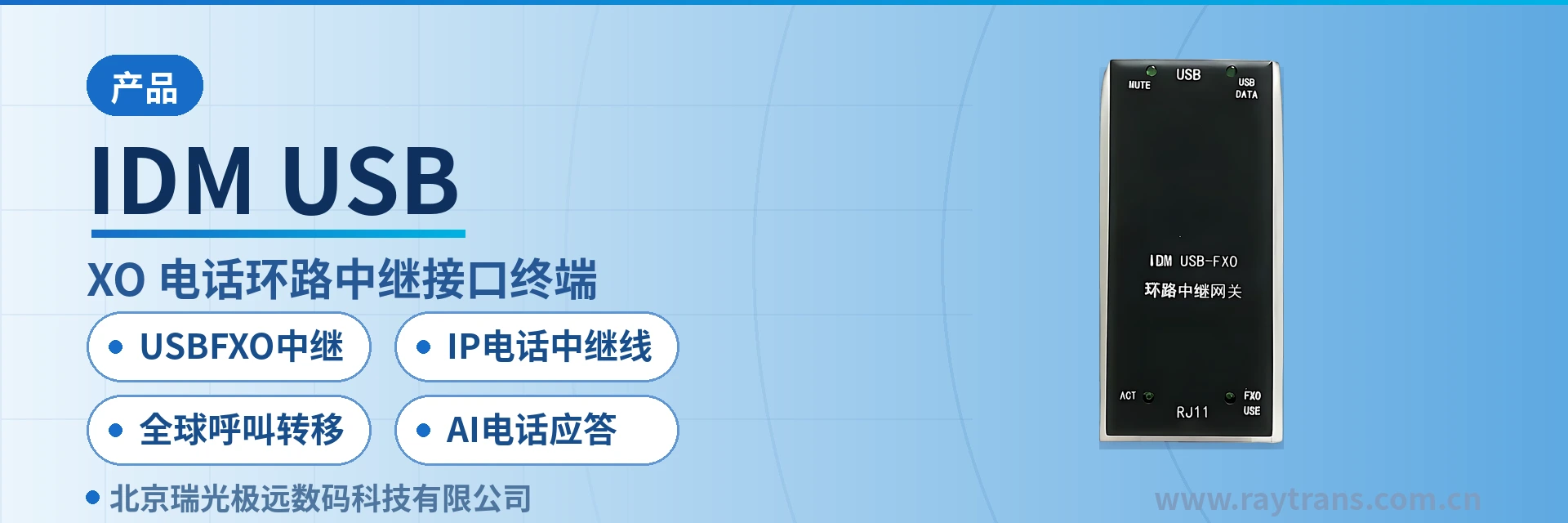
IDM USB-FXO is a USB FXO trunk gateway, i.e., a telephone loop-start trunk interface terminal (IP access terminal), developed by Beijing Ruiguang Jiyuan (Raytrans), used to convert an enterprise's existing wired telephone lines into IP telephone trunks. One side of the device is an FXO loop-start trunk interface, connected directly to the enterprise's existing analog outside lines; the other side is a USB interface, connected to a host running SIP registration and the enterprise's internal AI services, whereby outside-line voice channels become trunk resources that the internal telephone system can route. As a USB SIP trunk gateway, it often appears in the product showcase in a compact terminal form, facilitating rapid deployment in the equipment room.
The value of this access mode lies in changing no terminals and pulling no new lines: the enterprise's existing ordinary telephones remain as they are, and the upgrade happens only at the single interface where outside lines enter the equipment room. Internal users can dial as usual to call public network telephones and mobile phones, while incoming public network calls land on designated extensions according to configured rules; an outside line goes from a single line held by the carrier to a trunk resource that the enterprise itself can manage and allocate. For sites still using analog outside lines, a SIP analog trunk gateway is exactly the key link that smoothly connects traditional lines to the enterprise's internal telephone system, and this is also where the SIP FXO gateway is positioned—letting outside lines be uniformly dispatched by the internal system as IP telephone trunks.
Key Specifications at a Glance: FXO loop-start trunk interface · USB host interface · SIP trunk registration · blacklist number policy · global call forwarding · call records and speech-to-text · AI telephone answering
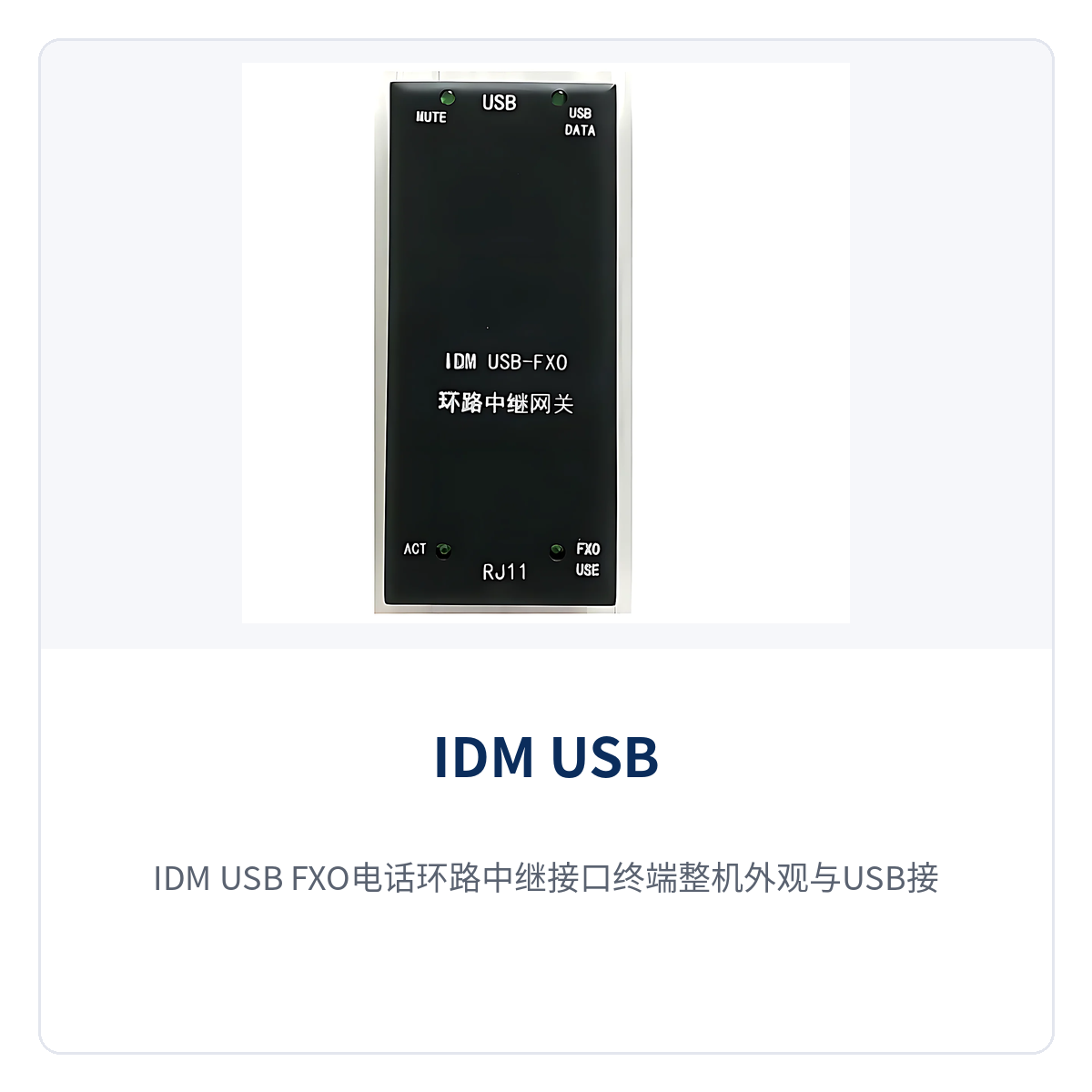
Figure 1: Overall appearance of the IDM USB-FXO telephone loop-start trunk interface terminal and layout of the USB interface and FXO outside-line ports
What kind of device is a USB FXO trunk gateway?
A USB FXO trunk gateway is an IP access terminal that performs signaling and media conversion between analog outside lines and SIP trunks. An FXO port behaves like an ordinary telephone, going off-hook, dialing, receiving digits and hanging up toward the carrier's outside line, so it can be connected in parallel directly to the enterprise's existing analog outside lines. On the SIP side, it registers with the internal telephone system per the SIP protocol, presenting each outside line as a trunk link that can be routed and managed.
An analog outside line carries only a single voice channel and has no capability for number allocation or call recording; for an enterprise to assign incoming calls by extension, block nuisance numbers and search call content, all of this must be done in upper-layer systems. Only after outside lines are first converted into SIP trunks do number policies, call records and AI processing have somewhere to land, while the lines and tariff model on the carrier side remain unchanged.
How existing telephone lines become IP telephone trunks
An IP telephone trunk here means a trunk link in the enterprise's internal telephone system, sourced from the enterprise's existing analog outside lines rather than from a newly applied carrier service. IDM USB-FXO completes three things to open up this link: emulate telephone behavior on the FXO side to answer outside-line calls, establish a trunk with the internal telephone system by registration on the SIP side, and convert dial tone, DTMF digits and call voice between the two.
Outbound and inbound are two independent call paths, with prefix, calling number display and landing rules configured separately and independently of each other. During on-site verification, place test calls item by item along the three paths below; the upgrade is complete only when all three call types work, after which only rules are adjusted and wiring is left untouched:
- Outbound calls: an internal user dials the outside-line prefix, the internal telephone system sends the call to the USB FXO trunk gateway, the FXO port goes off-hook and dials the called number toward the public network, and the calling number seen on the public network side is still the enterprise's original outside-line number.
- Inbound calls: a public network call reaches the FXO port, the gateway passes the calling number to the internal telephone system, and the system decides the landing target according to the blacklist and extension rules.
- Transferred calls: incoming calls matching the whitelist or forwarding rules skip the manual answering process and are transferred directly to the designated extension or remote terminal.
The three paths determine call handling after the upgrade: external numbers stay the same, internal extensions stay the same, and what changes is that outside lines go from a single line to a configurable trunk resource inside the enterprise. O&M personnel can then view trunk occupancy and call records in the system instead of going to the equipment room to count cables.
What functions are available: what can be done after outside lines are converted to SIP
The functions of the USB FXO trunk gateway fall into four groups: outside-line access, number policy, call forwarding and call enhancement, and the four groups take effect simultaneously with the same device working together with the internal telephone system. Each function item and its purpose are listed in the table below for item-by-item verification against the enterprise's actual call handling.
| Function | Description |
|---|---|
| Outside line to SIP trunk | Converts the enterprise's existing wired telephone lines into IP telephone trunks, so internal telephone users can call public network telephones and mobile phones |
| Incoming call landing on extension | Public network calls to the enterprise are transferred to designated enterprise users by rule, without the front desk transferring each call |
| Outside-line blacklist | Blocks nuisance and sales calls by calling number; blocked calls do not occupy extensions and do not enter manual answering |
| Outside-line whitelist | Calls from numbers on the list skip the navigation step and are quickly transferred to designated users |
| Global call forwarding | Outside-line calls can be forwarded to any location with internet access, covering dispersed offices and business travelers |
| Enhanced incoming call information | Provides call records, calling number display and related record display, replacing the single ring of an ordinary telephone |
| Speech-to-text | Converts call voice into text for retention, facilitating search, shift handover and later verification |
| Language translation | Translates call content, so cross-language incoming calls do not require finding an interpreter first |
| AI telephone answering | The enterprise's internal AI services complete answering, information collection and transfer, so calls outside working hours are also caught |
| Phone book calling | Look up and call from the phone book like a mobile phone, without memorizing numbers |
| AI transfer service | More telephone transfer services are provided through the enterprise's internal AI service system, with policies adjusted along with the business |
How to verify access conditions and configuration items
The access conditions of the USB FXO trunk gateway center on three points: interfaces, protocols and number rules; determine the configuration only after verifying each item against on-site conditions. The table below lists four parts—outside-line side, main unit side, trunk side and value-added services—among which the number of interfaces and the power supply mode are subject to the product documentation supplied with the unit.
| Item | Description/Specification | Applicable condition |
|---|---|---|
| Outside-line side interface | FXO loop-start trunk interface, connected to the enterprise's existing analog outside lines | The outside line is an ordinary analog subscriber line |
| Main unit side interface | USB interface, connected to a host running SIP registration and the enterprise's AI services | The host has enterprise network or internet access |
| Trunk side protocol | SIP registration, providing trunk resources to the internal telephone system | The internal telephone system supports SIP trunks |
| Call direction | Bidirectional outbound and inbound, supporting outside-line call transfer | Prefix and extension rules are set according to the enterprise numbering plan |
| Number policy | Outside-line blacklist blocking, whitelist quick transfer | Lists are maintained by the front desk or administrative personnel |
| Forwarding scope | Any location with internet access | Remote terminals register with the internal system over SIP |
| Enhanced services | Call records, speech-to-text, language translation, AI telephone answering, phone book calling | Provided by the enterprise's internal AI service system |
| Number of interfaces and power supply | Subject to the product documentation supplied with the unit | Configuration determined after on-site verification |
How the outside-line blacklist and whitelist work together
The blacklist and whitelist address two directions of the same matter: keeping unwanted calls out and delivering important calls straight to the person. The outside-line blacklist blocks nuisance and sales calls by calling number; blocked calls do not occupy extensions and do not enter manual answering. The whitelist lets calls from numbers on the list skip voice navigation and be transferred directly to designated users.
Maintaining the two lists is not complicated and is suitable for the front desk or administrative personnel to manage themselves; adding or removing a number takes effect immediately, without stopping or restarting the device. The enterprise only needs to first decide who maintains the lists and by what criteria numbers are added or removed, and then put these rules into the system configuration:
- Enter the blacklist item by item: add recurring sales, collection and irrelevant numbers to the list; they are blocked on match, with no need to hang up manually each time.
- Enter the whitelist by relationship: add customers, suppliers, headquarters and key contacts first, so their calls get through in one step.
- Priority setting: during configuration, place whitelist matching before blacklist matching, so important numbers are not mistakenly blocked even if entered repeatedly.
- Scope of effect: the lists apply only to the inbound direction of outside lines; internal calls and outbound calls are unaffected.
How outside-line calls are forwarded to anywhere in the world with internet access
The landing point of an outside-line call is not limited to extensions in the office. After IDM USB-FXO converts outside lines into SIP trunks, the landing point can be any terminal registered with the enterprise's internal telephone system over SIP, including office IP phones, mobile softphones of business travelers and telephones at overseas offices. With global call forwarding capability, outside-line calls can be forwarded to any internet location worldwide, supporting dispersed offices—a direct result of the access mode that reuses analog outside lines.
For enterprises with dispersed offices, this path eliminates long-distance charges and layer-by-layer transfers. When overseas colleagues answer an outside-line call from headquarters, the voice travels over the internet rather than an international long-distance call; after logging in to a softphone, business travelers can answer and make calls with a company extension identity. The trunk lines remain only the few the enterprise originally had, number resources need not be applied for repeatedly by location, and personnel transfers do not require changing numbers.
How to use speech-to-text, language translation and AI telephone answering
An ordinary telephone can only ring and talk, and leaves nothing behind after the call ends. After IDM USB-FXO sends outside-line calls into the enterprise's internal AI service system, call records, speech-to-text, language translation and AI telephone answering can all be completed on the system side, with no upgrade needed at the telephone end and no change to employees' usage habits.
The five enhanced capabilities each address a type of on-site problem; during rollout, decide by business priority which to enable first and which later. The following explains each capability's purpose and where it is used, for item-by-item comparison with the existing functions of the internal telephone system to avoid duplicate construction:
- Call records and number display: each outside-line call leaves the calling number, time and call records, so follow-ups no longer require flipping through paper logs.
- Speech-to-text: call voice is converted into text, facilitating search, shift handover and later verification.
- Language translation: voice content is translated during cross-language calls, so incoming calls from overseas customers do not depend on a temporary interpreter.
- AI telephone answering: the enterprise's internal AI services complete answering, information collection and transfer, so calls outside working hours are also caught.
- Phone book calling: look up and call from the phone book like a mobile phone, reaching frequently used numbers with one touch.
Through the enterprise's internal AI service system, more telephone transfer services can be provided, with transfer policies adjusted as the business changes, without replacing hardware. Externally it is still the same number; internally it is a call flow assigned by business role, and the upgrade falls only on the software side.
Typical application scenarios
Dispersed industrial enterprises: headquarters and multiple plants share a few outside lines
Dispersed industrial enterprises usually apply for outside lines separately by plant, headquarters and plants rely on manual transfer to reach each other, and business travelers must wait until back in the office to return company calls. After connecting the outside lines of each plant to the same internal telephone system with the IP access terminal IDM USB-FXO, outside-line calls can land on the extension of the corresponding plant by business category, and business travelers can answer on softphones from remote locations. The upgrade touches neither existing telephones nor cabling; it can be implemented as long as the plant has internet access, and the wiring shown in the product showcase matches on-site conditions.
Multinational manufacturers: cross-time-zone calls must reach the right person
Outside-line calls to multinational manufacturers often come with two problems, language and time zone: a customer calls outside working hours and no one is there to answer; or the person answering does not understand the caller's language. Speech-to-text and language translation convert call content into readable text, AI telephone answering first catches calls outside working hours, and outside-line calls can be forwarded to overseas offices or business travelers at any internet location worldwide, with global call forwarding rules set separately by person and by time period. Answering is no longer limited by office location, and the same batch of outside-line numbers need not be applied for repeatedly in every country.
AI customer service centers: inbound outside-line calls are answered by AI first, then transferred to agents
Customer service centers have a large volume of inbound outside-line calls and many repetitive questions, with labor costs concentrated in the screening step. The USB SIP trunk gateway IDM USB-FXO sends inbound outside-line calls into the enterprise's internal AI service system; AI telephone answering first completes identity confirmation, question classification and information collection, then transfers calls requiring manual handling to agent seats together with the call records. When an agent seat answers, it already knows who the caller is and what has been asked, so call duration and number of transfers drop accordingly, and the number of outside lines need not grow in step with the seat count.
Deployment and wiring: six steps from outside line to extension
Deploying a SIP FXO gateway requires no changes to carrier lines and no replacement of existing telephones; the work centers on three tasks: wiring, registration, and rule configuration. Complete them one by one in the following order. On site, service is usually enabled in a single visit, and the upgrade window is measured in hours:
- Verify outside lines: Confirm that the lines to be connected are ordinary analog outside lines, record the numbers and wiring sequence, and avoid mistakenly connecting dedicated lines or data cables to FXO ports.
- Wiring: Connect the FXO ports to the outside lines and the USB port to the main unit running SIP registration and AI services. Disconnect the outside lines before wiring, and verify the line state of each channel after connection.
- Registration: Configure SIP trunk accounts for the gateway on the internal telephone system side, confirm that registration is normal, and then test off-hook, dialing, and hang-up on the outside lines.
- Number rules: Configure the outside line prefix, calling number display, and extension assignment rules. First place test calls from a small number of extensions, then open up all of them.
- Lists and transfer: Enter outside line blacklists and whitelists, set transfer rules for remote terminals and business travelers, and verify whitelist priority.
- Trial run: Place consecutive test calls of three types—outbound, inbound, and transfer—and confirm that call records and speech-to-text are properly stored in the database before delivery for use.
When Outside Line Access Is Suitable
Whether to adopt USB outside line access depends mainly on three conditions: outside line conditions, call handling distribution, and upgrade scope. The following four criteria are common; if two or more are met, the project can enter the solution design stage. Outside line conditions are a prerequisite—if they do not match, there is no need to evaluate further.
- Outside line conditions match: The enterprise already has several ordinary analog outside lines and does not plan to change carrier services in the short term.
- Call handling is distributed: The headquarters, plant, offices, and business travelers all need to reach the same batch of numbers, which must be assigned by rules.
- Upgrade scope must be small: The enterprise does not want to replace telephones, re-cable, or endure long service outages for cutover; the available upgrade window is only a few hours.
- Value-added requirements are clear: The enterprise wants call records, speech-to-text, language translation, and AI telephone answering to be applied to telephone services.
Summary
As a USB SIP trunk gateway, the Raytrans IDM USB-FXO converts an enterprise's existing wired telephone lines into IP telephone trunk lines. Without replacing terminals, it adds call records, speech-to-text, language translation, and AI telephone answering, and extends the reach of outside line calls to any location with Internet access.
For the three call handling scenarios of distributed offices, cross-border collaboration, and AI customer service, the USB FXO trunk gateway provides a low-modification access method that reuses existing lines; wiring and rule configuration can be completed within one day. For the number of interfaces, power supply mode, and compatible internal telephone system versions, confirm with the manufacturer based on on-site conditions before finalizing the configuration, to avoid ordering by a generic model.