IDM talkie 70 Desktop Dispatch Terminal
Driver-free USB sound card, five-key shortcut panel, one-touch recording and announcement, direct display of number and duration
Used as a USB sound card extension for Android, Linux, and Windows systems, typically for the dispatch console of converged communications; it can be used with SIP softphones such as linphone, eyebeam, and microSIP, and the terminal can generally be configured for manual or automatic answering. It can also be used with WebRTC communications, etc. On the panel, operations such as increasing and decreasing the audio output volume, one-touch mute, one-touch microphone mute, and hanging up a call can be performed, and audio commands can be sent to the audio conference room to implement group intercom, etc.; when used with the IDM IPhone softphone software, in addition to the functions above, it can also
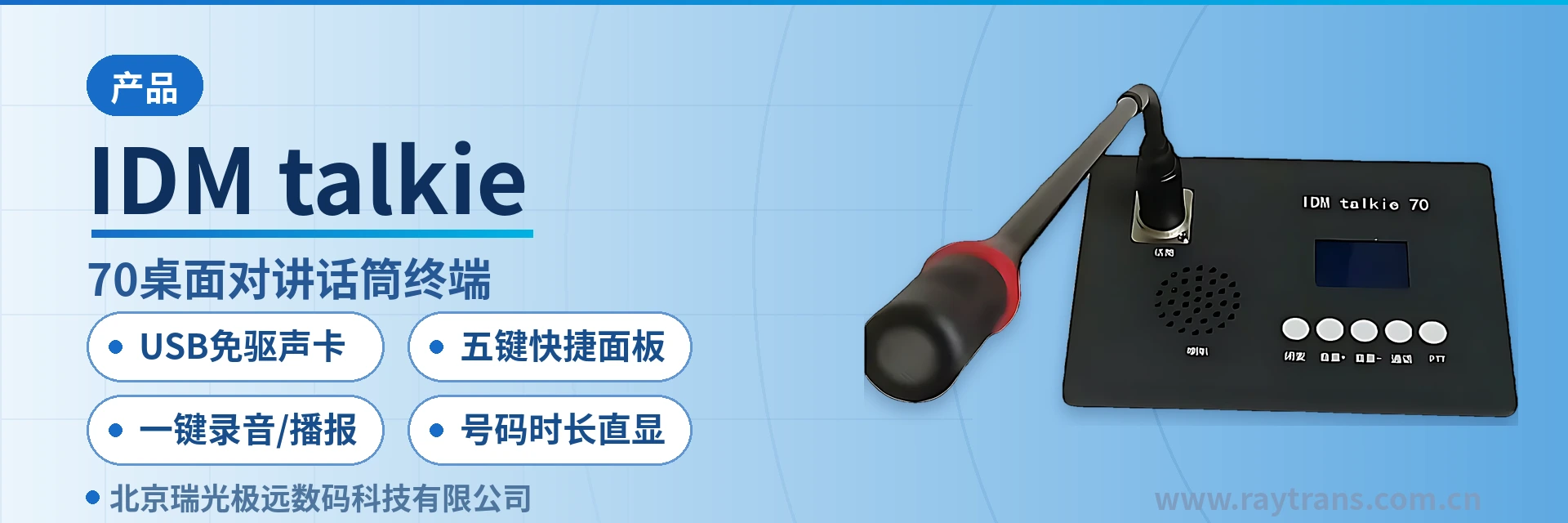
The IDM talkie 70 desktop intercom microphone terminal is a USB sound card desktop dispatch terminal developed by Beijing Ruiguang Jiyuan Digital Technology Co., Ltd. (Raytrans) for converged communication dispatch console seats under Android, Linux, and Windows systems. As an IP access terminal designed for command and dispatch scenarios, the terminal appears to the host as a standard USB sound card and requires no dedicated driver; once plugged in, it is recognized by the system and the softphone, with gooseneck audio pickup, panel operation, and status display all housed in a single desktop device, balancing compactness and practicality as shown in the product showcase.
A dispatch seat used to require a microphone, a speaker, a SIP telephone, plus a mouse and keyboard, and answering, muting, and volume adjustment often meant going back to the software interface to click. This desktop dispatch terminal moves these common actions onto the desktop, so the duty operator can answer, mute, adjust volume, hang up, and speak to a group without leaving the desktop, while the software side continues to handle registration, encoding and decoding, and service logic. For job roles that require trunking intercom and unified command, the device can serve as an IP access terminal node in the overall solution of a command and dispatch system manufacturer, working with SIP desktop communication terminals, webRTC communication terminals, and other devices to form a complete desktop communication terminal layout.
Key Specifications at a Glance: USB driver-free sound card · five-key shortcut panel · one-touch recording/announcement · direct number and duration display · 3.5 mm headset jack · 8 Ω 3 W speaker
What Kind of Device Is a USB Sound Card Desktop Dispatch Terminal?
A USB sound card desktop dispatch terminal is a type of desktop dispatch device that plugs into a computer's USB port and hands audio pickup and playback to the host for processing. SIP softphones such as linphone, eyebeam, and microSIP and webRTC clients treat it simply as a sound card; registration, calling, and encoding and decoding are still handled by the software, so switching to another softphone does not require changing the hardware. As a typical IP access terminal, it integrates the audio channel and the data channel in one desktop device, and when used with a SIP desktop communication terminal or a webRTC communication terminal, it completes the driver-free access described in the product showcase without additional drivers.
The terminal's other channel goes through the data port: serial port data is converted into USB data and sent to the host, and panel key presses and display status pass in and out this way. The audio channel handles the human voice, the data channel handles control, and the two channels run in parallel; key actions can be executed locally or sent as commands to the dispatch software or the audio conference room.
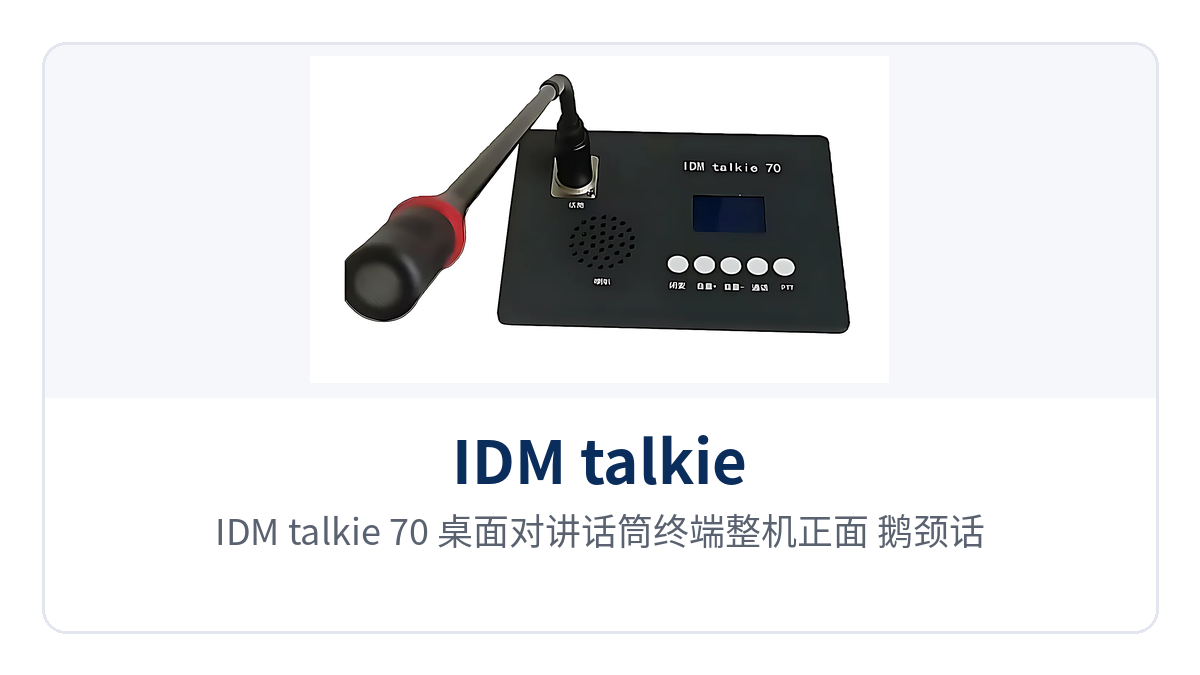
Figure 1: Front view of the IDM talkie 70 desktop intercom microphone terminal, close-up of the gooseneck microphone, five-key shortcut panel, and LCD status screen
Which Operations Can the Five-Key Shortcut Panel Replace the Mouse For?
The panel has five fixed shortcut keys: mute, volume up, volume down, telephone (call), and broadcast (PTT). The key positions are fixed and separated from one another, so common actions take effect as soon as they are pressed, with no need to switch back to the software window to find a button. Once the duty operator is familiar with the key positions, they can press them without looking at the panel, keeping their eyes on the service interface.
- Mute: cuts off the sound sent from the microphone with one key, so on-site conditions can be discussed briefly during a call without hanging up;
- Volume up and volume down: directly adjust the audio output volume, corrected at any time according to on-site noise;
- Telephone (call): answers and ends the current call, and can also bring the dialing window to the front of the screen;
- Broadcast (PTT): opens or cuts off the microphone in PTT group intercom state to speak to members in the same conference room.
The gooseneck microphone has a MIC operating indicator LED, which lights when the communication channel is open and the microphone is connected; a short press of the call key cuts off or opens the microphone, while in a PTT intercom group the PTT key takes over. Whether the LED is on shows at a glance whether voice is currently being sent, preventing a situation where someone speaks at length with the microphone muted and no one hears it.
The LCD screen presents communication status in three lines. When the terminal is called, it automatically enters the telephone call state, and the screen shows its own user name and user number, the incoming call number, and the call duration in minutes; pressing the telephone key ends the call. When a member call is received during broadcast intercom, the screen instead shows the user name and number, the broadcast group name and the speaker name, and the start time (hours and minutes) and duration.
What Functions Does One Desktop Intercom Microphone Terminal Provide?
The functions are presented in four groups: audio access, panel operation, status display, and linkage expansion, each corresponding to a type of on-site action. During selection, first confirm the host system, the softphone type, and whether the terminal connects to a converged dispatching platform, then look at the configuration combination, to avoid equipping a batch of interfaces that will not be used. The table below lists the actual role and usage prerequisites of each function item by item.
Function Overview
| Function | Description |
|---|---|
| USB driver-free sound card | Connects as a USB sound card on Android, Linux, and Windows hosts, with audio input and output going through the same sound card |
| Softphone adaptation | Works with SIP softphones such as linphone, eyebeam, and microSIP, configurable for manual answer or auto-answer |
| webRTC communication | Works with webRTC clients to complete audio and video communication; the browser side only selects the device, with no line changes |
| Five-key shortcut panel | Five keys—mute, volume up, volume down, telephone (call), and broadcast (PTT)—arranged together on the panel |
| Microphone on/off control | A short press of the call key cuts off or opens the microphone; in PTT group intercom the PTT key takes over |
| Call status display | The LCD screen shows the user name, user number, incoming call number, and call duration in minutes |
| Broadcast status display | Shows the broadcast group name, speaker name, start time, and duration |
| Automatic switchover between telephone and broadcast | When both functions are enabled, the terminal stays in broadcast intercom by default and temporarily switches to calling when a call comes in or a call is needed |
| One-touch recording | With the IDM IPhone softphone, recording starts with one key when a call comes in, initiated on the terminal side |
| Local voice announcement | Plays a local voice file to other terminals with one key, without going through the softswitch server for announcement mode |
| DTMF receive/transmit | Receives and transmits DTMF information in an established audio channel, supporting end-to-end information transmission and also usable for function development toward the dispatching exchange |
| Data port expansion | Serial port data is converted to USB for transmission, supporting further development of dispatch functions |
Key Specifications and Technical Specifications
Interfaces and capabilities are listed item by item in the table below for easy comparison against on-site traffic and seat count. Electrical and environmental items not given in the product documentation are not presumed; power supply mode, dimensions, and operating temperature are confirmed according to the technical documentation supplied with the unit and the ordering configuration sheet, and cabinet power and desktop space are reserved according to actual measurement.
| Item | Parameter/Specification | Description/Applicable Conditions |
|---|---|---|
| Access mode | USB sound card expansion, driver-free | The host recognizes it as a standard audio device, ready to use once plugged in |
| Supported systems | Android, Linux, Windows | Connects as a USB sound card under all three systems |
| Compatible softphones | SIP softphones such as linphone, eyebeam, and microSIP | Configurable for manual answer or auto-answer |
| Communication protocols | SIP, webRTC | Used with softphones and webRTC clients |
| Panel keys | Mute, volume up, volume down, telephone, broadcast (PTT) | Five shortcut keys; daily operation does not depend on the mouse |
| Status display | Communication status LCD screen, three-line display | User name, number, incoming call number, call duration, broadcast group and speaker |
| Microphone | Gooseneck microphone with MIC operating indicator LED | The indicator LED lights when the channel is open and the microphone is connected |
| Local sound output | 8 Ω 3 W speaker, 180–15000 Hz | Direct desktop sound output, no external speaker needed |
| Headset jack | 3.5 mm headset jack | Connect a headset for calls, suitable for multiple people in the same room talking separately |
| Telephone interface | Telephone line interface | Can connect an ordinary telephone |
| Data port | Serial port data converted to USB transmission | For secondary development of dispatch functions |
| Signaling | DTMF receive/transmit | Received and transmitted in an established audio channel |
| Power supply and power consumption | not yet recorded in the knowledge base | Subject to the technical documentation supplied with the unit and the ordering configuration |
| Dimensions and weight | not yet recorded in the knowledge base | Subject to the technical documentation supplied with the unit and the ordering configuration |
| Operating environment | not yet recorded in the knowledge base | Subject to the technical documentation supplied with the unit and the ordering configuration |
How Do One-Touch Recording and Local Voice Announcement Shed Server Dependence?
Announcements in an audio conference room used to be initiated by the softswitch server, and recordings also landed on the server side, with the terminal only sending voice and playing sound. With the IDM IPhone softphone software, an incoming call can be recorded with one key, and local voice files can be pushed to other terminals for playback with one key; the action is initiated on the terminal side, without first going through the server.
This capability is very practical for private network sites. When the duty operator receives a situation report, pressing record keeps the call record on file on the spot; when a prompt tone or pre-defined plan voice needs to be played to the seats in the same conference room, the local file can be pushed directly, and a temporary server unavailability does not affect either action.
When working with the IDM converged dispatching platform, the content shown on the panel is further expanded: the local number, incoming and outgoing call numbers, and call duration are all read directly on the local panel, and which conference room or which intercom group number is currently active is also displayed. The direct number and duration display saves the trouble of repeatedly switching screens to check.
How Is the Software Environment of a Desktop Dispatch Terminal Configured?
The terminal itself is not bound to any particular softswitch; audio goes through the USB sound card and control goes through the data port, so which type of software is used only affects the settings, not the on-site wiring. As a desktop dispatch terminal and a SIP desktop communication terminal, the difference in software environment lies only in the location of the parameter pages and whether supporting software is installed, with the same access sequence. The following four types of environments differ only in the location of the parameter pages and whether supporting software is installed, with the same access sequence:
- SIP softphone: in linphone, eyebeam, or microSIP, select the terminal's USB sound card as the audio input and output, set manual answer or auto-answer according to duty habits, and the panel volume and mute take effect immediately;
- webRTC communication: on the browser side, likewise select this USB sound card as the microphone and speaker; after joining the conference room, the panel keys control voice transmission and volume;
- IDM IPhone softphone: adds one-touch recording of incoming calls and one-touch announcement of local voice files on top of the general capabilities;
- IDM converged dispatching platform: further adds panel display of the local number, incoming and outgoing call numbers, call duration, and conference room or intercom group number.
How Is Wiring Done on the Desktop?
An IP access terminal on the desktop usually connects only four types of cables; once connected, the seat no longer needs a separate power supply box and speaker, and the amount of desktop cabling is reduced accordingly. Each of the four cables handles one thing; during commissioning, confirm them one by one in the order below to locate no-sound or unresponsive-key problems quickly:
- USB cable: connects to the USB port of the dispatch host; both audio and serial port control data go through this cable, which also serves as the system's sound card device;
- 3.5 mm headset: connect a headset for calls, so that multiple people on duty in the same room each hear their own channel and do not interfere with one another;
- Telephone interface: use a telephone line to connect an ordinary SIP telephone, retaining the usage habits of traditional telephones;
- Data port: serial port data is converted to USB for intercommunication with the host, for further function development by the command and dispatch system manufacturer.
Typical Application Scenarios
Converged Communication Dispatch Center
A converged communication dispatch center has dense seats, with calls, conferences, and trunking intercom switching in turn. The desktop dispatch terminal connects to the dispatch host as a USB sound card, one terminal per host; when seats are expanded, only terminals and accounts are added, with no need to re-lay audio cables. The dispatcher answers, mutes, adjusts volume, and presses PTT to speak to the group on the panel, leaving the mouse for the service interface, so actions are faster during call peaks.
Electric Power and Energy Private Network Dispatch
Dispatch seats in electric power and energy private networks often carry multiple responsibilities, answering calls from superiors as well as listening to on-site reports and issuing instructions. When a SIP desktop communication terminal enables both telephone and broadcast intercom, it stays in broadcast state by default, temporarily switches to calling when a call comes in or a call is needed, and returns to the group after speaking, so the duty operator does not need to switch back and forth between two software windows. Call duration is read directly on the screen, giving a verifiable basis for shift handover records.
Emergency Command and Public Safety
In an emergency command on-site environment, noise is high and the pace is fast, and the duty operator wearing a headset still has to free a hand to flip through documents. The 3.5 mm headset jack keeps voice at the ear, while the 8 Ω 3 W speaker provides direct external playback during seat discussions; one-touch recording keeps received notifications on file, and one-touch broadcast pushes pre-defined plan voice messages to other terminals in the same conference room, so the commander does not need to find someone to read a script on the spot.
Conclusion
The Raytrans IDM talkie 70 desktop intercom microphone terminal packs a driver-free USB sound card, a five-key shortcut panel, and a three-line status screen into a single desktop device, ready to use once plugged into an Android, Linux, or Windows main unit. As a USB sound card desktop dispatch terminal, it brings answering, muting, volume adjustment, hanging up, and group speaking back to hand, freeing the mouse and software windows from high-frequency operations, and also provides an intuitive placement reference for the SIP desktop communication terminal and IP access terminal solutions in the product showcase.
For converged communication dispatch centers, electric power and energy private networks, and emergency command operator seats, three accounts are worth settling first: whether seat capacity expansion requires re-laying audio cables, whether recording and broadcast must long depend on servers, and whether a duty operator can complete calls and intercom with one hand in a high-noise environment. When these three accounts add up, the terminal has value in its placement.