IDM MCS
IDM MCS
The MCS Terminal Management Platform is a maintenance and management platform used to manage devices deployed within a network. The MCS is deployed at the top level of the user's network, and devices in the same-level network or subnets register with the MCS to receive unified management. The MCS has a built-in ACS server, which communicates with devices for command management via the TR069 protocol. The MCS provides users with a fast and easy-to-use tool for remote deployment and management of devices.
I. Product Overview
The MCS Terminal Management Platform is a maintenance and management platform used to manage devices deployed within a network. The MCS is deployed at the top layer of the user's network. Devices in the same-level network or sub-networks register with the MCS and accept unified management from the MCS. The MCS has a built-in ACS server, which communicates with devices for command management via the TR069 protocol. The MCS provides users with a fast and easy-to-use tool for remote device deployment and management.
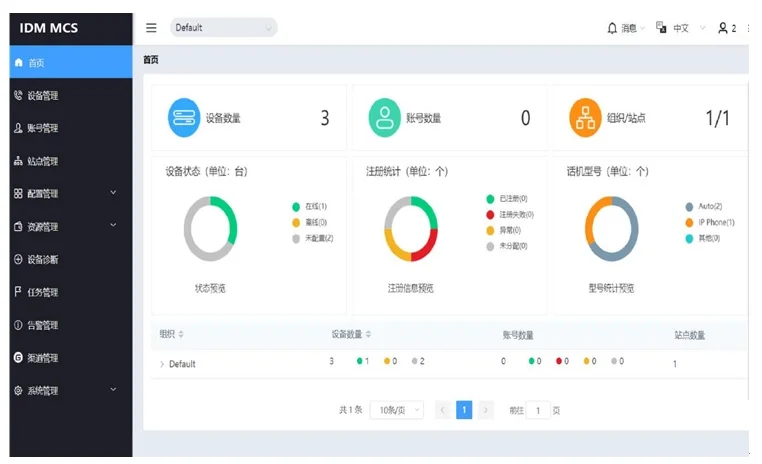
MCS Terminal Management Platform
II. Product Advantages
n Integrated device management, account management, configuration management, firmware upgrade, device diagnostics, order management, and statistical analysis functions;
n Terminal device management functions, including device online status monitoring, automated device configuration deployment, remote parameter modification, batch device upgrade, remote reboot, remote upgrade, and batch device addition;
n Remote device diagnostics, enabling operations on devices through the platform such as viewing system and account status, exporting system logs, packet capture, exporting configuration files, checking network status, and taking screenshots;
n Hierarchical user permission management, allowing the addition of user accounts with different permissions to meet the platform management and device management requirements of different roles such as agents, distributors, service providers, and end customers;
n Supports immediate task execution as well as scheduled and recurring task execution, meeting user requirements for diversified and personalized task management;
n High security — adopts the TLS transport protocol, supports a two-way authentication mechanism, and uses encrypted storage.
III. Product Functions
Data Dashboard | u Quantity statistics: Device count/Account count/Organization/Site count u Device status statistics: Online/Offline/Unconfigured u SIP Account status statistics: Registered/Abnormal/Unassigned u Device model quantity statistics u Organization status statistics: Device count/Device status statistics/Account count/Registration status statistics/Site count statistics |
Device Management | u Zero-touch deployment: Supports automatic zero-configuration deployment after power-on u Batch management: Batch add devices/ Batch export devices/ Batch delete devices u Real-time device status monitoring: Online/ Offline/ Abnormal u Device registration status: Registered/ Registration failed/ Not registered/ Unknown u Action: Edit/ Delete/ Transfer device organization/ Set site/ Configure parameters u Remote management: Reboot/ Firmware upgrade/ Update configuration file/ Update resource file/Factory reset |
Account Management | u Batch managementSIP Account: Batch add accounts/ Batch export accounts/ Batch delete accounts u Add server u Batch delete servers u Assign account/ Unassign account u Auto-registration: Automatically registers account when device connects to platform after assignment u Action: Edit/ Delete/ Modify account's affiliated server |
Task Management | u Task type: Immediate/ Scheduled/ Recurring u Task content: Reboot device/ Restore factory settings/ Firmware upgrade/ Upgrade by model u Configuration file/ Upgrade configuration file by site/ Update resource file u Task execution: All devices at selected site/ All devices of specified model/ Specified devices/ InputMAC Address u Monitor task status and results in real-time u Action: Execute immediately/ Cancel execution/ Stop Task/ Edit Task |
Site Management | u Multi-level Site Management u Batch Import Sites u Transfer Devices in Site |
Configuration Management | u General Configuration: Common device settings supporting immediate or scheduled deployment u MAC Configuration: DeviceMAC Address-named configuration supporting immediate push u Parameter Modification: Supports GUI-based or text-based configuration editing u Download Configuration Template |
Resource Management | u Firmware Management: Official Firmware/ My Firmware u Upload Custom Firmware u View Official FirmwareRelease Note u Operation: Push Firmware Update/ Download Firmware u Resource Files: Images/ Phonebook/ Certificates/ Ringtones |
Device diagnostic function | u Remote device diagnostics u Diagnostic method: View system and account status/ Export system logs/ Packet capture/ Export configuration file/ Check network status/ Screenshot u Network status check:Ping/ Routing diagnostics |
Alarm management function | u View alarm details u Alarm: Email notification/ Site push notification u Alarm content includes: Account registration failure/ Insufficient or full storage space/ Restore factory settings/ Device reboot/ Task execution failure/ Device offline u Delete alarm |
Channel management function | u View orders u Import orders u Import device management u Assign to sub-channels u Bind sub-channels u Channel authorization: Authorize superior channel binding u View bound channel list |
System management function | u User management: Add sub-accounts/ Add roles/ Add organizations/ Set sub-account roles and permissions u View system logs u Export system logs |
Protocol | u TLS Protocol u HTTP/HTTPS Protocol u TR069 Protocol |
FAQs
What Are the Functions and Advantages of Video Optical Terminals?
The function of a video optical terminal is to convert one or multiple channels of analog video signals into optical…
View answerWhat is the difference between a Video Optical Terminal and a Network Video Server?
Composition and Function of Video Optical Terminal and Network Video Server An optical terminal is a device used to…
View answerWhat are common issues when using optical terminals in security surveillance?
Fiber optic technology is increasingly used in security surveillance projects to transmit images, audio, data…
View answerWhat is IPTV and Its Key Technologies
IPTV, or Interactive Network Television, is an innovative technology that utilizes broadband cable TV networks…
View answer