
What Are Common Optical Terminal Faults and How to Troubleshoot Them?
In scenarios such as security surveillance, power communications, and rail transit…
Understanding Common Optical Terminal Faults at a Glance — Easily Avoid O&M Pitfalls
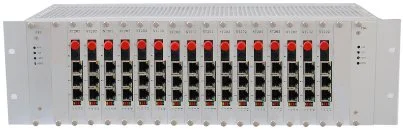
In scenarios such as security surveillance, power communications, and rail transit, the optical terminal serves as the core device for signal transmission, acting like a "bridge" in the entire communication link, carrying the stable transmission of video, audio, and data signals. Its normal operation directly determines the communication quality and reliability of the entire system. However, during long-term use, affected by factors such as environment, installation, and equipment wear, optical terminals will inevitably encounter various problems that not only affect signal transmission efficiency but can also cause the entire link to be interrupted in severe cases, bringing unnecessary losses to enterprises and users. Today, we will sort out the most common types of optical terminal problems, analyze the symptoms and root causes, and help you quickly grasp the key points of O&M to easily handle various emergencies.
1. No Signal Output: The "Number One Culprit" of Link Interruption
No signal output is the most common and intuitive fault of optical terminals. When many users encounter this problem, their first reaction is to mistakenly assume the equipment is damaged, but in reality, the cause is often not that complicated. The most common situations mainly fall into three categories: first, abnormal fiber optic link conditions, such as fiber breakage, loose splicing points, or excessive fiber attenuation, which prevent optical signals from transmitting normally — especially in outdoor scenarios where fiber optics are susceptible to breakage or wear due to external forces like wind, rain, and construction; second, power supply issues — a faulty power adapter, unstable supply voltage, or poor contact at the power interface can all prevent the equipment from starting normally, naturally resulting in no signal output; third, incorrect port connections — mismatched ports between the transmitter and receiver, or loose video, audio, and data interfaces, can also cause signal "disconnection."
Troubleshooting this type of problem is relatively simple: first check whether the power supply is normal, then inspect whether the fiber optic interface is firmly plugged in and whether the fiber link has obvious damage, and finally verify that port connections correspond correctly. In most cases, the problem can be quickly located and resolved.
2. Signal Interference: The "Invisible Killer" of Transmission Quality
Signal interference is the most easily overlooked problem in optical terminal usage. Although it does not directly cause link interruption, it seriously affects transmission quality, resulting in video screen distortion, audio noise, data packet loss, and other phenomena that give users a poor experience. Signal interference is mainly divided into two categories: one is electromagnetic interference — if the optical terminal is placed near strong electromagnetic radiation sources such as high-voltage equipment, frequency converters, or motors, or if the equipment is poorly grounded, electromagnetic signals can invade and interfere with the normal operation of the optical terminal; the other is fiber optic self-interference — for example, excessive transmission distance on multimode fiber, mismatched fiber core diameters, or impurities mixed into the fiber link can cause optical signal scattering and attenuation, leading to signal distortion.
The key to avoiding such problems lies in avoiding strong electromagnetic interference sources during installation, ensuring proper equipment grounding, selecting fiber that matches the transmission distance and signal type, and regularly cleaning dust from fiber optic interfaces to reduce the possibility of signal interference.
3. Image Distortion/Stuttering: The "Common Pain Point" of Video Transmission
In security surveillance scenarios, image distortion and stuttering on optical terminals are the most frequently reported problems by users, especially during high-definition video transmission where these issues are more pronounced. There are four main root causes: first, optical power mismatch — if the transmitter's optical power is too high or too low, the receiver cannot properly receive the optical signal, resulting in abnormal image decoding; second, excessive fiber link loss — when loss exceeds the optical terminal's receiving sensitivity, signal attenuation occurs during transmission, triggering distortion and stuttering; third, equipment compatibility issues — mixing optical terminals of different brands or models, or mismatched resolution and frame rates between the optical terminal and cameras, monitors, or other devices, can cause abnormal signal decoding; fourth, equipment overheating — long-term continuous operation with poor heat dissipation can cause unstable operation of internal chips, affecting video signal transmission.
To solve these problems, an optical power meter can be used to check whether the optical power is within the normal range, adjust the transmitter's optical power, or replace the fiber with lower loss. At the same time, ensure equipment model compatibility and regularly clean the optical terminal's heat dissipation vents to avoid overheating.
4. Audio Distortion/No Sound: The "Easily Overlooked Problem" of Voice Transmission
In addition to video signals, optical terminals often need to transmit audio signals (such as voice intercom in security scenarios or audio transmission in conference scenarios), and audio distortion or no sound is also a common fault. The main causes include: poor contact at audio interfaces, aging or damaged audio cables preventing normal audio signal transmission; mismatched audio encoding methods on the optical terminal — inconsistent audio parameter settings between the transmitter and receiver prevent proper decoding; and faults in audio input/output devices — for example, damaged microphones or speakers being mistakenly attributed to the optical terminal.
When troubleshooting, you can first replace the audio cable and check interface connections, then verify the optical terminal's audio encoding parameters, and finally test whether the input/output devices are functioning properly, gradually locating the root cause.
5. Frequent Equipment Restarts: The "Fatal Hidden Danger" of Insufficient Stability
Frequent restarts of optical terminals cause intermittent signal interruptions and seriously affect system stability. This type of problem is mostly related to power supply, heat dissipation, and equipment faults. On one hand, excessive supply voltage fluctuations or aging power adapters can cause unstable power supply to the equipment, triggering automatic restarts; on the other hand, poor ventilation in the installation environment, blocked heat dissipation vents, or aging and damaged internal components can cause the equipment to overheat, triggering over-temperature protection and automatic restarts. In addition, intermittent faults in the fiber link can also cause the optical terminal to restart frequently.
To address these problems, replace the power adapter with a stable one to ensure stable supply voltage; optimize the installation environment to ensure good ventilation and regularly clean heat dissipation vents; and if equipment components are aging, repair or replace them promptly to prevent the fault from escalating.
6. Summary: Perform Routine Maintenance to Reduce Fault Incidence
Most optical terminal faults are related to non-standard installation, inadequate routine maintenance, and equipment aging. In fact, by doing just three things well, you can significantly reduce the fault incidence rate: first, strictly follow specifications during installation — avoid strong electromagnetic interference sources, ensure the fiber link is intact, and verify port connections and equipment compatibility; second, perform routine maintenance regularly — clean equipment dust, check interface connections, and test optical power and power supply conditions; third, replace aging components promptly to prevent minor faults from escalating into major problems.
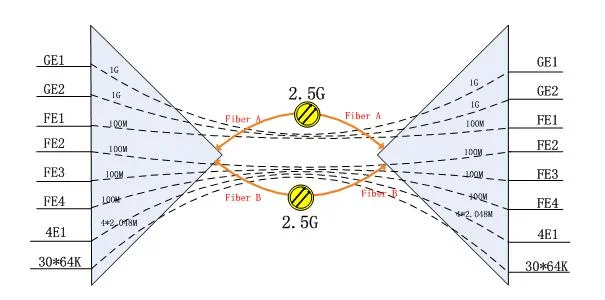


As the core equipment of the communication link, the stable operation of the optical terminal is the foundation for the normal operation of the entire system. Mastering the above common problems and troubleshooting methods can not only help you quickly respond to sudden faults and reduce downtime losses, but also extend equipment service life, allowing the optical terminal to fully leverage its transmission advantages and safeguard communications in various scenarios. If you encounter complex faults during use, it is recommended to contact professional technical personnel for handling to avoid equipment damage caused by improper operation.