IDM VDT1000 Video Optical Multiplexer
E1 Direct Connection, No IP Network Required, Simultaneous Voice and Data Transmission, Service Provisioning with a Pair of Devices
The IDM VDT1000 bidirectional audio and video codec transmission device is designed for transmission over telecommunications E1 (2M port) channels. It uses H.264 compression and provides powerful real-time image capture and image compression capabilities. The IDM-VDT1000
The IDM VDT1000 bidirectional audio and video codec transmission device is an audio and video codec transmission device developed by Beijing Ruiguang Jiyuan Digital Technology Co., Ltd. It is used to compress and multiplex the composite video from on-site cameras, the voice from dispatch telephones, and device serial port data into a single 2 Mbps PCM stream, which is then sent over a telecommunications E1 channel to the opposite end for item-by-item restoration. The device is used in pairs in point-to-point mode, with one unit placed at the station end and one at the central end; services can be provisioned as soon as one service goes in and one comes out. It is a typical product showcase from Raytrans for private network scenarios.
As an E1 video codec optical multiplexer device designed for private networks, the IDM VDT1000 does not rely on an IP network for transmission. On the transmitting side, video is compressed using H.264 video codec, voice is encoded using ITU G.711 A-law, and these are then mixed with RS232/RS485 data to form a 2M-rate PCM stream that the E1 channel can carry directly.
The receiving side performs the reverse processing, restoring the 2M stream into BNC composite video, analog voice channels, and RS232/RS485 serial port signals, so that images, voice, and data appear in pairs at both ends. There are no routers or switches along the entire link, making it suitable for substations and field sites that have only E1 leased lines and no data network, and it can support the implementation of substation E1 video transmission solutions.
Key Specifications at a Glance: E1 2 Mbps · H.264 video · dual power supply input · wide temperature -15 to 65℃ · 720×576 (D1) · RS232/RS485 bidirectional data · ≤20 W overall power consumption
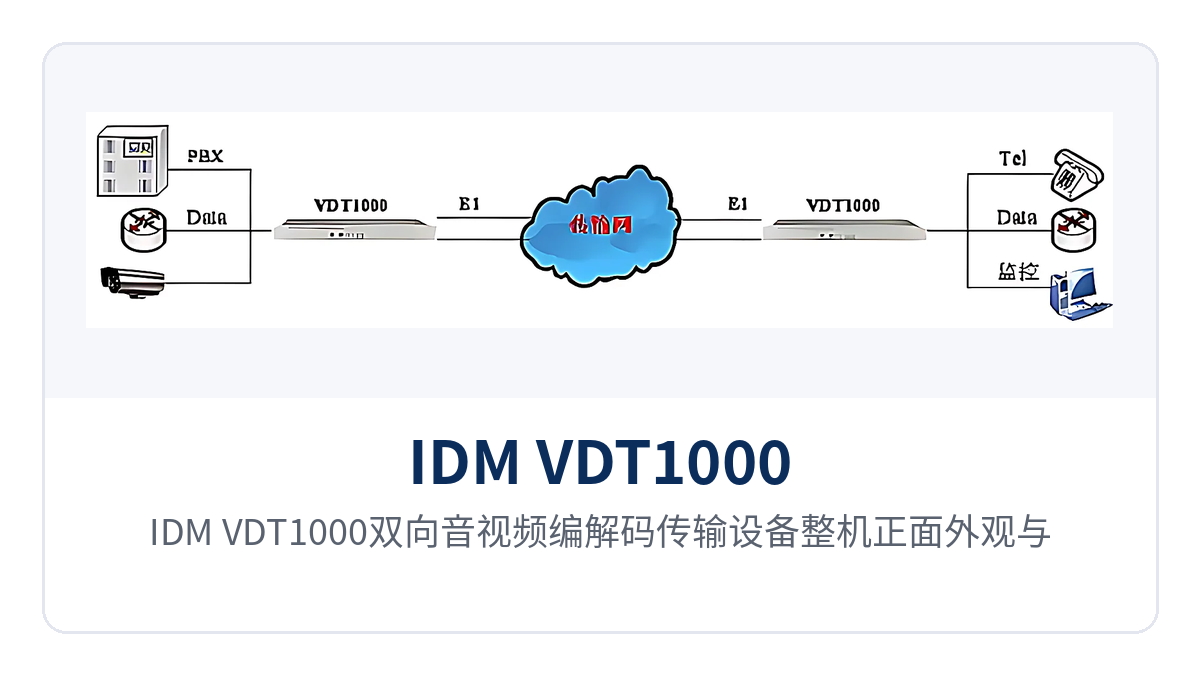
Figure 1: Front appearance of the IDM VDT1000 bidirectional audio and video codec transmission device and power link indicator LEDs
As an optical multiplexer manufacturer, Raytrans offers this video optical multiplexer device that can also be integrated into government private network optical fiber communication solutions and military emergency communications vehicle solutions, providing private network users with stable and reliable E1 video transmission support.
How a Single E1 Channel Carries Video, Voice, and Data Simultaneously
The E1 channel operates according to the ITU-T G.703 specification, with a bit rate of 2048 Kbps, HDB3 line coding, PCM30/31 frame structure, and channel-associated signaling; the transmission capacity of one E1 is 2.048 Mbps. When the IDM VDT1000 video optical multiplexer divides this single channel by service, video, voice, and data each occupy fixed time slot positions, and the receiving end restores them in reverse according to the same time slot table, so the three types of services do not preempt each other.
The division method and the encoding method together determine whether the 2M bandwidth is sufficient. Video is compressed using H.264 to 720×576 (D1), PAL 25 fps composite video; voice is compressed using ITU G.711 A-law into 64 Kbps voice channels; one RS232/RS485 data channel occupies a small number of time slots. The combined audio and video bit rate is 2 Mbps, which fits exactly into one E1 without requiring additional bandwidth.
Core Functions: How Video, Voice, and Data Are Multiplexed in a Single 1U Device
The functions of the IDM VDT1000 are divided into three parts: compression encoding, service access, and channel multiplexing. Each function and its role on site are shown in the table below. The function items correspond one-to-one with the rear panel ports, so during acceptance testing you can check item by item whether signals are being sent out, and during capacity expansion you can also use the table to determine which end should have equipment added.
| Function | Description |
|---|---|
| H.264 video compression | Video is encoded and compressed using H.264 to 720×576 (D1), PAL 25 fps composite video, balancing image quality and 2M channel capacity |
| Bidirectional video transmission | Provides 1 channel of bidirectional composite video input and output, BNC interface 75 Ω, allowing both ends to exchange on-site images |
| G.711 voice access | Voice is encoded using ITU G.711 A-law, audio range 300 Hz to 3400 Hz, loop current 25 mA per channel |
| Two-way voice intercom | 1 bidirectional voice channel; voice is transmitted together with video, allowing the command end and the site to make announcements directly |
| Serial port data transparent transmission | RJ-45 data interface, supporting RS232/RS485, used for bidirectional transmission of PTZ control commands and device telemetry data |
| 2M PCM stream multiplexing | Mixes compressed video, voice, and data into a 2M-rate PCM stream, which is sent out through the E1 interface |
| E1 interface access | Supports ITU-T G.703, bit rate 2048 Kbps, HDB3 line coding, impedance 75 Ω/120 Ω selectable |
| IP-network-free operation | The entire link does not pass through an IP network or switches; service can be provisioned with a direct E1 channel connection, suitable for sites with only leased-line channels |
| 1U rack-mounted structure | Standard 19-inch 1U device, easy to install in communications cabinets and substation secondary equipment panels |
Figure 2 shows the rear panel service interface layout: composite video input and output each occupy one BNC port, voice goes through FXO/FXS telephone ports, data is brought out through an RJ-45 serial port, and the power side has two access points, AC 220 V and DC -48 V. During wiring, simply match each item to the panel markings.
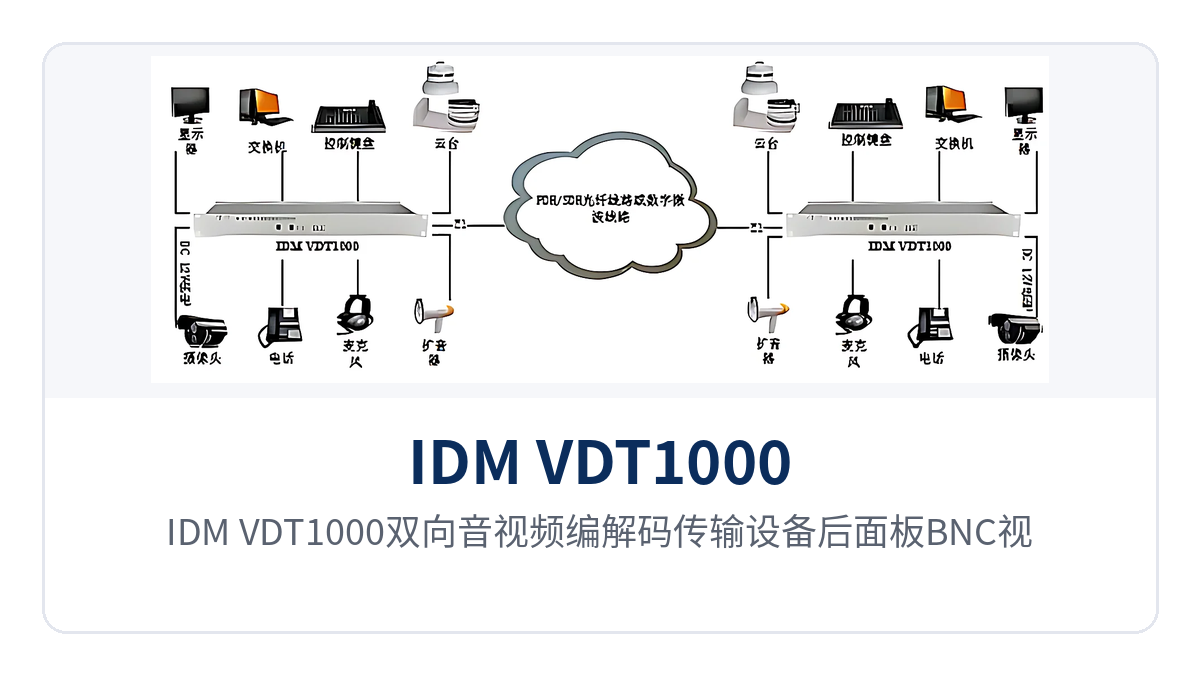
Figure 2: Rear panel layout of the IDM VDT1000 bidirectional audio and video codec transmission device with BNC video ports, voice ports, and RS232/RS485 data ports
Technical Specifications: How to Check the E1 Interface, Video Channel, and Power Supply Environment
The specifications are listed in groups by interface type. During selection, first check whether the E1 interface and video channel match the existing transmission equipment and cameras, and then check voice, data, and power supply conditions. The values in the table are taken from the original product documentation; during project implementation, the factory markings and manufacturer's technical documentation shall prevail.
E1 Interface and Video Channel Parameters
| Item | Parameter/Specification | Description/Applicable Conditions |
|---|---|---|
| Standard protocol | Supports ITU-T G.703 | E1 primary group interface specification |
| Bit rate | 2048 Kbps | Transmission capacity of a single E1 |
| Line coding | HDB3 | Interfacing with existing PDH and SDH equipment |
| Impedance | 75 Ω/120 Ω | Selected according to the interface type of the opposite-end transmission equipment |
| Frame structure | PCM30/31 | Primary group frame structure |
| Signaling | Channel-associated signaling | Signaling is transmitted along with the voice time slots |
| Video compression | H.264 | Sent into the 2M stream after compression |
| Video format | PAL 25 fps composite video (CVBS) | Compatible with conventional analog cameras and monitors |
| Video format | 720×576 (D1) | Standard definition image quality, meeting monitoring and evidence collection needs |
| Audio and video bit rate | 2 Mbps | Aligned with the capacity of one E1 |
| Video input/output | Composite signal BNC | 75 Ω coaxial cable connects to cameras and monitors |
Voice, Data, and Power Supply Environment Parameters
| Item | Parameter/Specification | Description/Applicable Conditions |
|---|---|---|
| Audio range | 300 Hz to 3400 Hz | Telephone voice channel bandwidth |
| Compression | ITU G.711 A-law | 64 Kbps per voice channel |
| Audio impedance | Three-element complex impedance 200 Ω + 560 Ω//0.1 μF | Standard impedance of the subscriber line interface |
| Loop current | 25 mA per channel | Voice channel feeding capability |
| Data interface type | RJ-45 | Serial port data lead-out method |
| Data type | RS232/RS485 | PTZ control and device telemetry |
| Power supply mode | AC 220 V/DC -48 V | Dual power supply input, suitable for AC equipment rooms and DC distribution panels |
| Overall power consumption | ≤20 W | Load can be calculated according to site power supply capacity |
| Operating temperature | -15℃ to +65℃ | Wide-temperature operation, suitable for equipment rooms without air conditioning |
| Storage temperature | -25℃ to +75℃ | Transportation and spare parts inventory conditions |
Typical Application Scenarios
The three types of users have very different requirements for E1 audio and video transmission: the electric power sector cares whether there is a data network in the substation, rail transit cares whether the channels along the line can be reused, and the military and border and coastal defense care about field power supply and temperature margins. The following describes deployment methods for these three types of sites; interfaces and parameters can be checked against the table above.
Electric Power Private Network: Sending Images and Dispatch Voice Back to the Center Without an IP Network in the Substation
Substations, switching stations, and distribution rooms mostly have only E1 channels used for dispatch automation, with no available data network on site. One IDM VDT1000 is placed at the station end: cameras connect to the BNC video ports, dispatch telephones connect to the voice ports, and RS485 from intelligent devices in the station connects to the data ports. Images, voice, and telemetry data are compressed together into a 2M stream, and video backhaul and dispatch voice upload for the substation are completed over the E1 channel without building a separate network for video. This is a typical deployment form of the substation E1 video transmission solution that Raytrans provides for the electric power industry.
Power supply conditions determine whether the device can stay online for a long time. Dual power supply input supports AC 220 V and DC -48 V, so the substation's DC distribution panel can supply the load directly; overall power consumption is ≤20 W, with very little impact on the station's DC load. The wide operating temperature range of -15 to 65℃ allows the device to be installed in secondary equipment panels or outdoor cabinets without additional constant-temperature equipment.
Rail Transit: H.264 Video and Dispatch Voice over E1 Channels Along the Line
Between stations, section substations, and signal equipment rooms along metro and conventional railway lines, the existing communication channels are mainly E1, while laying new optical cables or building data networks involves long cycles and many approval steps. One IDM VDT1000 is placed in the section cabinet to compress platform camera images and duty telephone voice into the existing E1 channel; after restoration at the central side, they go directly to monitors and the dispatch console, so the upgrade does not require changing the original transmission link.
The temperature and power supply conditions in section cabinets are harsher than in equipment rooms. The device has an operating temperature of -15℃ to +65℃ and a storage temperature of -25℃ to +75℃, so it can operate without air conditioning in the cabinet; dual power supply input can be connected to AC or DC according to the cabinet's existing power supply conditions, and overall power consumption is ≤20 W, so the cabinet power supply capacity does not need to be recalculated.
Military and Border and Coastal Defense: Audio and Video Backhaul at Unattended Field Sites Powered by DC -48 V
Border and coastal defense duty posts, field observation sentry posts, and temporary training sites are scattered and mostly unattended; on site there is only an E1 link and DC power, and the cost of maintenance personnel visiting the site is high. The IDM VDT1000 combines observation point images, announcement voice, and sentry post device data into one E1 channel; after restoration at the command post side, the site can be seen and announcements can be made directly, without sending personnel back and forth to relay information. As an optical multiplexer manufacturer deeply engaged in private network communication, Raytrans can provide a supporting military emergency communications vehicle solution for mobile deployment scenarios, integrating E1 audio and video transmission equipment into the communication vehicle for rapid commissioning on the move.
Temperature and power supply in field environments are two hard requirements. The device supports direct DC -48 V power supply with overall power consumption of ≤20 W, and can operate for long periods on a small-capacity DC power supply; the operating temperature covers -15℃ to +65℃, adapting to the day-night temperature difference of unattended cabinets, and the storage temperature of -25℃ to +75℃ facilitates seasonal withdrawal and transfer.
Installation and Wiring: How to Implement Rack Mounting, Power Supply, and Wide-Temperature Deployment
The unit has a 19-inch 1U structure; after installation in a standard cabinet, service can be provisioned by wiring according to service type, with no electrical or optical adjustment required on site. The networking relationship is shown in Figure 3: one IDM VDT1000 at the station end and one at the central end, with the E1 interfaces at both ends connected to transmission equipment, and video, voice, and data restored in pairs at both ends. As a video optical multiplexer product showcase for private network scenarios, its wiring method and provisioning process are representative among similar optical multiplexers.
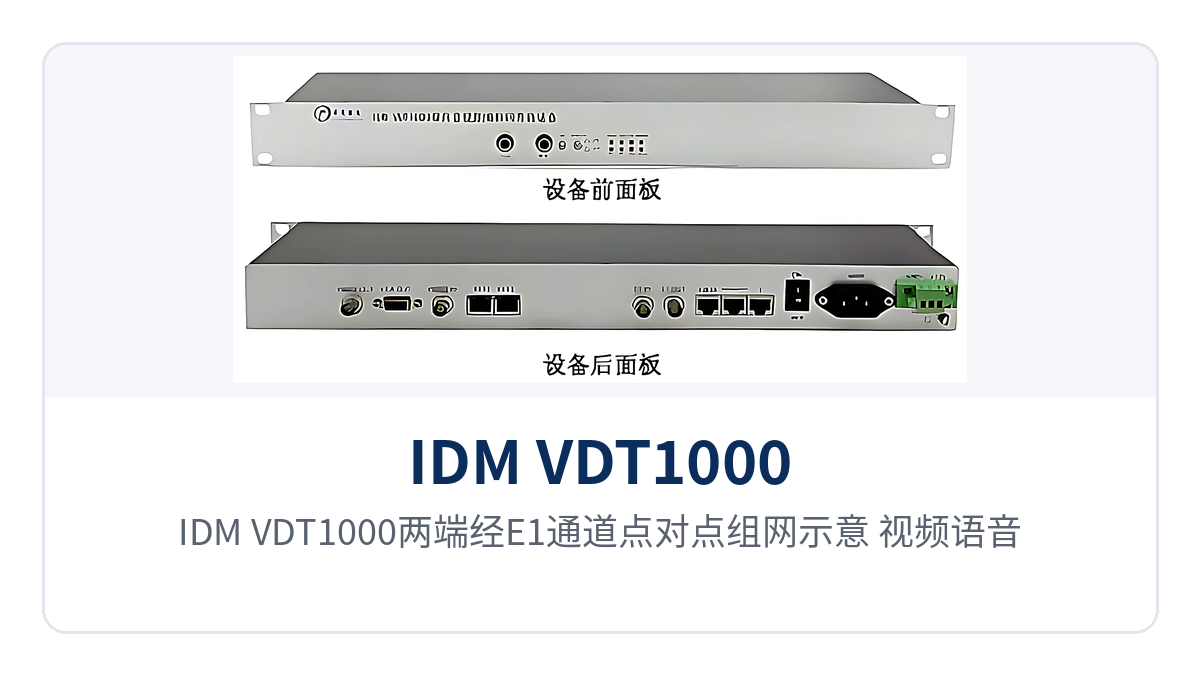
Figure 3: Point-to-point networking diagram of IDM VDT1000 at both ends over an E1 channel, with video, voice, and data reaching each other over a single cable
Rack Mounting and Wiring in Four Steps
The wiring sequence is consistent with the service provisioning sequence; complete each item before powering on to avoid repeated troubleshooting caused by connecting the wrong port. Proceed in the following four steps during installation, record the check results after each step, and review them against the records at shift handover; the port markings on both end devices are identical, so match them port by port against the same service list. Incorrect connections usually appear as a signal on the image while voice does not work.
- Rack mounting: Install the two devices into the cabinets at the station end and the central end respectively, leave heat dissipation space, and connect the protective ground wire.
- Connecting service cables: Connect cameras and monitors to the BNC video ports, dispatch telephones to the voice ports, and PTZ or telemetry devices to the RS232/RS485 data ports, matching each port according to the front panel labels.
- Connecting E1 channels: Use 75 Ω coaxial cable or 120 Ω twisted pair to connect the E1 ports to the transmission device, keeping the impedance and interface type consistent at both ends.
- Powering on and checking: Connect AC 220 V or DC -48 V according to site conditions. After power-on, confirm that the power and link indications are normal, then test the video, voice, and serial port data item by item.
How to Troubleshoot Alarms and Common Failures
Failures on E1 audio and video links are mostly concentrated in wiring and power supply. Judging by symptom in stages is faster than replacing devices one by one. If the video has snow, check the video cable and impedance first; if there is no voice, check the voice channel type first; if both ends fail, perform an E1 loopback self-test first. Keep a 75 Ω load, a multimeter, and a short patch cord on site, and most problems can be isolated to the port level.
- No video output: Check whether the BNC video cable is connected to the output port and whether the monitor format is PAL, then check whether the camera at the transmitter has a signal.
- No voice or one-way voice: Check the voice channel type and wiring at both ends, and check whether the loop current is fed normally.
- Data communication failure: Confirm that the wiring sequence and baud rate of RS232 and RS485 are set consistently at both ends.
- The unit does not power on: Check the AC 220 V and DC -48 V access points separately to avoid incorrect connection of both power supplies at the same time.
- Link alarm: First loop back the E1 port at the local end to determine whether the fault is on the device side or the transmission side, then perform segment-by-segment troubleshooting of the line.
How to Select the IDM VDT1000 Bidirectional Audio and Video Codec Transmission Device
Selection is checked item by item from four aspects: number of service channels, channel conditions, power supply mode, and environmental conditions. Determine the configuration only after all four match, which avoids rework after delivery. The check results also serve as the basis for the commercial quotation and the construction checklist. The devices at both ends are provided in a paired configuration. The number of interfaces, impedance type, and power supply conditions at the station end and the central end must be consistent; if any item is missing, it must be completed before ordering. If the project involves a government private network optical fiber communication solution or a military emergency communications vehicle solution, it is recommended to communicate the channel conditions and power supply mode with the optical multiplexer manufacturer Raytrans during the selection stage to ensure the configuration is completed in one pass.
- Number of service channels: Calculate according to the number of cameras, the number of telephones, and the number of data ports. One bidirectional video channel, one bidirectional voice channel, and one bidirectional data channel correspond to one E1 channel.
- Channel conditions: Confirm that an available E1 channel exists on site. Whether the impedance is 75 Ω or 120 Ω is determined by the transmission device at the opposite end.
- Power supply mode: Choose AC 220 V for AC equipment rooms, and DC -48 V for the DC distribution panel at substations and communication stations. Both power supplies can be connected at the same time.
- Environmental conditions: For outdoor cabinets and equipment rooms without air conditioning, check whether the operating temperature of -15 ℃ to +65 ℃ covers the local extreme temperatures.
- Link distance: The E1 interface of the device interconnects with the transmission device according to G.703. How far the link can extend depends on the connected transmission device and line conditions. The knowledge base does not yet record specific distance values, so it must be calculated according to the on-site link.