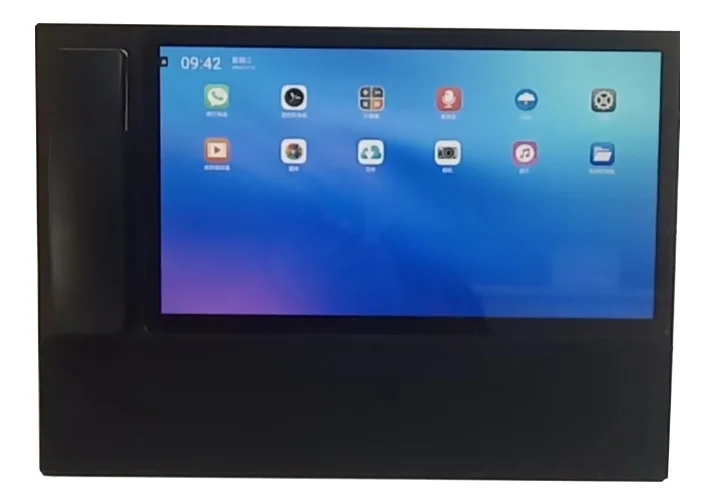

IDM-MCC2000 Unified Communication Dispatch System
The IDM-MCC2000 Unified Communication Dispatch System is built on SIP softswitch as its core technical architecture, integrating MQTT IoT communication protocol, RTMP/RTSP streaming media protocols, GIS geographic information system, and BI information display system. It combines voice, video, image, data, and text message dispatch methods to achieve equipment integration, flattened command, and intelligent operation, easily meeting the needs of different industries through configuration and interface layout.
IDM-MCC2000 Unified Communication Dispatch System
The IDM-MCC2000 Unified Communication Dispatch System is built on SIP softswitch as its core technical architecture, integrating MQTT IoT communication protocol, RTMP/RTSP streaming media protocols, GIS geographic information system, and BI information display system. It combines voice, video, image, data, and text message dispatch methods to achieve equipment integration, flattened command, and intelligent operation, easily meeting the needs of different industries through configuration and interface layout. Voice terminal types include ordinary telephones and trunk lines connected through telephone gateways, SIP network phones, mobile APP SIP softphones, as well as network broadcast intercom speakers, analog/digital trunked radios, and other audio terminals connected through SIP gateways. By using a combination of SIP and MQTT protocols, the IDM-MCC2000 can be conveniently applied to access control intercom, elevator intercom, and other acquisition and control terminals, supporting a large number of networked user terminals. The display content of the IDM-MCC2000 Unified Communication Dispatch System includes GIS geographic information system display, BI dispatch situation display, inspection system management, dispatch order system management, consultation system management, structured emergency plan management, and large-screen output layout management software functions. Terminals that can be dispatched include but are not limited to: analog telephones, IP phones, video phones, fax machines, amplified telephones, audio/video broadcast intercom terminals, network display screens, audio conference terminals, surveillance cameras, video conference terminals, BDS/GPS positioning devices, shortwave/ultra-shortwave, analog/digital trunking, individual soldier image transmission, mobile APP, satellite phones, broadband trunking, IoT protocol collectors/controllers, etc. The basic voice dispatch functions provided by the IDM-MCC2000 Unified Communication Dispatch System include: Call: Pick up the agent handset, click the extension button and call button to talk with the selected terminal. Buttons can also be assigned for outside lines. Calls can also be made via the screen dial pad or the phone dial pad; Answer: Pick up the agent handset, click the extension button and incoming extension button to connect to the incoming extension; Hang up: Immediately end the call with the selected terminal; Monitor: Monitor the call of the selected terminal without the other party's awareness, which can be divided into call monitoring and environmental monitoring applications; Barge-in: Convert the selected ongoing terminal call into a three-party conference mode; Whisper: Talk to the selected ongoing terminal call without the other party's awareness; Forced Release: Convert the selected ongoing terminal call into a call with the console, and the other party is forcibly hung up; Transfer: Transfer the selected terminal call to a specified terminal. Consultative Transfer: Before transferring an incoming call to a specified extension, first seek the extension's opinion. Commonly used for transferring calls to important leaders or important locations. Roll Call: Used to call all extensions in the group once, play pre-recorded voice after connection, and the agent phone can monitor and interject, finally providing call statistics records. It can also be used for enterprise roll call, e-commerce sales, etc.; Polling: Used to call all extensions in the group N times, each time calling extensions that were not reached, stopping after N calls or after manual intervention, and finally providing call statistics records. Commonly used for telephone notification services; Duty: Used to transfer the agent phone to the duty phone, also known as "night service" phone. Recording: Record the specified phone call, automatically stopping when hung up; Conference: Used to create a temporary conference group for multiple selected extensions, or activate and switch to the conference group interface. Conference groups can also be created in the address book interface. Broadcast: Used to create a temporary broadcast group for multiple selected extensions, or activate and switch to the broadcast group interface. Intercom: Used to create a temporary intercom group for multiple selected extensions, or activate and switch to the intercom group interface. I. Conference Room Data content should include: 1. Conference room information (including permanent and temporary conference rooms): conference number, conference name, scheduled start time (optional), actual start time, conference type (free speech, request to speak), entry password, host number, host password; 2. Member information: extension list, extension status (whether entered the conference room), extension request-to-speak status, extension speaking status, extension entry method (extension dial-in, invited entry). Members include outside line numbers (including the trunk line numbers used). 3. Host information: Host function actions: invite extensions to join, remove extensions from the conference, prohibit/enable speaking, designate speaking extension, prohibit/enable speaking for all, close the conference room. Recording file names and data index used in the conference. 4. Conference records: conference name, start time, member login and departure times, member speaking start and stop times, host function operation times and content, list of call records for unreached members, entry method records, dispatcher monitoring records. 5. Conference function [Dispatch Console](/product/) interface: The dispatcher has the same functions as the host and can also monitor the conference content. The conference room can display the above content in list form, and the list window can be expanded or collapsed to show only the conference name, conference status, host, and small icons of some members. II. PTT Intercom Group PTT intercom group implementation: all extensions are muted, only listen, press # to speak. When multiple users press #, only the first one has the right to speak, others can only listen. After speaking, the user presses # again to end, or the speech automatically ends after X minutes (the speech end method can be set to allow flexible control of speaking time). In PTT mode, others cannot hear your voice when you are not speaking, which is different from a conference. PTT intercom groups are more suitable for connecting analog intercom groups and digital intercom groups through gateways. PTT intercom groups are also suitable for connecting network broadcast intercom systems with intercom function through gateways. Intercom group requirements (similar to conference groups, but simpler and with single function): 1. PTT intercom group information (including permanent and temporary PTT intercom groups): PTT intercom group number, PTT intercom group name. (Intercom groups can only be created by the [Dispatch Console](/product/)) 2. Member information: extension list, extension status (whether entered the PTT intercom group), extension speaking status. Extension members include PTT gateway information (divided into digital intercom gateways and analog intercom gateways, gateways are treated as extensions). 3. [Dispatch Console](/product/) function actions: invite extensions to join the group, remove extensions from the group, prohibit extension speaking, close the group. 4. PTT intercom group records: group name, member speaking start/stop times, [Dispatch Console](/product/) function operation times and function name records. (PTT intercom groups require the [Dispatch Console](/product/) to monitor and output to speakers throughout the entire process) PTT intercom groups can display the above content in list form, and the list window can be expanded or collapsed to show only the conference name, conference status, host, and small icons of some members. III. Audio/Video [Command & Dispatch](/solution/) Video layout allocation modes: (including mobile and PC layouts)
Extension dispatch interface:

Address book dispatch interface:

Broadcast group interface: